
Join us at FabCon Atlanta from March 16 - 20, 2026, for the ultimate Fabric, Power BI, AI and SQL community-led event. Save $200 with code FABCOMM.
Register now!Get Fabric Certified for FREE during Fabric Data Days. Don't miss your chance! Request now
Hi All,
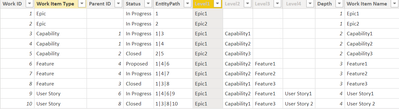
I have the below data structure. I have created the hierarchy and determined the paths as well.
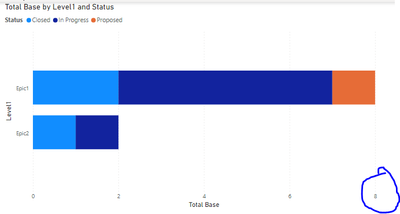
I am trying to build a visual where in I can see the count of work items at each drill down level. However, as you can see in the below screenshot, I also get the parent counted in when I simply use the ISFILTERED and DISTINCTCOUNT. Here, there are 7 items that are linked to the Epic1 but I get the count as 8 (the one additional record is of the Epic1 itself). Similarly for Epic2, there is only one record (Capability3), but I get the count as 2.
How do I make sure that I exclude this self-reference in the count? Or is this counting approach fundamentally wrong? Thanks in advance!
Solved! Go to Solution.
Hi @Anonymous ,
Please try:
Measure =
var level1=CALCULATE(COUNTROWS('Table'),FILTER('Table',[Work Item Name]<>MAX('Table'[Level1])))
var level2=CALCULATE(COUNTROWS('Table'),FILTER('Table',[Work Item Name]<>MAX('Table'[Level2])))
var level3=CALCULATE(COUNTROWS('Table'),FILTER('Table',[Work Item Name]<>MAX('Table'[Level3])))
var level4=CALCULATE(COUNTROWS('Table'),FILTER('Table',[Work Item Name]<>MAX('Table'[Level4])))
return IF(HASONEVALUE('Table'[Level4]),level4,IF(HASONEVALUE('Table'[Level3]),level3,IF(HASONEVALUE('Table'[Level2]),level2,IF(HASONEVALUE('Table'[Level1]),level1))))
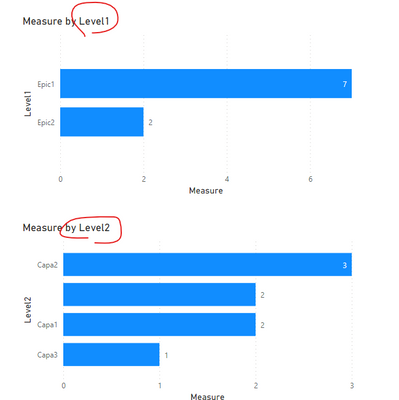
Output:
Best Regards,
Eyelyn Qin
If this post helps, then please consider Accept it as the solution to help the other members find it more quickly.
Hi @Anonymous ,
Please try:
Measure =
var level1=CALCULATE(COUNTROWS('Table'),FILTER('Table',[Work Item Name]<>MAX('Table'[Level1])))
var level2=CALCULATE(COUNTROWS('Table'),FILTER('Table',[Work Item Name]<>MAX('Table'[Level2])))
var level3=CALCULATE(COUNTROWS('Table'),FILTER('Table',[Work Item Name]<>MAX('Table'[Level3])))
var level4=CALCULATE(COUNTROWS('Table'),FILTER('Table',[Work Item Name]<>MAX('Table'[Level4])))
return IF(HASONEVALUE('Table'[Level4]),level4,IF(HASONEVALUE('Table'[Level3]),level3,IF(HASONEVALUE('Table'[Level2]),level2,IF(HASONEVALUE('Table'[Level1]),level1))))
Output:
Best Regards,
Eyelyn Qin
If this post helps, then please consider Accept it as the solution to help the other members find it more quickly.
Check out the November 2025 Power BI update to learn about new features.
Advance your Data & AI career with 50 days of live learning, contests, hands-on challenges, study groups & certifications and more!