FabCon is coming to Atlanta
Join us at FabCon Atlanta from March 16 - 20, 2026, for the ultimate Fabric, Power BI, AI and SQL community-led event. Save $200 with code FABCOMM.
Register now!- Power BI forums
- Get Help with Power BI
- Desktop
- Service
- Report Server
- Power Query
- Mobile Apps
- Developer
- DAX Commands and Tips
- Custom Visuals Development Discussion
- Health and Life Sciences
- Power BI Spanish forums
- Translated Spanish Desktop
- Training and Consulting
- Instructor Led Training
- Dashboard in a Day for Women, by Women
- Galleries
- Data Stories Gallery
- Themes Gallery
- Contests Gallery
- QuickViz Gallery
- Quick Measures Gallery
- Visual Calculations Gallery
- Notebook Gallery
- Translytical Task Flow Gallery
- TMDL Gallery
- R Script Showcase
- Webinars and Video Gallery
- Ideas
- Custom Visuals Ideas (read-only)
- Issues
- Issues
- Events
- Upcoming Events
Get Fabric Certified for FREE during Fabric Data Days. Don't miss your chance! Request now
- Power BI forums
- Forums
- Get Help with Power BI
- Desktop
- Exclude column of TOP N filter or make constant
- Subscribe to RSS Feed
- Mark Topic as New
- Mark Topic as Read
- Float this Topic for Current User
- Bookmark
- Subscribe
- Printer Friendly Page


- Mark as New
- Bookmark
- Subscribe
- Mute
- Subscribe to RSS Feed
- Permalink
- Report Inappropriate Content
Exclude column of TOP N filter or make constant
Good afternoon,
I have a problem. I need to have in one table the number of episodes per problem, in another the total number of episodes and in another the %. (There are more than 3 rows), so the total is 9508.
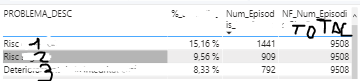
That´s right.
The problem is when I filter doing TOP 10 per PROBLEMA_DESC: Since I have now 10 rows instead the 15 that I had in the past, the total number of episodis change to 6690 so percentages change as well.

Num_Episodis = COUNTROWS(SUMMARIZE('Table1,'Table1'[EPISODI],'Table1'[PROBLEMA_DESC],'Table1'[PROBLEMA_CODI]))
NF_Num_Episodis = CALCULATE(COUNTROWS((SUMMARIZE('Table1','Table1'[EPISODI],'Table1'[PROBLEMA_DESC]))), ALLSELECTED('Table1'))
%_Episodis = [Num_Episodis]/[NF_Num_Episodis]
I don´t know how to have a column that doesn´t work with the TOP N filter. I tried with ALLEXCEPT, ALL... but it doesn´t work and I'm not sure if that´s is possible or do a constant.
Thank you in advance.
Solved! Go to Solution.


- Mark as New
- Bookmark
- Subscribe
- Mute
- Subscribe to RSS Feed
- Permalink
- Report Inappropriate Content
@silvias - Yeah, it's a pain and annoying really. ALL is documented as removing all filters but then it doesn't if you use the Filters pane. I wish it wasn't like that.
Follow on LinkedIn
@ me in replies or I'll lose your thread!!!
Instead of a Kudo, please vote for this idea
Become an expert!: Enterprise DNA
External Tools: MSHGQM
YouTube Channel!: Microsoft Hates Greg
Latest book!: DAX For Humans
DAX is easy, CALCULATE makes DAX hard...
- Mark as New
- Bookmark
- Subscribe
- Mute
- Subscribe to RSS Feed
- Permalink
- Report Inappropriate Content
@silvias - If you are doing a filter in the Filter pane, then that pre-filters the data such that DAX calculations lose access to the raw data that is filtered and thus ALL, etc. will not be able to "bring those rows back" so to speak. Are you using a page filter?
Follow on LinkedIn
@ me in replies or I'll lose your thread!!!
Instead of a Kudo, please vote for this idea
Become an expert!: Enterprise DNA
External Tools: MSHGQM
YouTube Channel!: Microsoft Hates Greg
Latest book!: DAX For Humans
DAX is easy, CALCULATE makes DAX hard...
- Mark as New
- Bookmark
- Subscribe
- Mute
- Subscribe to RSS Feed
- Permalink
- Report Inappropriate Content
- Mark as New
- Bookmark
- Subscribe
- Mute
- Subscribe to RSS Feed
- Permalink
- Report Inappropriate Content
@silvias - If it is in the Filter pane, it is going to pre-filter the data such that the DAX does not have access to the filtered data and there is no getting around it. This has come up before in other threads and to the best of my knowledge there is no work-a-round.
Seems like @Pragati11 was headed down the same path.
Follow on LinkedIn
@ me in replies or I'll lose your thread!!!
Instead of a Kudo, please vote for this idea
Become an expert!: Enterprise DNA
External Tools: MSHGQM
YouTube Channel!: Microsoft Hates Greg
Latest book!: DAX For Humans
DAX is easy, CALCULATE makes DAX hard...
- Mark as New
- Bookmark
- Subscribe
- Mute
- Subscribe to RSS Feed
- Permalink
- Report Inappropriate Content
@Greg_DecklerThank you, Greg.
I guess I'll have to show all the values without TOP 10 if I want to be shown all of them. Thank you!
- Mark as New
- Bookmark
- Subscribe
- Mute
- Subscribe to RSS Feed
- Permalink
- Report Inappropriate Content
@silvias - Yeah, it's a pain and annoying really. ALL is documented as removing all filters but then it doesn't if you use the Filters pane. I wish it wasn't like that.
Follow on LinkedIn
@ me in replies or I'll lose your thread!!!
Instead of a Kudo, please vote for this idea
Become an expert!: Enterprise DNA
External Tools: MSHGQM
YouTube Channel!: Microsoft Hates Greg
Latest book!: DAX For Humans
DAX is easy, CALCULATE makes DAX hard...


- Mark as New
- Bookmark
- Subscribe
- Mute
- Subscribe to RSS Feed
- Permalink
- Report Inappropriate Content
Hi @silvias ,
Just want to check how you are using TOPN filter on this visual?
- Are you putting a Top N filter on your visual only from FILTER PANE?
- Are you using a Top N slicer at the top?
Thanks,
Pragati
- Mark as New
- Bookmark
- Subscribe
- Mute
- Subscribe to RSS Feed
- Permalink
- Report Inappropriate Content
Hi @Pragati11
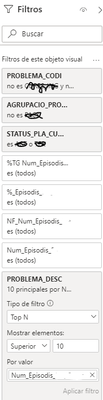
thank you for your answer. I'm putting the Top N filter on my visual only from FILTER PANE:


Helpful resources

Power BI Monthly Update - November 2025
Check out the November 2025 Power BI update to learn about new features.

Fabric Data Days
Advance your Data & AI career with 50 days of live learning, contests, hands-on challenges, study groups & certifications and more!

FabCon Atlanta 2026
Join us at FabCon Atlanta, March 16-20, for the ultimate Fabric, Power BI, AI and SQL community-led event. Save $200 with code FABCOMM.


