Join us at FabCon Atlanta from March 16 - 20, 2026, for the ultimate Fabric, Power BI, AI and SQL community-led event. Save $200 with code FABCOMM.
Register now!The Power BI Data Visualization World Championships is back! Get ahead of the game and start preparing now! Learn more
Hi All,
I'm trying to figure out the best way to exclude 5% of the top and bottom values in the table I currently have.
For example if I filter the Top 5 lowest numbers I may have 12,14,16,18,20 and the Top 5 highest filtered values are 120,130,140,150. I need to exclude these to get an accurate overall average but not sure at the best place to start?
Thanks
Solved! Go to Solution.
Hi @Chrisss14 ,
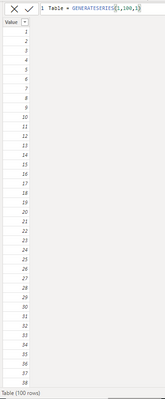
Based on your description, I have created a simple sample:
Please try:
Measure =
var _a = COUNTROWS('Table')
return AVERAGEX(TOPN(0.9*_a,TOPN(0.95*_a,'Table',[Value],ASC),[Value],DESC),[Value])
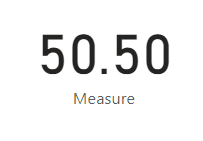
Final output:
Best Regards,
Jianbo Li
If this post helps, then please consider Accept it as the solution to help the other members find it more quickly.
Hi @Chrisss14 ,
Based on your description, I have created a simple sample:
Please try:
Measure =
var _a = COUNTROWS('Table')
return AVERAGEX(TOPN(0.9*_a,TOPN(0.95*_a,'Table',[Value],ASC),[Value],DESC),[Value])
Final output:
Best Regards,
Jianbo Li
If this post helps, then please consider Accept it as the solution to help the other members find it more quickly.
@Chrisss14 https://community.powerbi.com/t5/Quick-Measures-Gallery/TRIMMEAN/m-p/1074075#M504
The Power BI Data Visualization World Championships is back! Get ahead of the game and start preparing now!
| User | Count |
|---|---|
| 41 | |
| 39 | |
| 37 | |
| 29 | |
| 24 |
| User | Count |
|---|---|
| 119 | |
| 100 | |
| 72 | |
| 69 | |
| 65 |