cancel
Showing results for 
Search instead for 
Did you mean: 

The Power BI Data Visualization World Championships is back! Get ahead of the game and start preparing now! Learn more

Reply

Exchange Rates and Dates

Hi Power BI Community,

I am working on a dataset for exchage rates. However, the exchange rates have specific dates associated to the exchange rate.

I have the following exchange rate table:

CurrencyExchange RateStart DateEnd Date
USD1.3201/01/202131/01/2021
USD1.5401/02/202128/02/2021

I have the following Sales table:

Sale PriceQuantityCurrencySale Date
5145GBP15/01/2021

I need to create a calculation to look at the data in the Sales table and accurately exchange the Sale Price based on the exchange rate for the the Sale Date happened, with reference to the start and end date for the currency exchange rate.

I would really appreciate any help on this.

Thank you in advance.

1 ACCEPTED SOLUTION

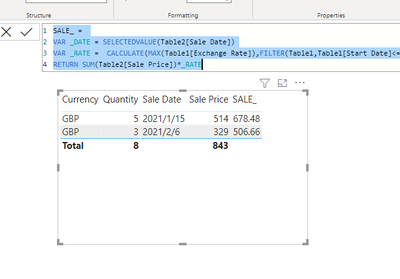
Try to create a measure like below:

SALE_ = 
VAR _DATE = SELECTEDVALUE(Table2[Sale Date])
VAR _RATE =  CALCULATE(MAX(Table1[Exchange Rate]),FILTER(Table1,Table1[Start Date]<=_DATE&&Table1[End Date]>=_DATE))
RETURN SUM(Table2[Sale Price])*_RATE

Vlianlmsft_0-1632796083968.png


View solution in original post

3 REPLIES 3
amitchandak
Super User
Super User

@PowerEnthusiast , based on what I got so far new column in sales


rate = minx(filter(Rate, [Sale Date] >=[Start Date] && [Sale Date]<=[End date]),[Exchange Rate])

Share with Power BI Enthusiasts: Full Power BI Video (20 Hours) YouTube
Microsoft Fabric Series 60+ Videos YouTube
Microsoft Fabric Hindi End to End YouTube

Hi @amitchandak 

The dates are in different tables - how do I look up from the Sales table to the Exchange Rate table?. Also, I don't think I will be able to reference a column for the dates in the query above. Seems to only want measures. 

Try to create a measure like below:

SALE_ = 
VAR _DATE = SELECTEDVALUE(Table2[Sale Date])
VAR _RATE =  CALCULATE(MAX(Table1[Exchange Rate]),FILTER(Table1,Table1[Start Date]<=_DATE&&Table1[End Date]>=_DATE))
RETURN SUM(Table2[Sale Price])*_RATE

Vlianlmsft_0-1632796083968.png


Helpful resources

Announcements
Power BI DataViz World Championships

Power BI Dataviz World Championships

The Power BI Data Visualization World Championships is back! Get ahead of the game and start preparing now!

December 2025 Power BI Update Carousel

Power BI Monthly Update - December 2025

Check out the December 2025 Power BI Holiday Recap!

FabCon Atlanta 2026 carousel

FabCon Atlanta 2026

Join us at FabCon Atlanta, March 16-20, for the ultimate Fabric, Power BI, AI and SQL community-led event. Save $200 with code FABCOMM.