Share feedback directly with Fabric product managers, participate in targeted research studies and influence the Fabric roadmap.
Sign up nowGet Fabric certified for FREE! Don't miss your chance! Learn more
Hi Power BI Community,
I am working on a dataset for exchage rates. However, the exchange rates have specific dates associated to the exchange rate.
I have the following exchange rate table:
| Currency | Exchange Rate | Start Date | End Date |
| USD | 1.32 | 01/01/2021 | 31/01/2021 |
| USD | 1.54 | 01/02/2021 | 28/02/2021 |
I have the following Sales table:
| Sale Price | Quantity | Currency | Sale Date |
| 514 | 5 | GBP | 15/01/2021 |
I need to create a calculation to look at the data in the Sales table and accurately exchange the Sale Price based on the exchange rate for the the Sale Date happened, with reference to the start and end date for the currency exchange rate.
I would really appreciate any help on this.
Thank you in advance.
Solved! Go to Solution.
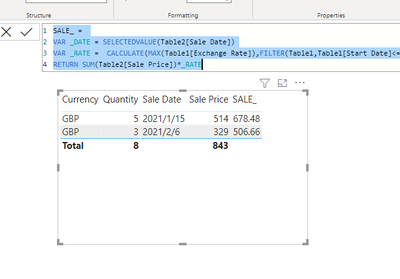
Try to create a measure like below:
SALE_ =
VAR _DATE = SELECTEDVALUE(Table2[Sale Date])
VAR _RATE = CALCULATE(MAX(Table1[Exchange Rate]),FILTER(Table1,Table1[Start Date]<=_DATE&&Table1[End Date]>=_DATE))
RETURN SUM(Table2[Sale Price])*_RATE
@PowerEnthusiast , based on what I got so far new column in sales
rate = minx(filter(Rate, [Sale Date] >=[Start Date] && [Sale Date]<=[End date]),[Exchange Rate])
Hi @amitchandak
The dates are in different tables - how do I look up from the Sales table to the Exchange Rate table?. Also, I don't think I will be able to reference a column for the dates in the query above. Seems to only want measures.
Share feedback directly with Fabric product managers, participate in targeted research studies and influence the Fabric roadmap.
If you love stickers, then you will definitely want to check out our Community Sticker Challenge!
Check out the January 2026 Power BI update to learn about new features.
| User | Count |
|---|---|
| 63 | |
| 62 | |
| 42 | |
| 20 | |
| 18 |