Hello,
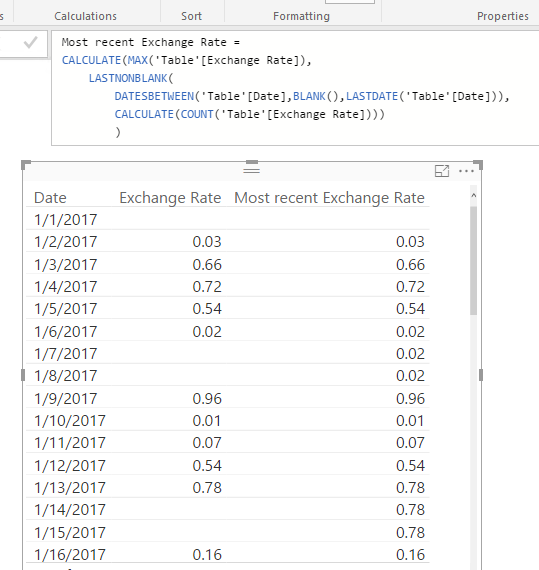
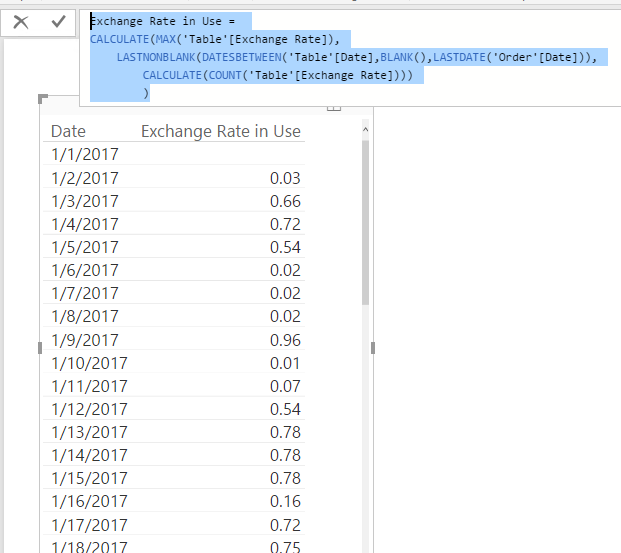
I have a very similar issue to this one but I cannot solve it since I'm rather new to Power BI, DAX and the M language etc.:
https://community.powerbi.com/t5/Integrations-with-Files-and/Generate-Missing-Data-via-Script/td-p/1...
Explanation:
I have an Order table and an ExchangeRates table and I need to match ExchangeRates based on the Currency and the order date.
Exchange rates are downloaded from the ECB/EZB (Europäische Zentral Bank) as a CSV or XML file. But the problem is that weekends and holidays are missing in that files. For example the 1.1.2017 is missing.
In the Order table I have an order from 1.1.2017 so I cannot lookup the exchange rate for that specific date. The date I need to use is <= order date so in this case it would be 30.12.2016 (it's the last date in the downloaded file).
One more difficulty:
The orders can be in different currencies, for example GBP, PLN, CZK etc.
Here are the Table definitions:
Exchange Rates:
Currency - Rate - Date
CZK - 27,021 - 30.12.2016
GBP - 0,8694 - 30.12.2016
PLN - 4,3703 - 30.12.2016
Order:
OrderID - TotalAmount - Currency - Date
1 - 100 - GBP - 01.01.2017
2 - 200 - PLN - 01.01.2017
So in SQL I would do something like that:
SELECT
ExchangeRates.Rate
FROM
ExchangeRates
WHERE
ExchangeRates.Currency = Order.Currency AND
ExchangeRates.Date <= Order.OrderDate
ORDER BY
ExchangeRates.Date DESC
I think that's not the right approach here though.
Filling the missing dates like in the link above in a new calculated table seems to be better but I don't know how to accomplish that.