cancel
Showing results for 
Search instead for 
Did you mean: 

Next up in the FabCon + SQLCon recap series: The roadmap for Microsoft SQL and Maximizing Developer experiences in Fabric. All sessions are available on-demand after the live show. Register now

Reply
PAULO
Regular Visitor

Excel function DURATION to DAX

How can I using DAX to calculate the DURATION function equal to that of Excel. DURATION(Settlement, Maturity, Coupon, Yld, Frequency).

1 ACCEPTED SOLUTION
dax
Community Support
Community Support

Hi PAULO,


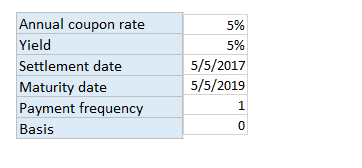
As  I know, there is no direct function to calculate duration in Powerbi, one workaround is that you could calculate this in Excel, then import these data in powerbi. Or I  think you need to create calculated column based on its function logic. You could refer to Bond duration(step by step example), bring the fields into the formula

For Example:

206.PNG

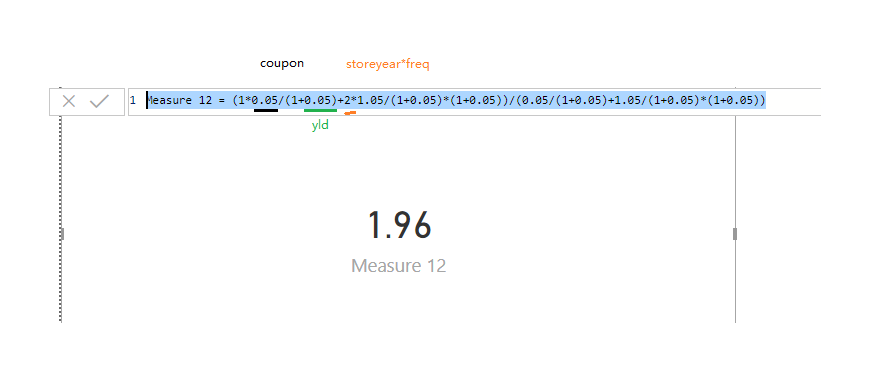
Measure 12 =
 ( 1 * 0.05 / ( 1 + 0.05 ) + 2 * 1.05 / ( 1 + 0.05 ) * ( 1 + 0.05 ) ) / ( 0.05 / ( 1 + 0.05 ) + 1.05 / ( 1 + 0.05 ) * ( 1 + 0.05 ) )

22.png

23.png

Because there is no direct function in powerbi, so if your store year* freq >5, it will more complex, you need to write long expression. So I suggest you calculate this in Excel then import in powerbi


Best Regards,

Zoe Zhi


If this post helps, then please consider Accept it as the solution to help the other members find it more quickly.


View solution in original post

1 REPLY 1
dax
Community Support
Community Support

Hi PAULO,


As  I know, there is no direct function to calculate duration in Powerbi, one workaround is that you could calculate this in Excel, then import these data in powerbi. Or I  think you need to create calculated column based on its function logic. You could refer to Bond duration(step by step example), bring the fields into the formula

For Example:

206.PNG

Measure 12 =
 ( 1 * 0.05 / ( 1 + 0.05 ) + 2 * 1.05 / ( 1 + 0.05 ) * ( 1 + 0.05 ) ) / ( 0.05 / ( 1 + 0.05 ) + 1.05 / ( 1 + 0.05 ) * ( 1 + 0.05 ) )

22.png

23.png

Because there is no direct function in powerbi, so if your store year* freq >5, it will more complex, you need to write long expression. So I suggest you calculate this in Excel then import in powerbi


Best Regards,

Zoe Zhi


If this post helps, then please consider Accept it as the solution to help the other members find it more quickly.


Helpful resources

Announcements
New to Fabric survey Carousel

New to Fabric Survey

If you have recently started exploring Fabric, we'd love to hear how it's going. Your feedback can help with product improvements.

Power BI DataViz World Championships carousel

Power BI DataViz World Championships - June 2026

A new Power BI DataViz World Championship is coming this June! Don't miss out on submitting your entry.

FabCon and SQLCon Highlights Carousel

FabCon &SQLCon Highlights

Experience the highlights from FabCon & SQLCon, available live and on-demand starting April 14th.

March Power BI Update Carousel

Power BI Community Update - March 2026

Check out the March 2026 Power BI update to learn about new features.