cancel
Showing results for 
Search instead for 
Did you mean: 

Get Fabric Certified for FREE during Fabric Data Days. Don't miss your chance! Request now

Reply
goalie_
Helper III
Helper III

Excel file not opening in powerBI

Has anyone encountered the error below when trying to read in an excel file into powerBI?

Error:

Unable to connect

We encountered an error while trying to connect.

Details: "The input couldn't be recognized as a valid Excel document."


However the file can be opened in excel without a problem and has a .xlsx extension. Any help or what to check?
Other files of the same format seem to work but some do not. I'm unable to share the files unfortunately. 

 
3 REPLIES 3
Ijaz375
New Member

Convert Excel file into csv and try.

v-henryk-mstf
Community Support
Community Support

Hi @goalie_ ,


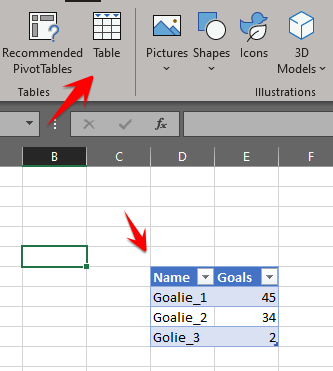
One of the reason could be that the data that you are importing to PBI is not in excel table. Select the rows and columns from the sheet that you want to import >> Insert Table in excel and try importing it should be able to read the data then. 


You can make a try and tell me if it works. Looking forward to your reply.


Best Regards,
Henry


If this post helps, then please consider Accept it as the solution to help the other members find it more quickly.

ponnusamy
Solution Supplier
Solution Supplier

Have you formated your data as table within Excel?

ponnusamy_0-1630699681491.png


Helpful resources

Announcements
November Power BI Update Carousel

Power BI Monthly Update - November 2025

Check out the November 2025 Power BI update to learn about new features.

Fabric Data Days Carousel

Fabric Data Days

Advance your Data & AI career with 50 days of live learning, contests, hands-on challenges, study groups & certifications and more!

FabCon Atlanta 2026 carousel

FabCon Atlanta 2026

Join us at FabCon Atlanta, March 16-20, for the ultimate Fabric, Power BI, AI and SQL community-led event. Save $200 with code FABCOMM.

Top Solution Authors
Top Kudoed Authors