
cancel
Showing results for 
Search instead for 
Did you mean: 

Try your skills in the Power BI Dataviz World Championship! Round one ends June 26. Join now

Reply
StoryofData
Helper III
Helper III

Excel Source will not Update after column Split

Hello, 


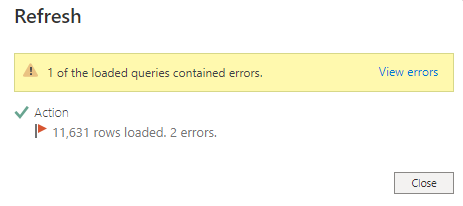
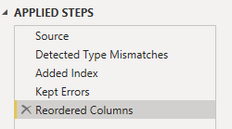
I loaded an excel file, I then duplicated and split one of the columns. When I click close and apply, I get an error message. 

Does anyone know what the issue is?


Capture.PNG
StoryofData_1-1676471695962.png


StoryofData_0-1676471655003.png

1 ACCEPTED SOLUTION

Found an answer through another avenue, column that was being split contained number and text, one entry was just text, splitting it caused an error in data types.

View solution in original post

3 REPLIES 3
StoryofData
Helper III
Helper III

Found an answer through another avenue, column that was being split contained number and text, one entry was just text, splitting it caused an error in data types.

Anonymous
Not applicable

Hi @StoryofData,

Can you please share some dummy data that keep the raw data structure and more detail information about this issue? They should help us clarify your scenario and test to troubleshoot. 

How to Get Your Question Answered Quickly  

Regards,

Xiaoxin Sheng

Found an answer through another avenue, column that was being split contained number and text, one entry was just text, splitting it caused an error in data types.

Helpful resources

Announcements
Fabric Data Days is here Carousel

Fabric Data Days 2026

Don't miss out on Data Days, June 15 through August 7. Learn Fabric, Power BI, SQL, AI and more.

May Power BI Update Carousel

Power BI Monthly Update - May 2026

Check out the May 2026 Power BI update to learn about new features.

Power BI DataViz World Championships carousel

Power BI DataViz World Championships - June 2026

A new Power BI DataViz World Championship is coming this June! Don't miss out on submitting your entry.