cancel
Showing results for 
Search instead for 
Did you mean: 

We've captured the moments from FabCon & SQLCon that everyone is talking about, and we are bringing them to the community, live and on-demand. Starts on April 14th. Register now

Reply
Benjamin_chee
Frequent Visitor

Excel Function To Dax Help

Hi PowerBi Community,


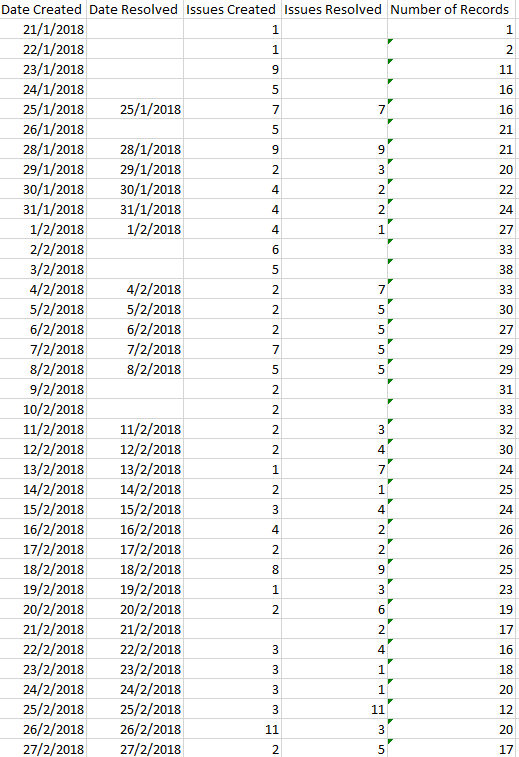
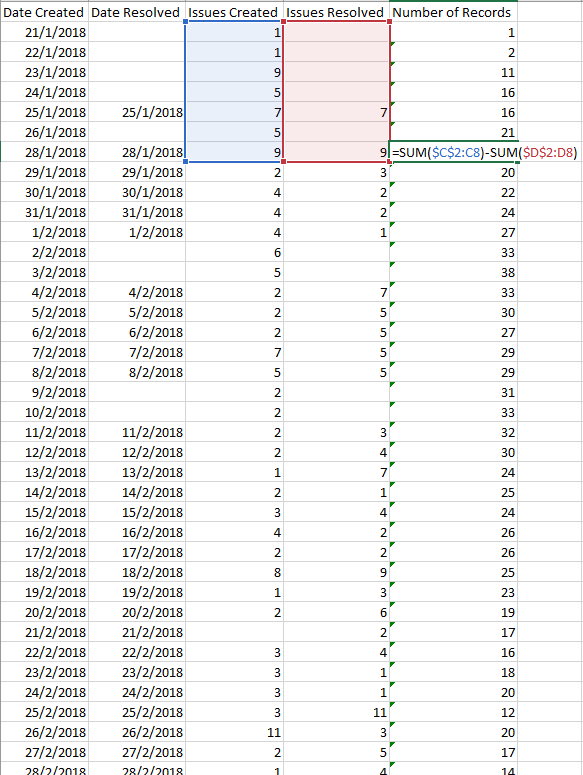
I will like to create a custom column in PowerBI that follows a function I have created in excel. The function is on the column "Number of Records" in excel. Basically taking the (sum of all issues created till that date)- (the sum of issues resolved till that day).

Need help in creating the DAX formula in powerbi. Thank you! 


End result in Excel:

2019-02-28_12-25-24.png


Formula in Excel:

2019-02-28_12-26-47.png


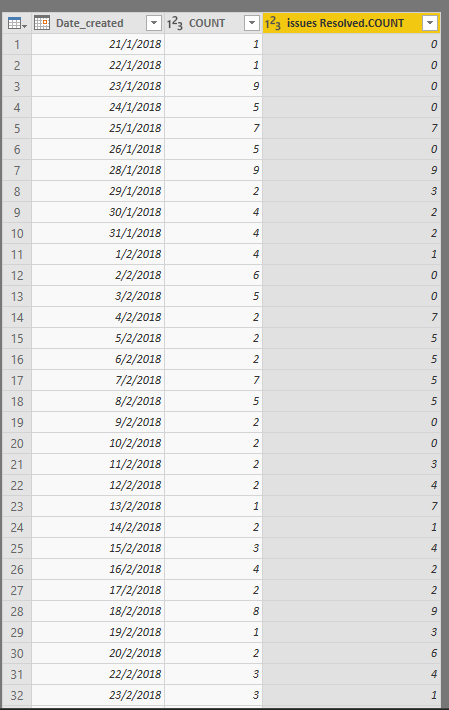
Current PowerBI layout

2019-02-28_12-27-31.png

1 ACCEPTED SOLUTION
PattemManohar
Community Champion
Community Champion

@Benjamin_chee  Please try below.


Create a new column which will be a supporting column for the main logic.


TotalIssues = Test222Lkp[IssuesCreated]-Test222Lkp[IssuesResolved]

Then, create a new column which is your expected output 


NumOfRecords = CALCULATE(SUM(Test222Lkp[TotalIssues]),FILTER(Test222Lkp,Test222Lkp[DateCreated]<=EARLIER(Test222Lkp[DateCreated])))

image.png


Note - Please try to post the sample data in copiable format which will be great in time saving.


Did I answer your question? Mark my post as a solution!

Proud to be a PBI Community Champion


View solution in original post

2 REPLIES 2
PattemManohar
Community Champion
Community Champion

@Benjamin_chee  Please try below.


Create a new column which will be a supporting column for the main logic.


TotalIssues = Test222Lkp[IssuesCreated]-Test222Lkp[IssuesResolved]

Then, create a new column which is your expected output 


NumOfRecords = CALCULATE(SUM(Test222Lkp[TotalIssues]),FILTER(Test222Lkp,Test222Lkp[DateCreated]<=EARLIER(Test222Lkp[DateCreated])))

image.png


Note - Please try to post the sample data in copiable format which will be great in time saving.


Did I answer your question? Mark my post as a solution!

Proud to be a PBI Community Champion


Thank you Pattem! This works great, will take note to post the data in copiable format in the future. Thank you!!

Helpful resources

Announcements
New to Fabric survey Carousel

New to Fabric Survey

If you have recently started exploring Fabric, we'd love to hear how it's going. Your feedback can help with product improvements.

Power BI DataViz World Championships carousel

Power BI DataViz World Championships - June 2026

A new Power BI DataViz World Championship is coming this June! Don't miss out on submitting your entry.

Join our Fabric User Panel

Join our Fabric User Panel

Share feedback directly with Fabric product managers, participate in targeted research studies and influence the Fabric roadmap.

March Power BI Update Carousel

Power BI Community Update - March 2026

Check out the March 2026 Power BI update to learn about new features.