cancel
Showing results for 
Search instead for 
Did you mean: 

The Power BI Data Visualization World Championships is back! Get ahead of the game and start preparing now! Learn more

Reply
Anonymous
Not applicable

Errors when uploading data

Hi, please can you assist me with an issue I am having when I try and upload my data in Power BI.

I have included screen shots of the data as well as the error message below, as I cannot seemt to find an upload button to upload the excel spreadsheet.

My data does not want to load fully.


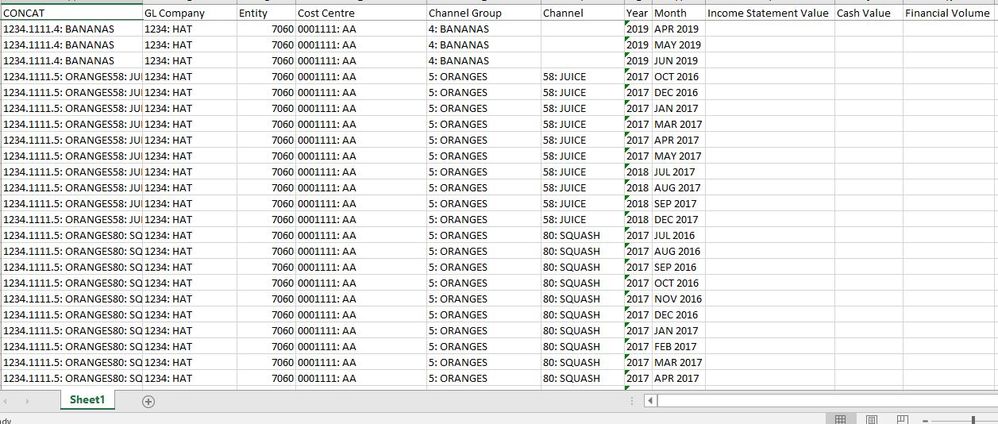
Screen shot of data.JPG


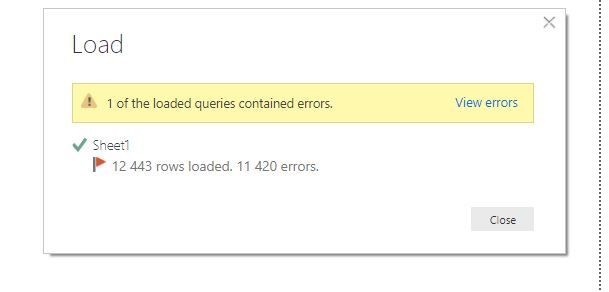
Screen shot of error message.JPG

3 REPLIES 3
petegordon
New Member

How do I know the data type of the column in BI?  I am uploading an excel file and know how to format the upload file in excel but not a clue how power bi column format works

v-diye-msft
Community Support
Community Support

Hi @Anonymous 


Sorry I’m not quite sure about “I cannot seemt to find an upload button to upload the excel spreadsheet.” Does it means you edit it in query editor and then apply to the desktop? could you please specify more details? That would be preferred if you could share us the detailed error info as well.


Based on my research, this phenomenon probably happens when your columns contain data that doesn't match the data type of the column. This is allowed in Power Query, but not when the data is loaded.


An example would be numbers with fractions, while your column's data type is whole number.


Finding the errors: visually check if the actual data in each column matches the data type of the column.


Solving the errors: make sure the data types of the columns match the data types of the values in the columns.


Please share us more info if the problem still exist. Thanks!


Best regards,

Dina Ye


Community Support Team _ Dina Ye
If this post helps, then please consider Accept it as the solution to help the other members find it more
quickly.

Hi @Anonymous ,


If my above post helps, could you please consider Accept it as the solution to help the other members find it more quickly. thanks!

Best regards,
Dina Ye

Community Support Team _ Dina Ye
If this post helps, then please consider Accept it as the solution to help the other members find it more
quickly.
Helpful resources

Announcements
Power BI DataViz World Championships

Power BI Dataviz World Championships

The Power BI Data Visualization World Championships is back! Get ahead of the game and start preparing now!

December 2025 Power BI Update Carousel

Power BI Monthly Update - December 2025

Check out the December 2025 Power BI Holiday Recap!

FabCon Atlanta 2026 carousel

FabCon Atlanta 2026

Join us at FabCon Atlanta, March 16-20, for the ultimate Fabric, Power BI, AI and SQL community-led event. Save $200 with code FABCOMM.

Top Solution Authors