This time we’re going bigger than ever. Fabric, Power BI, SQL, AI and more. We're covering it all. You won't want to miss it.
Learn moreDid you hear? There's a new SQL AI Developer certification (DP-800). Start preparing now and be one of the first to get certified. Register now
Hello,
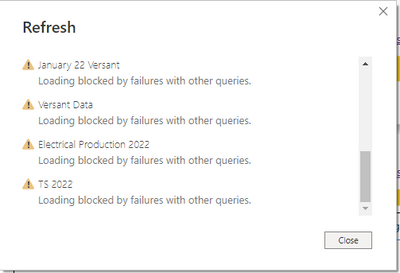
I work at a manufacturing business and have been using Power Bi to report/analyze production data in several different areas. I am I am pulling data from our SCADA system via the web. Most of the csv files for each set of production data are organized by year (although a few are organized by month). I have separate querys for each data set but then I merged the datasets from different years together to create a "master" dataset for each batch of production data. I created new query for each set of data for 2022 but when I refresh the query in power bi desktop - this is the error I get
Any ideas whats happening here? Thanks
Solved! Go to Solution.
That did it - thank you!
@jwint Scroll down and find the query that is having errors and click on the link to view errors. Not enough to go on otherwise.
There doesnt appear to be any errors. I can keep scrolling down but its just more of the same
@jwint Well, in Power Query Editor you could right-click queries and disable the loading one by one to see what is causing the problem.
Check out the April 2026 Power BI update to learn about new features.
If you have recently started exploring Fabric, we'd love to hear how it's going. Your feedback can help with product improvements.
| User | Count |
|---|---|
| 37 | |
| 37 | |
| 31 | |
| 21 | |
| 16 |
| User | Count |
|---|---|
| 66 | |
| 56 | |
| 31 | |
| 26 | |
| 23 |