Join us at FabCon Atlanta from March 16 - 20, 2026, for the ultimate Fabric, Power BI, AI and SQL community-led event. Save $200 with code FABCOMM.
Register now!The Power BI Data Visualization World Championships is back! Get ahead of the game and start preparing now! Learn more
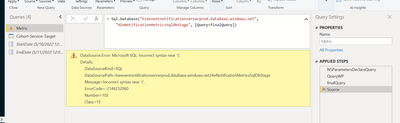
Based on the native query (which works totally fine in the DirectQuery mode), I created an M Query to add two parameters, according to the documentation: Dynamic M query parameters in Power BI Desktop - Power BI | Microsoft Docs
However, I got an error:
DataSource.Error: Microsoft SQL: Incorrect syntax near '('.
Details:
DataSourceKind=SQL
DataSourcePath=hieeventnotificationserverprod.database.windows.net;HieNotificationMetricsSqlDbStage
Message=Incorrect syntax near '('.
ErrorCode=-2146232060
Number=102
Class=15
Please advise how to solve this. Thanks a lot!
Hi, @Ning_pbi ;
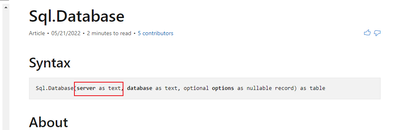
According to the office document,
Sql.Database(server as text, database as text, optional options as nullable record) as table
Check the server is right.
Best Regards,
Community Support Team _ Yalan Wu
If this post helps, then please consider Accept it as the solution to help the other members find it more quickly.
Thank you for your help. I checked that the server is right, and the database is also right. But the error still exists.
The Power BI Data Visualization World Championships is back! Get ahead of the game and start preparing now!
| User | Count |
|---|---|
| 40 | |
| 37 | |
| 35 | |
| 31 | |
| 28 |
| User | Count |
|---|---|
| 137 | |
| 102 | |
| 71 | |
| 67 | |
| 65 |