cancel
Showing results for 
Search instead for 
Did you mean: 

The Power BI Data Visualization World Championships is back! Get ahead of the game and start preparing now! Learn more

Reply
shkabuzar
Frequent Visitor

Error while converting the Unix time

Hi,


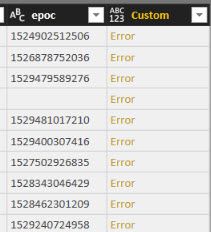
I have a field which stores unix time time, my filed value contains  [{ "start":1529469730821}], I have extracted the number using and the used below calculation to convert it to readable format.


#datetime(1970, 1, 1, 0, 0, 0) + #duration(0, 0, 0, [epoc]/1000)

 But I am geeting below errors, please let me know how can I resolve this issue. Thanks.epoc error.jpgepoc.jpg


2 ACCEPTED SOLUTIONS
prateekraina
Memorable Member
Memorable Member

Hi @shkabuzar,


FIrst make sure the datatype of epoc column is whole number, then try adding the calculated column.

You can also do this in DAX by using below code:

Timestamp = Table[epoc] / 86400000 + DATE(1970,1,1)

Regards,
Prateek Raina

View solution in original post

v-piga-msft
Resident Rockstar
Resident Rockstar

Hi @shkabuzar,


It would be better to modify the formula like below.


Timestamp = IF(ISBLANK('Table'[epoc]),BLANK(),'Table'[epoc] / 86400000 + DATE(1970,1,1))

If you have solved your problem, could you please accept the replies making sense as solution to your question so that people who may have the same question can get the solution directly.


If you still need help, please share your expected output, so that we can help further investigate on it?


Best Regards,

Cherry

Community Support Team _ Cherry Gao
If this post helps, then please consider Accept it as the solution to help the other members find it more quickly.

View solution in original post

2 REPLIES 2
v-piga-msft
Resident Rockstar
Resident Rockstar

Hi @shkabuzar,


It would be better to modify the formula like below.


Timestamp = IF(ISBLANK('Table'[epoc]),BLANK(),'Table'[epoc] / 86400000 + DATE(1970,1,1))

If you have solved your problem, could you please accept the replies making sense as solution to your question so that people who may have the same question can get the solution directly.


If you still need help, please share your expected output, so that we can help further investigate on it?


Best Regards,

Cherry

Community Support Team _ Cherry Gao
If this post helps, then please consider Accept it as the solution to help the other members find it more quickly.
prateekraina
Memorable Member
Memorable Member

Hi @shkabuzar,


FIrst make sure the datatype of epoc column is whole number, then try adding the calculated column.

You can also do this in DAX by using below code:

Timestamp = Table[epoc] / 86400000 + DATE(1970,1,1)

Regards,
Prateek Raina

Helpful resources

Announcements
November Power BI Update Carousel

Power BI Monthly Update - November 2025

Check out the November 2025 Power BI update to learn about new features.

Fabric Data Days Carousel

Fabric Data Days

Advance your Data & AI career with 50 days of live learning, contests, hands-on challenges, study groups & certifications and more!

FabCon Atlanta 2026 carousel

FabCon Atlanta 2026

Join us at FabCon Atlanta, March 16-20, for the ultimate Fabric, Power BI, AI and SQL community-led event. Save $200 with code FABCOMM.

Top Kudoed Authors