cancel
Showing results for 
Search instead for 
Did you mean: 

The Power BI Data Visualization World Championships is back! Get ahead of the game and start preparing now! Learn more

Reply
Aqib_Mughal
New Member

Error while connecting from a web data source

Hi, 


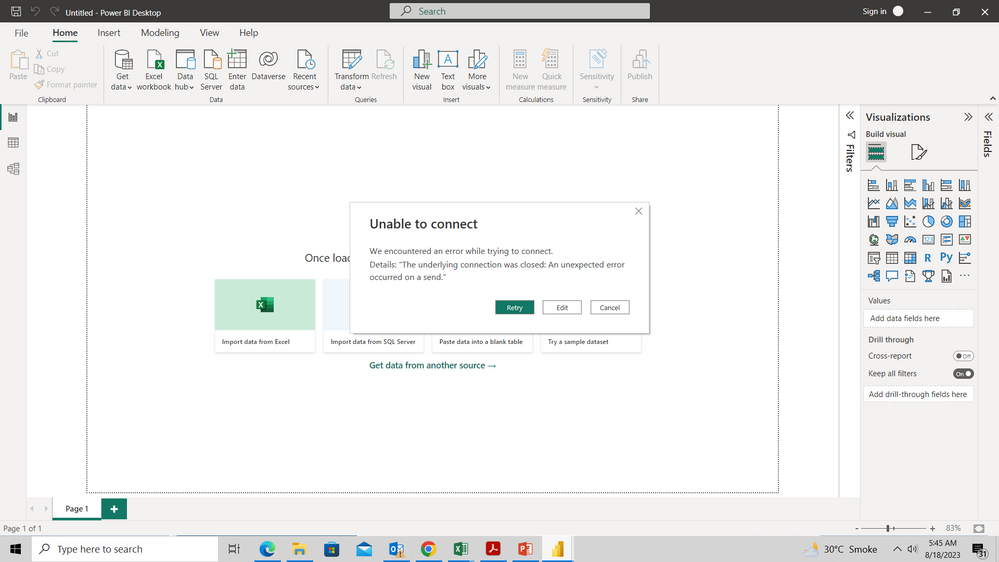
I am getting the following error, whenever I try to connect to a web data source. Please guide. 


Screenshot (47).png


1 ACCEPTED SOLUTION
v-yanjiang-msft
Community Support
Community Support

Hi @Aqib_Mughal ,

This error message "we encountered an error while trying to connect. Details: the underlying connection was closed: An unexpected error occurred on a send" usually occurs when there is an issue with the SSL/TLS certificate or the cipher suite used for the connection. You can try the following steps to resolve the issue:

  1. Check if the SSL/TLS certificate is valid and not expired. If it is expired, you need to renew it.

  2. Check if the cipher suite used for the connection is supported by the server. You can try changing the cipher suite to a supported one.

  3. Check if the firewall is blocking the connection. You can try disabling the firewall temporarily to see if it resolves the issue.

  4. Check if the server is running the latest version of the software. If not, you need to update it to the latest version.

  5. Check if the server is overloaded or under heavy load. If so, you need to wait for some time and try again later.

Best Regards,
Community Support Team _ kalyj

If this post helps, then please consider Accept it as the solution to help the other members find it more quickly.

View solution in original post

3 REPLIES 3
v-yanjiang-msft
Community Support
Community Support

Hi @Aqib_Mughal .

Has your problem beed solved? If so, please kindly accept the helpful reply as solution, then we'll close the thread, other people who has the similar problem will benefit from here. Thank you!


Best regards,

Community Support Team_yanjiang

v-yanjiang-msft
Community Support
Community Support

Hi @Aqib_Mughal ,

This error message "we encountered an error while trying to connect. Details: the underlying connection was closed: An unexpected error occurred on a send" usually occurs when there is an issue with the SSL/TLS certificate or the cipher suite used for the connection. You can try the following steps to resolve the issue:

  1. Check if the SSL/TLS certificate is valid and not expired. If it is expired, you need to renew it.

  2. Check if the cipher suite used for the connection is supported by the server. You can try changing the cipher suite to a supported one.

  3. Check if the firewall is blocking the connection. You can try disabling the firewall temporarily to see if it resolves the issue.

  4. Check if the server is running the latest version of the software. If not, you need to update it to the latest version.

  5. Check if the server is overloaded or under heavy load. If so, you need to wait for some time and try again later.

Best Regards,
Community Support Team _ kalyj

If this post helps, then please consider Accept it as the solution to help the other members find it more quickly.

amitchandak
Super User
Super User

@Aqib_Mughal , Check do you have access to data still.


From Home -> Transform Data -> Data Source setting -> clear permission and try again.


If this does not work log an issue too - https://community.powerbi.com/t5/Issues/idb-p/Issues

Share with Power BI Enthusiasts: Full Power BI Video (20 Hours) YouTube
Microsoft Fabric Series 60+ Videos YouTube
Microsoft Fabric Hindi End to End YouTube

Helpful resources

Announcements
Power BI DataViz World Championships

Power BI Dataviz World Championships

The Power BI Data Visualization World Championships is back! Get ahead of the game and start preparing now!

December 2025 Power BI Update Carousel

Power BI Monthly Update - December 2025

Check out the December 2025 Power BI Holiday Recap!

FabCon Atlanta 2026 carousel

FabCon Atlanta 2026

Join us at FabCon Atlanta, March 16-20, for the ultimate Fabric, Power BI, AI and SQL community-led event. Save $200 with code FABCOMM.