
Join us at FabCon Atlanta from March 16 - 20, 2026, for the ultimate Fabric, Power BI, AI and SQL community-led event. Save $200 with code FABCOMM.
Register now!The Power BI Data Visualization World Championships is back! Get ahead of the game and start preparing now! Learn more
Hi All,
I am having an issue with a measure that is adding together multiple measures. When I do the normal
([Measure1) + [Measure2] + [Measure3])
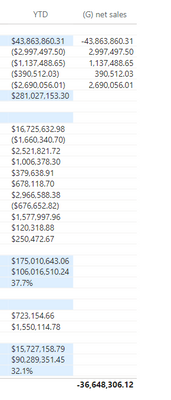
it will create them in a column and not sum them except in the total at the bottom of my matrix. Attached is my formula and a screenshot of the output of the formula.
I would like the total value at the bottom (36,648,306) to populate the location that has (281,027,153)
This formula is returning a column when I place it in my matrix.
@amitchandak I am using row context.
As it turns out, I am not using iteration. I am using agregators.
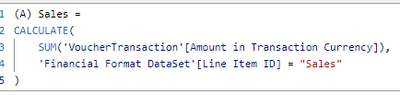
This is the format of the row context agregation measures that I am using to calculate the orginal values in each category.
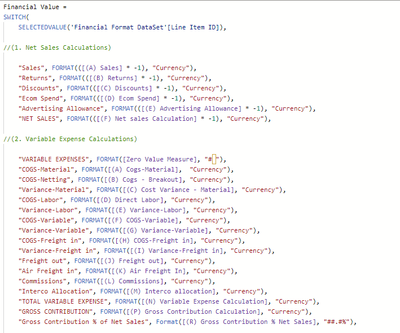
This is the measure that is placing each measure into the YTD column.
@Dax_Learner , Are you using row context in some measure?
can you share the measure calculation?
refer to Curbal's video on the same - https://www.youtube.com/watch?v=ufHOOLdi_jk
The Power BI Data Visualization World Championships is back! Get ahead of the game and start preparing now!
| User | Count |
|---|---|
| 38 | |
| 36 | |
| 33 | |
| 32 | |
| 29 |
| User | Count |
|---|---|
| 129 | |
| 88 | |
| 79 | |
| 68 | |
| 63 |