
Join us at FabCon Atlanta from March 16 - 20, 2026, for the ultimate Fabric, Power BI, AI and SQL community-led event. Save $200 with code FABCOMM.
Register now!Learn from the best! Meet the four finalists headed to the FINALS of the Power BI Dataviz World Championships! Register now
Hi All,
I am having an issue with a measure that is adding together multiple measures. When I do the normal
([Measure1) + [Measure2] + [Measure3])
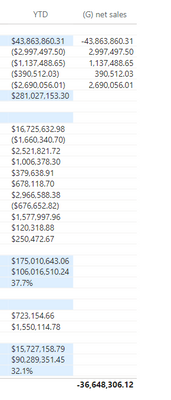
it will create them in a column and not sum them except in the total at the bottom of my matrix. Attached is my formula and a screenshot of the output of the formula.
I would like the total value at the bottom (36,648,306) to populate the location that has (281,027,153)
This formula is returning a column when I place it in my matrix.
@amitchandak I am using row context.
As it turns out, I am not using iteration. I am using agregators.
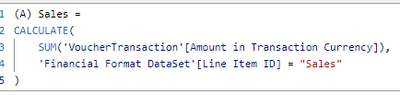
This is the format of the row context agregation measures that I am using to calculate the orginal values in each category.
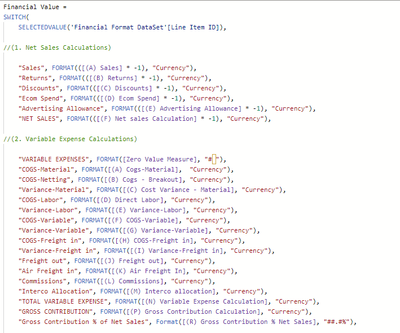
This is the measure that is placing each measure into the YTD column.
@Dax_Learner , Are you using row context in some measure?
can you share the measure calculation?
refer to Curbal's video on the same - https://www.youtube.com/watch?v=ufHOOLdi_jk
Share feedback directly with Fabric product managers, participate in targeted research studies and influence the Fabric roadmap.
Check out the February 2026 Power BI update to learn about new features.
| User | Count |
|---|---|
| 53 | |
| 51 | |
| 39 | |
| 15 | |
| 14 |
| User | Count |
|---|---|
| 94 | |
| 81 | |
| 34 | |
| 29 | |
| 25 |