Get certified for free when you join Fabric Data Days 2026 and dive into Fabric, Power BI, SQL, AI, and other essential data skills.
Join nowData Days is here! Join us now for 60+ days of learning, challenges, and connection. Learn more
Hello everyone, I have searched all over the forum and I have not found an answer that will solve me.
I'm working with Direct Query, I have 2 tables:
The link field is Phone and as you can see it is many to one. I want to insert a column in A that indicates when the same value is set to B.
I tried RELATED and the resutlado is this message: "The column 'B[Phone]' either doesn't exist or doesn't have a relationship to any table available in the current context."
Even (allows me) by changing the relationship one by one, the same error appears.
I've tried other formulas that I've found on the internet without solving this.
Thank you.
Hi @elflakoconk ,
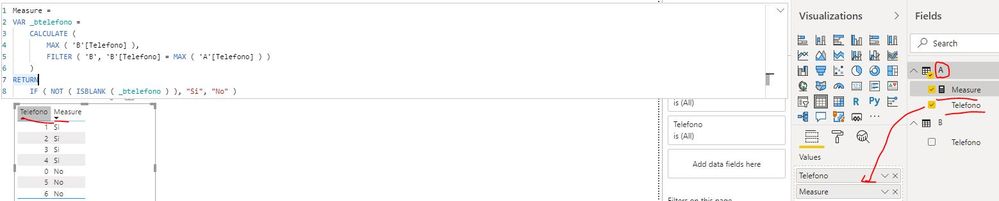
You can create a measure as below:
Measure =
VAR _btelefono =
CALCULATE (
MAX ( 'B'[Telefono] ),
FILTER ( 'B', 'B'[Telefono] = MAX ( 'A'[Telefono] ) )
)
RETURN
IF ( NOT ( ISBLANK ( _btelefono ) ), "Si", "No" )Best Regards
Rena
Thank you very much, this worked!!! The Microsoft team told me that interactions with DirectQuery may present some flaws with SQL Server, in my case it happened, but this is resolved.
Thanks a lot.
Hi @elflakoconk ,
If the problem has been resolved, could you please mark the helpful post as Answered? It will help others in the community find the solution fast when they face the same problem with you. Thank you.
Best Regards
Rena
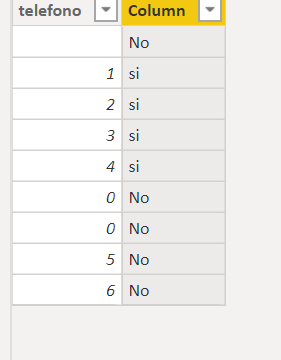
If you want to use related , try this
Column =
VAR _value=MAXX(FILTER(B,RELATED(B[telefono])),B[value])
return if (ISBLANK(_value),"No",_value)Proud to be a Super User!
@elflakoconk , Related you can use in 1- M relation on M side.
you can also move data like this from on table to another
City Name = maxx(FILTER(geography,geography[City Id]=Sales[City Id]),geography[City]) // New column in sales table in my case
Minx/maxx/sumx depend on need
Thanks a lot, i'll try this! and will give my feedback
Don't miss out on Data Days, June 15 through August 7. Learn Fabric, Power BI, SQL, AI and more.
Check out the May 2026 Power BI update to learn about new features.
| User | Count |
|---|---|
| 22 | |
| 21 | |
| 20 | |
| 19 | |
| 13 |
| User | Count |
|---|---|
| 58 | |
| 52 | |
| 37 | |
| 31 | |
| 27 |