cancel
Showing results for 
Search instead for 
Did you mean: 

The Power BI Data Visualization World Championships is back! It's time to submit your entry. Live now!

Reply
elflakoconk
Helper II
Helper II

Error using RELATED

Hello everyone, I have searched all over the forum and I have not found an answer that will solve me.

I'm working with Direct Query, I have 2 tables:

imagn.png

The link field is Phone and as you can see it is many to one. I want to insert a column in A that indicates when the same value is set to B.

objetivo.jpg

I tried RELATED and the resutlado is this message: "The column 'B[Phone]' either doesn't exist or doesn't have a relationship to any table available in the current context."

Even (allows me) by changing the relationship one by one, the same error appears.

I've tried other formulas that I've found on the internet without solving this.
Thank you.

6 REPLIES 6
Anonymous
Not applicable

Hi @elflakoconk ,

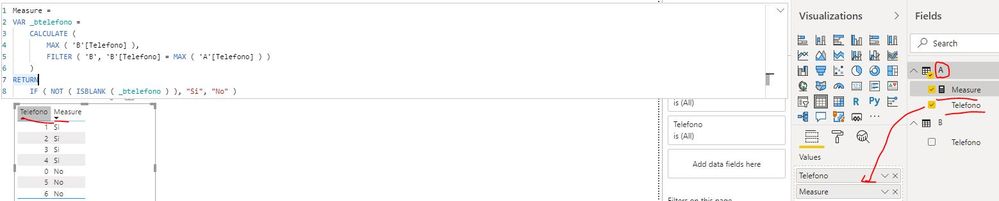
You can create a measure as below:

Measure = 
VAR _btelefono =
    CALCULATE (
        MAX ( 'B'[Telefono] ),
        FILTER ( 'B', 'B'[Telefono] = MAX ( 'A'[Telefono] ) )
    )
RETURN
    IF ( NOT ( ISBLANK ( _btelefono ) ), "Si", "No" )

error using related.JPG

Best Regards

Rena

Thank you very much, this worked!!! The Microsoft team told me that interactions with DirectQuery may present some flaws with SQL Server, in my case it happened, but this is resolved.

Thanks a lot.

Anonymous
Not applicable

Hi @elflakoconk ,

If the problem has been resolved, could you please mark the helpful post as Answered? It will help others in the community find the solution fast when they face the same problem with you. Thank you.

Best Regards

Rena

ryan_mayu
Super User
Super User

@elflakoconk 

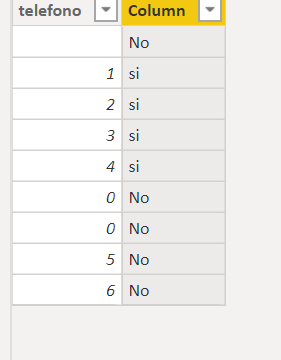
If you want to use related , try this

Column = 
VAR _value=MAXX(FILTER(B,RELATED(B[telefono])),B[value])
return if (ISBLANK(_value),"No",_value)

1.PNG


Did I answer your question? Mark my post as a solution!

Proud to be a Super User!


amitchandak
Super User
Super User

@elflakoconk , Related you can use in 1- M relation on M side.


you can also move data like this from on table to another

City Name = maxx(FILTER(geography,geography[City Id]=Sales[City Id]),geography[City]) // New column in sales table in my case


Minx/maxx/sumx depend on need

Share with Power BI Enthusiasts: Full Power BI Video (20 Hours) YouTube
Microsoft Fabric Series 60+ Videos YouTube
Microsoft Fabric Hindi End to End YouTube

Thanks a lot, i'll try this! and will give my feedback

Helpful resources

Announcements
FabCon Atlanta 2026 carousel

FabCon Atlanta 2026

Join us at FabCon Atlanta, March 16-20, for the ultimate Fabric, Power BI, AI and SQL community-led event. Save $200 with code FABCOMM.