cancel
Showing results for 
Search instead for 
Did you mean: 

We've captured the moments from FabCon & SQLCon that everyone is talking about, and we are bringing them to the community, live and on-demand. Starts on April 14th. Register now

Reply
BobbyEire
Regular Visitor

Error using Detect Data Changes Re: Incremental Refresh

Hey all,


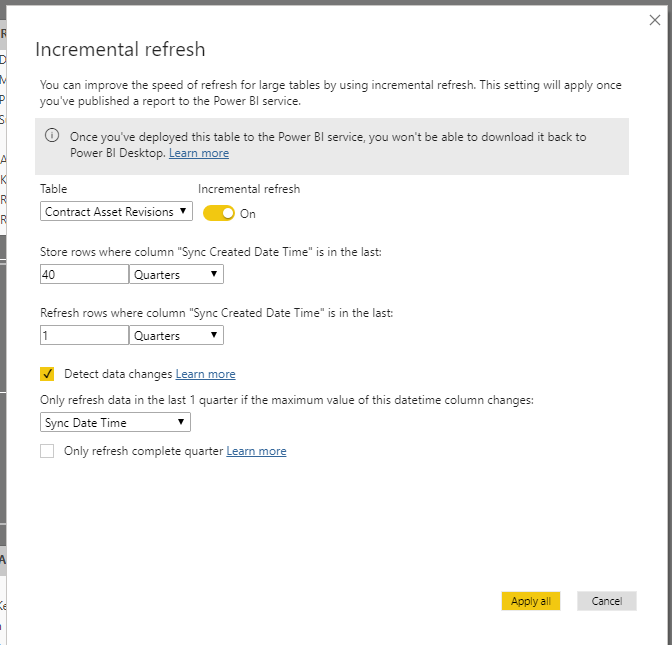
I've configured Incremental Refresh to work on my table using the settings below.


image.png


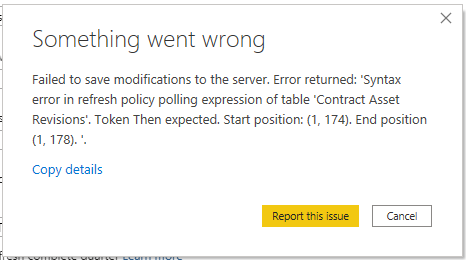
However when i attempt to enable "Detect Data Changes" on the same table using the settings above, i get the following error.


image.png


Anyone have any idea what this is about?

5 REPLIES 5
BobbyEire
Regular Visitor

Hey all,

Issue resolved. After recreating the model and trying all sorts, i renamed the column in "Detect Data Changes" to exclude spaces in the name and hey presto, it worked!!


Not sure thats in documentation anywhere.


So essentially i changed my column from [Sync Date Time] to [SyncDateTime] and the error disappeared.

v-xicai
Community Support
Community Support

Hi @BobbyEire ,


If you select the Detect data changes checkbox, you can select a date/time column used to identify and refresh only the days where the data has changed. This assumes such a column exists in the source system, which is typically for auditing purposes. This should not be the same column used to partition the data with the RangeStart/RangeEnd parameters. The maximum value of this column is evaluated for each of the periods in the incremental range. If it has not changed since the last refresh, there is no need to refresh the period. 


For reference:

Incremental refresh in Power BI


Best Regards,

Amy 


Community Support Team _ Amy

If this post helps, then please consider Accept it as the solution to help the other members find it more quickly.

Hey Amy, 


I'm using 2 separate columns:


[Sync Created Date Time] for the incremenatl refresh

[Sync Date Time] for Detecting Data changes.

BobbyEire
Regular Visitor

Hey Mwegener,


The version of Power Bi desktop I have is Version: 2.81.5831.821 64-bit (May 2020).


It won;t allow me to apply the changes because of the error so i can't publish them

mwegener
Most Valuable Professional

Hi @BobbyEire ,


do you get errors when publishing?

Which Power BI desktop version are you using?


Did I answer your question?
Please mark my post as solution, this will also help others.
Please give Kudos for support.

Marcus Wegener works as Full Stack Power BI Engineer at BI or DIE.
His mission is clear: "Get the most out of data, with Power BI."
twitter - LinkedIn - YouTube - website - podcast - Power BI Tutorials


Helpful resources

Announcements
New to Fabric survey Carousel

New to Fabric Survey

If you have recently started exploring Fabric, we'd love to hear how it's going. Your feedback can help with product improvements.

Power BI DataViz World Championships carousel

Power BI DataViz World Championships - June 2026

A new Power BI DataViz World Championship is coming this June! Don't miss out on submitting your entry.

Join our Fabric User Panel

Join our Fabric User Panel

Share feedback directly with Fabric product managers, participate in targeted research studies and influence the Fabric roadmap.

March Power BI Update Carousel

Power BI Community Update - March 2026

Check out the March 2026 Power BI update to learn about new features.