FabCon is coming to Atlanta
Join us at FabCon Atlanta from March 16 - 20, 2026, for the ultimate Fabric, Power BI, AI and SQL community-led event. Save $200 with code FABCOMM.
Register now!- Power BI forums
- Get Help with Power BI
- Desktop
- Service
- Report Server
- Power Query
- Mobile Apps
- Developer
- DAX Commands and Tips
- Custom Visuals Development Discussion
- Health and Life Sciences
- Power BI Spanish forums
- Translated Spanish Desktop
- Training and Consulting
- Instructor Led Training
- Dashboard in a Day for Women, by Women
- Galleries
- Data Stories Gallery
- Themes Gallery
- Contests Gallery
- Quick Measures Gallery
- Notebook Gallery
- Translytical Task Flow Gallery
- TMDL Gallery
- R Script Showcase
- Webinars and Video Gallery
- Ideas
- Custom Visuals Ideas (read-only)
- Issues
- Issues
- Events
- Upcoming Events
To celebrate FabCon Vienna, we are offering 50% off select exams. Ends October 3rd. Request your discount now.
- Power BI forums
- Forums
- Get Help with Power BI
- Desktop
- Re: Error on Subtracting two measures having forma...
- Subscribe to RSS Feed
- Mark Topic as New
- Mark Topic as Read
- Float this Topic for Current User
- Bookmark
- Subscribe
- Printer Friendly Page

- Mark as New
- Bookmark
- Subscribe
- Mute
- Subscribe to RSS Feed
- Permalink
- Report Inappropriate Content
Error on Subtracting two measures having format
Hi @PaulDBrown and @all,
Here is one more Issue i am facing. I think you can fix this.
Continuing to the link below.
https://community.powerbi.com/t5/Desktop/sign-currency-for-only-few-rows-based-upon-condition/m-p/94...
I have subtracted two measures and applied in matrix which gives me an error as shown in the screenshot.
Change = [January] - [February]

Solved! Go to Solution.


- Mark as New
- Bookmark
- Subscribe
- Mute
- Subscribe to RSS Feed
- Permalink
- Report Inappropriate Content
Hi @Anonymous ,
We can try to use the following measure to meet your requirement:
Change =
VALUE (
    SUBSTITUTE (
        [January Total] & "",
        "$",
        ""
    )
)
    - VALUE (
        SUBSTITUTE (
            [February Total] & "",
            "$",
            ""
        )
    )
If it does not work, could you please share the formula of [Janury Total] and [February Total] if it does not contain any confidential information?
Best regards,
If this post helps, then please consider Accept it as the solution to help the other members find it more quickly.

- Mark as New
- Bookmark
- Subscribe
- Mute
- Subscribe to RSS Feed
- Permalink
- Report Inappropriate Content
@Anonymous
Make sure that all columns and measures used in the calculations are formatted as some sort of number (not "general" nor "text" etc..)
Did I answer your question? Mark my post as a solution!
In doing so, you are also helping me. Thank you!
Proud to be a Super User!
Paul on Linkedin.
- Mark as New
- Bookmark
- Subscribe
- Mute
- Subscribe to RSS Feed
- Permalink
- Report Inappropriate Content
Thanks for reply @PaulDBrown
The calculation used for Change are measures [January Total] and [February Total] which have the same data type as shown in below screenshot.
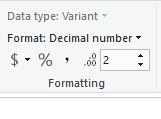
Change = [January Total] - [February Total]
Still results in same error. Is there any thing else I am missing ?
- Mark as New
- Bookmark
- Subscribe
- Mute
- Subscribe to RSS Feed
- Permalink
- Report Inappropriate Content
@Anonymous
Try changing the "Data Type: variant" to decimal number.
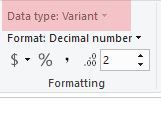
If you can't do it in the measure formatting options, make sure your columns you are refrencing in the measures for the calculations are formatted as decimal numbers.
Did I answer your question? Mark my post as a solution!
In doing so, you are also helping me. Thank you!
Proud to be a Super User!
Paul on Linkedin.
- Mark as New
- Bookmark
- Subscribe
- Mute
- Subscribe to RSS Feed
- Permalink
- Report Inappropriate Content
Hi @PaulDBrown ,
Unable to change the data type from Variant as few are having $ format and few don't. I have checked from lowest calculating columns and measures. I have changed them from General to Decimal Number still its the same error.

- Mark as New
- Bookmark
- Subscribe
- Mute
- Subscribe to RSS Feed
- Permalink
- Report Inappropriate Content
i think some of the columns you use to calculate january total or february total is txt or some are date and other numeric.
- Mark as New
- Bookmark
- Subscribe
- Mute
- Subscribe to RSS Feed
- Permalink
- Report Inappropriate Content
Hi @santiagomur ,
Thanks for reply. I have checked with calculating columns and measures. All of them are set to Decimal Number.
- Mark as New
- Bookmark
- Subscribe
- Mute
- Subscribe to RSS Feed
- Permalink
- Report Inappropriate Content
@Anonymous
Are you using the function FORMAT in any of the columns or measures?
The error you are getting is saying that somewhere along the calculation line you have a non-number value(s)
Did I answer your question? Mark my post as a solution!
In doing so, you are also helping me. Thank you!
Proud to be a Super User!
Paul on Linkedin.
- Mark as New
- Bookmark
- Subscribe
- Mute
- Subscribe to RSS Feed
- Permalink
- Report Inappropriate Content
- Mark as New
- Bookmark
- Subscribe
- Mute
- Subscribe to RSS Feed
- Permalink
- Report Inappropriate Content
@Anonymous
by "format" do you mean you are using the Function FORMAT( ) ?
Did I answer your question? Mark my post as a solution!
In doing so, you are also helping me. Thank you!
Proud to be a Super User!
Paul on Linkedin.
- Mark as New
- Bookmark
- Subscribe
- Mute
- Subscribe to RSS Feed
- Permalink
- Report Inappropriate Content
- Mark as New
- Bookmark
- Subscribe
- Mute
- Subscribe to RSS Feed
- Permalink
- Report Inappropriate Content
Hi @Anonymous ,
We can try to use the following measure to meet your requirement:
Change =
VALUE (
    SUBSTITUTE (
        [January Total] & "",
        "$",
        ""
    )
)
    - VALUE (
        SUBSTITUTE (
            [February Total] & "",
            "$",
            ""
        )
    )
If it does not work, could you please share the formula of [Janury Total] and [February Total] if it does not contain any confidential information?
Best regards,
If this post helps, then please consider Accept it as the solution to help the other members find it more quickly.
- Mark as New
- Bookmark
- Subscribe
- Mute
- Subscribe to RSS Feed
- Permalink
- Report Inappropriate Content
Hi,
Please try to apply the FORMAT function for the whole arithmetic operation and not for each measure.
so basicaly, FORMAT([January]-[February],....)
- Mark as New
- Bookmark
- Subscribe
- Mute
- Subscribe to RSS Feed
- Permalink
- Report Inappropriate Content
try use Jantotal=values(column) FebTot=Values(column) dif=[JanTotal]-[FebTotal]
Helpful resources

Power BI Monthly Update - September 2025
Check out the September 2025 Power BI update to learn about new features.

Fabric Community Update - August 2025
Find out what's new and trending in the Fabric community.


