cancel
Showing results for 
Search instead for 
Did you mean: 

The Power BI Data Visualization World Championships is back! Get ahead of the game and start preparing now! Learn more

Reply
shivar
Helper I
Helper I

Error message while retrieving data from one drive

Hello All,


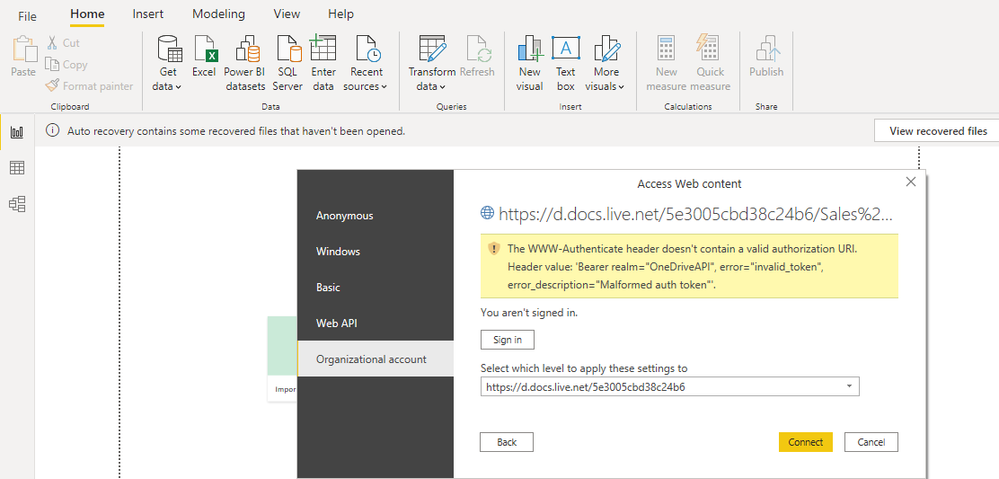
Following is the error message which i am recieving when i connect the excel file from the onedrive(personal).


error.png


I need to get the solution of this,


Can anyone help me on this


Thanks


1 ACCEPTED SOLUTION
v-xulin-mstf
Community Support
Community Support

Hi @shivar


Please refer this related post and try the method:

https://community.powerbi.com/t5/Power-Query/PowerBI-support-for-OneDrive-Personal-as-data-source/m-...


Best Regards,

Link


Is that the answer you're looking for? If this post helps, then please consider Accept it as the solution. Really appreciate!

View solution in original post

5 REPLIES 5
shivar
Helper I
Helper I

Hello All,


I am trying to chanage the source of excel file. The excel file was on local and now is saved to onedrive. i am trying to change the source setting but unbale to do so. The following error message is showing when i put the location path copiend from the file.

onedrive error.png


The File path was copied from the excel 365 app.


Can anyone help me out in this?


Thanks,

Shiva R

Hi @shivar,


I noticed that you mentioned a similar post in another thread.

If the issue has been solved, please adopt the solution to help others.

If you still have some question, please don't hesitate to let me known.‌‌

😉


Best Regards,

Link


Is that the answer you're looking for? If this post helps, then please consider Accept it as the solution. Really appreciate!


@shivar , onedrive you have use like web source

https://docs.microsoft.com/en-us/power-bi/connect-data/desktop-use-onedrive-business-links


Create a new one connection using one drive and then open advance editor in power query for that table and replace above portion


Part of steps are shown in

https://www.youtube.com/watch?v=59PUFuuCrbY

Share with Power BI Enthusiasts: Full Power BI Video (20 Hours) YouTube
Microsoft Fabric Series 60+ Videos YouTube
Microsoft Fabric Hindi End to End YouTube
v-xulin-mstf
Community Support
Community Support

Hi @shivar


Please refer this related post and try the method:

https://community.powerbi.com/t5/Power-Query/PowerBI-support-for-OneDrive-Personal-as-data-source/m-...


Best Regards,

Link


Is that the answer you're looking for? If this post helps, then please consider Accept it as the solution. Really appreciate!

amitchandak
Super User
Super User

@shivar , Have you taken the link after opening it in excel. check this document

https://docs.microsoft.com/en-us/power-bi/connect-data/desktop-use-onedrive-business-links

Share with Power BI Enthusiasts: Full Power BI Video (20 Hours) YouTube
Microsoft Fabric Series 60+ Videos YouTube
Microsoft Fabric Hindi End to End YouTube

Helpful resources

Announcements
Power BI DataViz World Championships

Power BI Dataviz World Championships

The Power BI Data Visualization World Championships is back! Get ahead of the game and start preparing now!

December 2025 Power BI Update Carousel

Power BI Monthly Update - December 2025

Check out the December 2025 Power BI Holiday Recap!

FabCon Atlanta 2026 carousel

FabCon Atlanta 2026

Join us at FabCon Atlanta, March 16-20, for the ultimate Fabric, Power BI, AI and SQL community-led event. Save $200 with code FABCOMM.