cancel
Showing results for 
Search instead for 
Did you mean: 

Learn from the best! Meet the four finalists headed to the FINALS of the Power BI Dataviz World Championships! Register now

Reply
Anonymous
Not applicable

Error message: When Connecting to PostgresSQL

Hi,


I have 2 Postgres databases to connect to from Power BI Desktop.


1. A database that I have full access to.
2. A database that I have limited access to columns. (Provider grants access to specific columns of some tables only.)


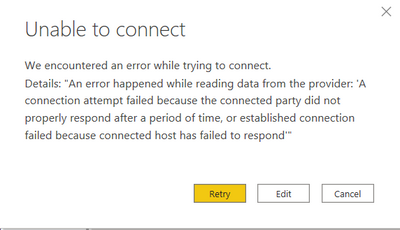
I was able to successfully connect to the first database, but receive the below error message when connecting to the second database with the same steps.

error_postgres.PNG
I also tried to connect to the second database with SQL statement, but still failed to connect.

How to troubleshoot this issue? Any thoughts would be appreciated! Thank you in advance.

3 REPLIES 3
parry2k
Super User
Super User

@Anonymous I used PostgresSQL in many reports and never had an issue. Can you connect to the data source by other method like pgadmin or so, just to check if you can connect it otherwise and run the select statement on the tables.


Follow us on LinkedIn


Check my latest blog post The Power of Using Calculation Groups with Inactive Relationships (Part 1) (perytus.com) I would  Kudos if my solution helped. 👉 If you can spend time posting the question, you can also make efforts to give Kudos to whoever helped to solve your problem. It is a token of appreciation!


Visit us at https://perytus.com, your one-stop-shop for Power BI-related projects/training/consultancy.


Subscribe to the @PowerBIHowTo YT channel for an upcoming video on List and Record functions in Power Query!!

Learn Power BI and Fabric - subscribe to our YT channel - Click here: @PowerBIHowTo

If my solution proved useful, I'd be delighted to receive Kudos. When you put effort into asking a question, it's equally thoughtful to acknowledge and give Kudos to the individual who helped you solve the problem. It's a small gesture that shows appreciation and encouragement! ❤


Did I answer your question? Mark my post as a solution. Proud to be a Super User! Appreciate your Kudos 🙂
Feel free to email me with any of your BI needs.

itsme
Resolver I
Resolver I

Are you using the PostgresSQL connector or an ODBC connector? With ODBC, make sure you have the correct Postgres drivers installed and the Power BI gateway is properly set up on the server. I have not used the PostgresSQL connector, so I'm probably not much help there.

Anonymous
Not applicable

Thank you for your response.

I am using the PostgresSQL connector. Hopefully to find some solutions soon.

Helpful resources

Announcements
Join our Fabric User Panel

Join our Fabric User Panel

Share feedback directly with Fabric product managers, participate in targeted research studies and influence the Fabric roadmap.

March Power BI Update Carousel

Power BI Community Update - March 2026

Check out the March 2026 Power BI update to learn about new features.