This time we’re going bigger than ever. Fabric, Power BI, SQL, AI and more. We're covering it all. You won't want to miss it.
Learn moreDid you hear? There's a new SQL AI Developer certification (DP-800). Start preparing now and be one of the first to get certified. Register now
Hey!
Can anyone see what gets wrong with my DAX formula?
I write following:
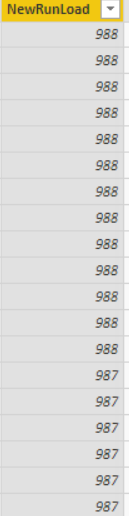
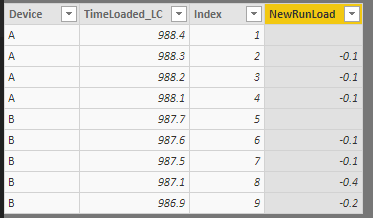
This is what TimeLoaded_LC is, and this is what NewRunLadoad gets:
I want it to take the current value, - previous value. as 988 - 987.9 = 0.1 and this value to be in NewRunLoad.
Thanks!
Kind regards
Agnes
Solved! Go to Solution.
Hi @Anonymous,
Please refer to below DAX formula:
NewRunLoad =
IF (
CALCULATE (
MAX ( Data[Index] ),
FILTER ( ALLEXCEPT ( Data, Data[Device] ), [Index] < EARLIER ( Data[Index] ) )
)
= BLANK (),
BLANK (),
Data[TimeLoaded_LC]
- CALCULATE (
SUM ( Data[TimeLoaded_LC] ),
FILTER (
ALLEXCEPT ( Data, Data[Device] ),
[Index]
= EARLIER ( Data[Index] ) - 1
)
)
)
Best regards,
Yuliana Gu
Hi @Anonymous,
Please refer to below DAX formula:
NewRunLoad =
IF (
CALCULATE (
MAX ( Data[Index] ),
FILTER ( ALLEXCEPT ( Data, Data[Device] ), [Index] < EARLIER ( Data[Index] ) )
)
= BLANK (),
BLANK (),
Data[TimeLoaded_LC]
- CALCULATE (
SUM ( Data[TimeLoaded_LC] ),
FILTER (
ALLEXCEPT ( Data, Data[Device] ),
[Index]
= EARLIER ( Data[Index] ) - 1
)
)
)
Best regards,
Yuliana Gu
Is this a measure?
Seems like your > sign in your minIndx VAR should be a < sign.
Check out the April 2026 Power BI update to learn about new features.
Sign up to receive a private message when registration opens and key events begin.
If you have recently started exploring Fabric, we'd love to hear how it's going. Your feedback can help with product improvements.
| User | Count |
|---|---|
| 34 | |
| 31 | |
| 30 | |
| 21 | |
| 16 |
| User | Count |
|---|---|
| 61 | |
| 50 | |
| 30 | |
| 23 | |
| 23 |