cancel
Showing results for 
Search instead for 
Did you mean: 

Data Days is here! Join us now for 60+ days of learning, challenges, and connection. Learn more

Reply
Anonymous
Not applicable

Error in column -Power Query

Hi,


I have imported some data from excel and I can see that one of the columns appears to have an error.

WHen I selected the column it says - we couldnt covert to number. 

This column has values  as shown below. 

1.11

2.09

XX21

3.11

RE12


I changed the column data type to text but still the error remain. Is there a way to manage this? I dont have any analysis on column, I will use this a text field.


Thanks a lot.

1 ACCEPTED SOLUTION
Greg_Deckler
Community Champion
Community Champion

You likely still have the step in there where this got converted to a number. Likely it is the first Changed Type step in your query. You need to change the data type up there. So, click on your step above your first Changed Type step and switch the column to Text. It should ask you to replace the current step. Say yes.


Follow on LinkedIn
@ me in replies or I'll lose your thread!!!
Instead of a Kudo, please vote for this idea
Become an expert!: Enterprise DNA
External Tools: MSHGQM
YouTube Channel!: Microsoft Hates Greg
Latest book!:
DAX For Humans

DAX is easy, CALCULATE makes DAX hard...

View solution in original post

4 REPLIES 4
Greg_Deckler
Community Champion
Community Champion

You likely still have the step in there where this got converted to a number. Likely it is the first Changed Type step in your query. You need to change the data type up there. So, click on your step above your first Changed Type step and switch the column to Text. It should ask you to replace the current step. Say yes.


Follow on LinkedIn
@ me in replies or I'll lose your thread!!!
Instead of a Kudo, please vote for this idea
Become an expert!: Enterprise DNA
External Tools: MSHGQM
YouTube Channel!: Microsoft Hates Greg
Latest book!:
DAX For Humans

DAX is easy, CALCULATE makes DAX hard...
Anonymous
Not applicable

Thanks @Greg_Deckler , it works a treat!


Thanks @az38 , I had to change it where it was converting it to a number as @Greg_Deckler  mentioned.

az38
Community Champion
Community Champion

Hi @Anonymous 

try  to set column AS text before the step that automatically set is as number


do not hesitate to give a kudo to useful posts and mark solutions as solution
LinkedIn
amitchandak
Super User
Super User

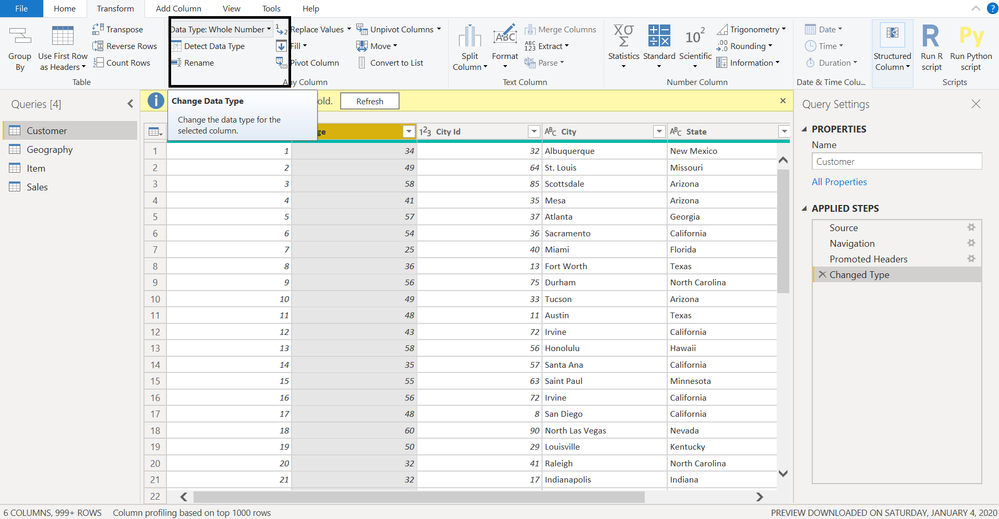
Go it edit query/transform data and try to change data type there.

Change data type Data transform.png

Share with Power BI Enthusiasts: Full Power BI Video (20 Hours) YouTube
Microsoft Fabric Series 60+ Videos YouTube
Microsoft Fabric Hindi End to End YouTube

Helpful resources

Announcements
Fabric Data Days is here Carousel

Fabric Data Days 2026

Don't miss out on Data Days, June 15 through August 7. Learn Fabric, Power BI, SQL, AI and more.

May Power BI Update Carousel

Power BI Monthly Update - May 2026

Check out the May 2026 Power BI update to learn about new features.

Power BI DataViz World Championships carousel

Power BI DataViz World Championships - June 2026

A new Power BI DataViz World Championship is coming this June! Don't miss out on submitting your entry.