FabCon is coming to Atlanta
Join us at FabCon Atlanta from March 16 - 20, 2026, for the ultimate Fabric, Power BI, AI and SQL community-led event. Save $200 with code FABCOMM.
Register now!- Power BI forums
- Get Help with Power BI
- Desktop
- Service
- Report Server
- Power Query
- Mobile Apps
- Developer
- DAX Commands and Tips
- Custom Visuals Development Discussion
- Health and Life Sciences
- Power BI Spanish forums
- Translated Spanish Desktop
- Training and Consulting
- Instructor Led Training
- Dashboard in a Day for Women, by Women
- Galleries
- Data Stories Gallery
- Themes Gallery
- Contests Gallery
- QuickViz Gallery
- Quick Measures Gallery
- Visual Calculations Gallery
- Notebook Gallery
- Translytical Task Flow Gallery
- TMDL Gallery
- R Script Showcase
- Webinars and Video Gallery
- Ideas
- Custom Visuals Ideas (read-only)
- Issues
- Issues
- Events
- Upcoming Events
The Power BI Data Visualization World Championships is back! Get ahead of the game and start preparing now! Learn more
- Power BI forums
- Forums
- Get Help with Power BI
- Desktop
- Null value in visual in Power BI
- Subscribe to RSS Feed
- Mark Topic as New
- Mark Topic as Read
- Float this Topic for Current User
- Bookmark
- Subscribe
- Printer Friendly Page


- Mark as New
- Bookmark
- Subscribe
- Mute
- Subscribe to RSS Feed
- Permalink
- Report Inappropriate Content
Error in calculating rate in Power BI
Hi,
I am having this issue. I tried creating this measure but getting error:
mokLY =
IF( HASONEVALUE( PARDAVIMAI[year]) ,CALCULATE ( [moketina_suma],
DATEADD (PARDAVIMAI[SUTP_IRASO_DATA],-1,YEAR ) ) )
When I put this measure in visual, getting this error:
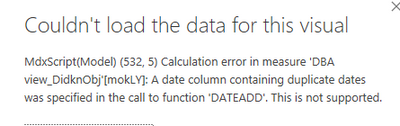
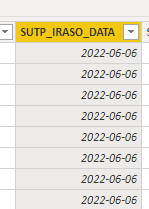
I am getting this error message. So how to resolve this error?


- Mark as New
- Bookmark
- Subscribe
- Mute
- Subscribe to RSS Feed
- Permalink
- Report Inappropriate Content
@Analitika , You should always use date table joined with date of your table
mokLY =
IF( HASONEVALUE( date[year]) ,CALCULATE ( [moketina_suma],
DATEADD (date[date],-1,YEAR ) ) )
Why Time Intelligence Fails - Powerbi 5 Savior Steps for TI :https://youtu.be/OBf0rjpp5Hw
https://amitchandak.medium.com/power-bi-5-key-points-to-make-time-intelligence-successful-bd52912a5b...
To get the best of the time intelligence function. Make sure you have a date calendar and it has been marked as the date in model view. Also, join it with the date column of your fact/s. Refer :radacad sqlbi My Video Series Appreciate your Kudos.
- Mark as New
- Bookmark
- Subscribe
- Mute
- Subscribe to RSS Feed
- Permalink
- Report Inappropriate Content
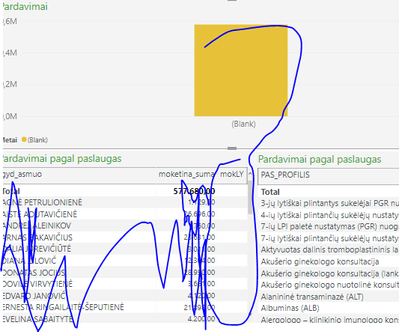
I tried still not working. I also made a relationship between date table and my table. But stil not working.
- Mark as New
- Bookmark
- Subscribe
- Mute
- Subscribe to RSS Feed
- Permalink
- Report Inappropriate Content
Hi @Analitika ,
As far as I know, DATEADD() will return a table that contains a column of dates, shifted either forward or backward in time by the specified number of intervals from the dates in the current context. Due to you add a table into measure which should return a single value, you will get an error as above.
mokLY =
IF(
HASONEVALUE( PARDAVIMAI[year]) ,
CALCULATE ([moketina_suma],
DATE(YEAR(MAX(PARDAVIMAI[SUTP_IRASO_DATA]))-1,MONTH(MAX(PARDAVIMAI[SUTP_IRASO_DATA])),DAY(MAX(PARDAVIMAI[SUTP_IRASO_DATA])))
)
Best Regards,
Rico Zhou
If this post helps, then please consider Accept it as the solution to help the other members find it more quickly.
- Mark as New
- Bookmark
- Subscribe
- Mute
- Subscribe to RSS Feed
- Permalink
- Report Inappropriate Content
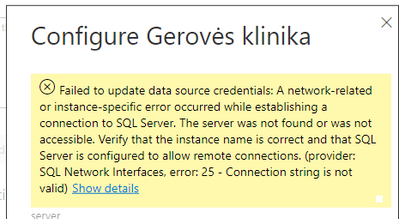
Ok. I solved it. Please help me with this issue. I am getting this whenever I publish it in Power BI.
- Mark as New
- Bookmark
- Subscribe
- Mute
- Subscribe to RSS Feed
- Permalink
- Report Inappropriate Content
Hi,
I am facing issue when getting wrong measure. I wanted to calculate growth of sales per year. Here is a measure:
mok_ly =
IF( HASONEVALUE('Date1'[Metai]) ,CALCULATE ( [moketina_suma],
    DATEADD ('Date1'[Date],-1,YEAR ) ) )
When I put measure in table, I am getting null value.

I have made a relationship between tables Date and Pardavimai. Measure [moketina_suma] is from Pardavimai table.
Here is a relationship:

So how to resolve this issue?
- Mark as New
- Bookmark
- Subscribe
- Mute
- Subscribe to RSS Feed
- Permalink
- Report Inappropriate Content
Hi,
I have this issue:
I created a measure but it gives me null value. How to fix it?
Here how looks visual:
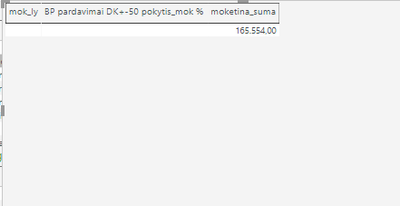
It shows null value.
mok_ly =
IF( HASONEVALUE('Date1'[Metai]) ,CALCULATE ( [moketina_suma],
    DATEADD ('Date1'[Date],-1,YEAR ) ) )
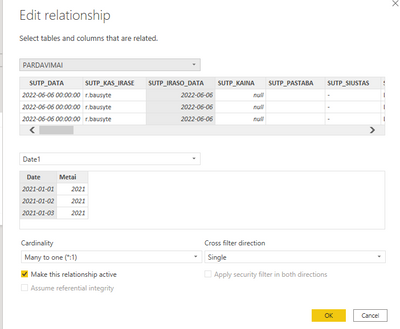
Relationship between tables.
Here is a measure:


- Mark as New
- Bookmark
- Subscribe
- Mute
- Subscribe to RSS Feed
- Permalink
- Report Inappropriate Content
It could be a number of reasons. Please will you try these two test measures. Please put both of them into the visual and post here a screenshot of the result.
Test1 = CALCULATE ( [moketina_suma], DATEADD ('Date1'[Date],-1,YEAR )Test2 = IF( HASONEVALUE('Date1'[Metai]) , "true", "false" )
- Mark as New
- Bookmark
- Subscribe
- Mute
- Subscribe to RSS Feed
- Permalink
- Report Inappropriate Content
Hi,
Having issue with measure:
mok_ly =
IF( HASONEVALUE(PARDAVIMAI[year]) ,CALCULATE ( [moketina_suma],
    DATEADD (PARDAVIMAI[SUTP_DATA],-1,YEAR ) ) )
Getting this error:
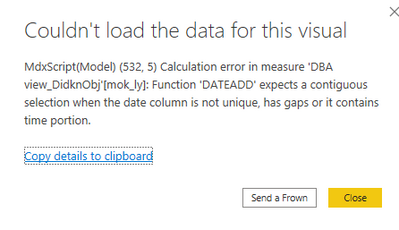
Full dax formula:
- Mark as New
- Bookmark
- Subscribe
- Mute
- Subscribe to RSS Feed
- Permalink
- Report Inappropriate Content
Hi,
I would like to ask why I am getting null values in visual if there is a relationship between Pardavimai and Date table.
Measure looks like this:
mok_ly =
IF( HASONEVALUE('Date'[Metai]) ,CALCULATE ( [moketina_suma],
    DATEADD ('Date'[Date],-1,YEAR ) ) )
null, even I selected years.
- Mark as New
- Bookmark
- Subscribe
- Mute
- Subscribe to RSS Feed
- Permalink
- Report Inappropriate Content
Hi,
I would like to ask why it happens that I am getting null if I connected Pardavimai and Date. But when calculating rate and put it in visual see null column.

third column is null.
Why this happens?
mok_ly =
IF( HASONEVALUE('Date'[Metai]) ,CALCULATE ( [moketina_suma],
    DATEADD ('Date'[Date],-1,YEAR ) ) )

Helpful resources

Power BI Monthly Update - November 2025
Check out the November 2025 Power BI update to learn about new features.

Fabric Data Days
Advance your Data & AI career with 50 days of live learning, contests, hands-on challenges, study groups & certifications and more!

FabCon Atlanta 2026
Join us at FabCon Atlanta, March 16-20, for the ultimate Fabric, Power BI, AI and SQL community-led event. Save $200 with code FABCOMM.

| User | Count |
|---|---|
| 58 | |
| 45 | |
| 40 | |
| 21 | |
| 18 |


