cancel
Showing results for 
Search instead for 
Did you mean: 

The Power BI Data Visualization World Championships is back! Get ahead of the game and start preparing now! Learn more

Reply
fabo
Advocate III
Advocate III

Error in TOP 3 Ranking with DAX

Hello there!


I'm just learning DAX so maybe this question isn't hard at all.  I found this Top 3 ranking example in other site X.  I tried to implement it from the scratch but I got an error I can't fix neither understand.


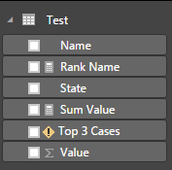
Table:


facts.PNG


Measures:


Sum Value = SUM(Test[Value])


Rank Name =
IF(
   HASONEVALUE(Test[Name]),
   RANKX(ALL(Test[Name], Test[Value]), [Sum Value])
   )


Top 3 Cases =
IF(
   HASONEVALUE(Test[Name]),
   IF(
      [Rank Name] <= 3,
      [Sum Value]
   )
)


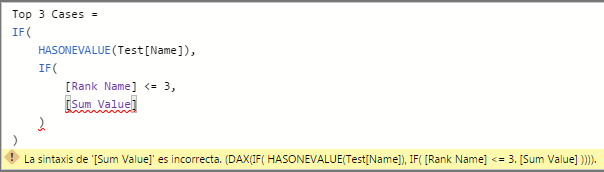
The error is highlighted in the measure Top 3 Cases:


error.PNGtable.PNG


The error is "the syntax of '[Sum Value] is incorrect".  


I downloaded the original files from that site X and the same error occurs.  I reviewed the comments looking for clues and I got nothing.


Maybe something in my Power BI Desktop settings is wrong.  Or maybe something else.  Any ideas, please?


Greetings!

1 ACCEPTED SOLUTION
MFelix
Super User
Super User

Hi ,

I believe that is relatef with regional settings try to change your formula from:
[Rank Name] <= 3,
[Sum Value]

To

[Rank Name] <= 3,0,
[Sum Value]

Still no sure why but with my regional.setting when I need to add numbers to my syntax always need to add the decimals, probably because the decimal.symbol (comma) is the same as the separator in the formulas

Check if it works.

Regards,
MFelix

Regards

Miguel Félix


Did I answer your question? Mark my post as a solution!

Proud to be a Super User!

Check out my blog: Power BI em Português


View solution in original post

2 REPLIES 2
MFelix
Super User
Super User

Hi ,

I believe that is relatef with regional settings try to change your formula from:
[Rank Name] <= 3,
[Sum Value]

To

[Rank Name] <= 3,0,
[Sum Value]

Still no sure why but with my regional.setting when I need to add numbers to my syntax always need to add the decimals, probably because the decimal.symbol (comma) is the same as the separator in the formulas

Check if it works.

Regards,
MFelix

Regards

Miguel Félix


Did I answer your question? Mark my post as a solution!

Proud to be a Super User!

Check out my blog: Power BI em Português


Hi @MFelix!


It works!  You were right.  It was a regional setting issue.  The code seems to be confunsing at first glance because 0 looks like the true argument in the IF statement and [Sum Value] looks like the false argument.  


Fortunately, we can use several lines and spacing to make it clearer.


Thank you for your help!


Best regards!

fabo

Helpful resources

Announcements
Power BI DataViz World Championships

Power BI Dataviz World Championships

The Power BI Data Visualization World Championships is back! Get ahead of the game and start preparing now!

December 2025 Power BI Update Carousel

Power BI Monthly Update - December 2025

Check out the December 2025 Power BI Holiday Recap!

FabCon Atlanta 2026 carousel

FabCon Atlanta 2026

Join us at FabCon Atlanta, March 16-20, for the ultimate Fabric, Power BI, AI and SQL community-led event. Save $200 with code FABCOMM.