cancel
Showing results for 
Search instead for 
Did you mean: 

July 7 - July 17 | Round 2 of the Power BI Dataviz World Championships. Don't miss your chance! Learn more

Reply
johunt
New Member

Error in FIND/SEARCH function

I keep getting the following error

The search Text provided to function 'SEARCH' could not be found in the given text.


when i put in this formula

UK Region = IF(ISNUMBER(SEARCH("region",Table1[Region ])),"UK" , "International")


I tried the formula in excel and it worked.  Any ideas why it doesn't work in PowerBI?  I also tried adding in the extra part of the SEARCH formula with a ,,0) at the end, but that just overrided the IF function and ended up labelling everything UK whether or not the word Region was in the Region column.   I also tried changing the " for ' and the , for ; but it liked that even less. 


Any suggestions as to how to correct the formula would be greatly received.


1 ACCEPTED SOLUTION
Vvelarde
Community Champion
Community Champion

@johunt


Hi, Try with this:


UK Region = IF(ISNUMBER(SEARCH("Region",Table1[Region],,BLANK())),"UK","International")


Regards


Victor

Lima - Peru


Lima - Peru

View solution in original post

6 REPLIES 6
Hasan
Resolver I
Resolver I

Can you change your formula to IF(ISTEXT(SEARCH.........)

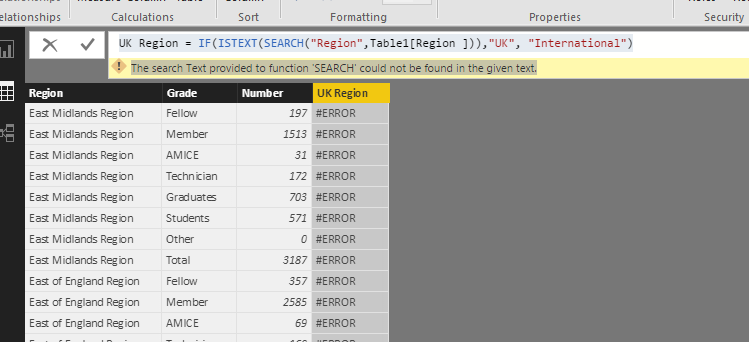
UK Region = IF(ISTEXT(SEARCH("Region",Table1[Region ])),"UK", "International")


The search Text provided to function 'SEARCH' could not be found in the given text.


Hi there

Changed it, but still the same error... pic attached ...


Capture.PNG


Vvelarde
Community Champion
Community Champion

@johunt


Hi, Try with this:


UK Region = IF(ISNUMBER(SEARCH("Region",Table1[Region],,BLANK())),"UK","International")


Regards


Victor

Lima - Peru


Lima - Peru

Cool; I had the same issue and it works. Thank you!

Fantastic!  That worked!  Thank you so much

@johunt,


You could use DAX below as well.

UK Region =
IF ( SEARCH ( "Region", Table1[Region],, 0 ) > 0, "UK", "International" )
Community Support Team _ Sam Zha
If this post helps, then please consider Accept it as the solution to help the other members find it more quickly.

Helpful resources

Announcements
FabCon and SQLCon Barcelona 2026

FabCon & SQLCon – Barcelona 2026

Join us in Barcelona for FabCon and SQLCon, the Fabric, Power BI, SQL, and AI community event. Save €200 with code FABCMTY200.

60 days of Data Days Carousel

Data Days 2026

Join Fabric Data Days 2026: 60 days of free live/on-demand sessions, challenges, study groups, and certification opportunities.

Power BI DataViz World Championships carousel

Power BI DataViz World Championships - June 2026

A new Power BI DataViz World Championship is coming this June! Don't miss out on submitting your entry.