cancel
Showing results for 
Search instead for 
Did you mean: 

The Power BI Data Visualization World Championships is back! Get ahead of the game and start preparing now! Learn more

Reply
Anonymous
Not applicable

Error in Custom function definition

Hello togehter from Germany,


i work since some weeks with Powerbi and its a nice tool. Today i have a prob with my first custom function.


let
    get_sublocation = (street as text, housenr as text, postcode as text, city as text) = >
let
    Quelle = Json.Document(Web.Contents("https://maps.googleapis.com/maps/api/geocode/json?address="&street&&housenr&","&postcode&&" "&city&","&key=xyz")),
    results = Quelle[results],
    #"In Tabelle konvertiert" = Table.FromList(results, Splitter.SplitByNothing(), null, null, ExtraValues.Error),
    #"Erweiterte Column1" = Table.ExpandRecordColumn(#"In Tabelle konvertiert", "Column1", {"address_components", "formatted_address", "geometry", "place_id", "plus_code", "types"}, {"Column1.address_components", "Column1.formatted_address", "Column1.geometry", "Column1.place_id", "Column1.plus_code", "Column1.types"}),
    #"Erweiterte Column1.geometry" = Table.ExpandRecordColumn(#"Erweiterte Column1", "Column1.geometry", {"location", "location_type", "viewport"}, {"Column1.geometry.location", "Column1.geometry.location_type", "Column1.geometry.viewport"}),
    #"Erweiterte Column1.types" = Table.ExpandListColumn(#"Erweiterte Column1.geometry", "Column1.types"),
    #"Erweiterte Column1.geometry.viewport" = Table.ExpandRecordColumn(#"Erweiterte Column1.types", "Column1.geometry.viewport", {"northeast", "southwest"}, {"Column1.geometry.viewport.northeast", "Column1.geometry.viewport.southwest"}),
    #"Erweiterte Column1.geometry.location" = Table.ExpandRecordColumn(#"Erweiterte Column1.geometry.viewport", "Column1.geometry.location", {"lat", "lng"}, {"Column1.geometry.location.lat", "Column1.geometry.location.lng"}),
    #"Erweiterte Column1.address_components" = Table.ExpandListColumn(#"Erweiterte Column1.geometry.location", "Column1.address_components"),
    #"Erweiterte Column1.address_components1" = Table.ExpandRecordColumn(#"Erweiterte Column1.address_components", "Column1.address_components", {"long_name", "short_name", "types"}, {"Column1.address_components.long_name", "Column1.address_components.short_name", "Column1.address_components.types"}),
    #"Erweiterte Column1.address_components.types" = Table.ExpandListColumn(#"Erweiterte Column1.address_components1", "Column1.address_components.types"),
    #"Entfernte Spalten" = Table.RemoveColumns(#"Erweiterte Column1.address_components.types",{"Column1.address_components.long_name", "Column1.geometry.viewport.northeast", "Column1.geometry.viewport.southwest", "Column1.geometry.location_type", "Column1.geometry.location.lng", "Column1.geometry.location.lat", "Column1.place_id", "Column1.plus_code", "Column1.types"}),
    #"Gefilterte Zeilen" = Table.SelectRows(#"Entfernte Spalten", each ([Column1.address_components.types] <> "administrative_area_level_1" and [Column1.address_components.types] <> "administrative_area_level_2" and [Column1.address_components.types] <> "political" and [Column1.address_components.types] <> "sublocality_level_1")),
    #"Entfernte Spalten1" = Table.RemoveColumns(#"Gefilterte Zeilen",{"Column1.formatted_address"}),
    #"Transponierte Tabelle" = Table.Transpose(#"Entfernte Spalten1"),
    #"Umgekehrte Zeilen" = Table.ReverseRows(#"Transponierte Tabelle"),
    #"Höher gestufte Header" = Table.PromoteHeaders(#"Umgekehrte Zeilen", [PromoteAllScalars=true]),
    #"Geänderter Typ" = Table.TransformColumnTypes(#"Höher gestufte Header",{{"street_number", Int64.Type}, {"route", type text}, {"sublocality", type text}, {"locality", type text}, {"country", type text}, {"postal_code", Int64.Type}})
in
    get_sublocation

The Engine said "Expected Token: RightParen." When i click on Show 


it marked the first line (the commas between the variables)  

get_sublocation = (street as text, housenr as text, postcode as text, city as text)


Can anyone tell me a right function definiation? I have test something like ; as seperator, but no one works.


Thanks a lot


Pascal 


1 ACCEPTED SOLUTION
Anonymous
Not applicable

I have found the problem... it was the space between "= >"


View solution in original post

2 REPLIES 2
v-danhe-msft
Microsoft Employee
Microsoft Employee

Hi @Anonymous,

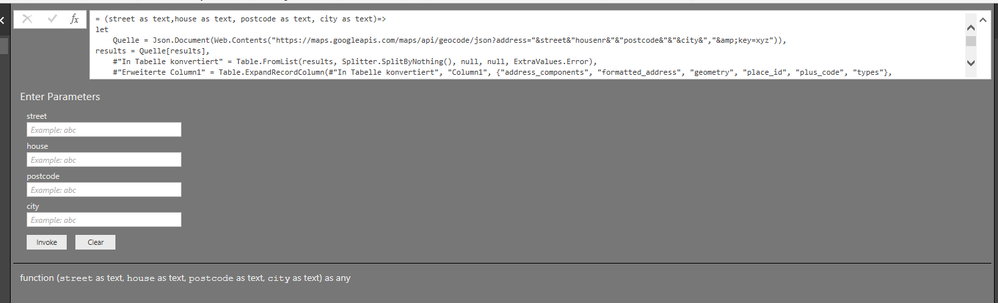
Based on my tets, you could modify your code like this:

(street as text,house as text, postcode as text, city as text)=>
let
    Quelle = Json.Document(Web.Contents("https://maps.googleapis.com/maps/api/geocode/json?address="&street&"housenr&"&"postcode&"&"&city&","&amp;key=xyz")),
results = Quelle[results],
    #"In Tabelle konvertiert" = Table.FromList(results, Splitter.SplitByNothing(), null, null, ExtraValues.Error),
    #"Erweiterte Column1" = Table.ExpandRecordColumn(#"In Tabelle konvertiert", "Column1", {"address_components", "formatted_address", "geometry", "place_id", "plus_code", "types"}, {"Column1.address_components", "Column1.formatted_address", "Column1.geometry", "Column1.place_id", "Column1.plus_code", "Column1.types"}),
    #"Erweiterte Column1.geometry" = Table.ExpandRecordColumn(#"Erweiterte Column1", "Column1.geometry", {"location", "location_type", "viewport"}, {"Column1.geometry.location", "Column1.geometry.location_type", "Column1.geometry.viewport"}),
    #"Erweiterte Column1.types" = Table.ExpandListColumn(#"Erweiterte Column1.geometry", "Column1.types"),
    #"Erweiterte Column1.geometry.viewport" = Table.ExpandRecordColumn(#"Erweiterte Column1.types", "Column1.geometry.viewport", {"northeast", "southwest"}, {"Column1.geometry.viewport.northeast", "Column1.geometry.viewport.southwest"}),
    #"Erweiterte Column1.geometry.location" = Table.ExpandRecordColumn(#"Erweiterte Column1.geometry.viewport", "Column1.geometry.location", {"lat", "lng"}, {"Column1.geometry.location.lat", "Column1.geometry.location.lng"}),
    #"Erweiterte Column1.address_components" = Table.ExpandListColumn(#"Erweiterte Column1.geometry.location", "Column1.address_components"),
    #"Erweiterte Column1.address_components1" = Table.ExpandRecordColumn(#"Erweiterte Column1.address_components", "Column1.address_components", {"long_name", "short_name", "types"}, {"Column1.address_components.long_name", "Column1.address_components.short_name", "Column1.address_components.types"}),
    #"Erweiterte Column1.address_components.types" = Table.ExpandListColumn(#"Erweiterte Column1.address_components1", "Column1.address_components.types"),
    #"Entfernte Spalten" = Table.RemoveColumns(#"Erweiterte Column1.address_components.types",{"Column1.address_components.long_name", "Column1.geometry.viewport.northeast", "Column1.geometry.viewport.southwest", "Column1.geometry.location_type", "Column1.geometry.location.lng", "Column1.geometry.location.lat", "Column1.place_id", "Column1.plus_code", "Column1.types"}),
    #"Gefilterte Zeilen" = Table.SelectRows(#"Entfernte Spalten", each ([Column1.address_components.types] <> "administrative_area_level_1" and [Column1.address_components.types] <> "administrative_area_level_2" and [Column1.address_components.types] <> "political" and [Column1.address_components.types] <> "sublocality_level_1")),
    #"Entfernte Spalten1" = Table.RemoveColumns(#"Gefilterte Zeilen",{"Column1.formatted_address"}),
    #"Transponierte Tabelle" = Table.Transpose(#"Entfernte Spalten1"),
    #"Umgekehrte Zeilen" = Table.ReverseRows(#"Transponierte Tabelle"),
    #"Höher gestufte Header" = Table.PromoteHeaders(#"Umgekehrte Zeilen", [PromoteAllScalars=true]),
    #"Geänderter Typ" = Table.TransformColumnTypes(#"Höher gestufte Header",{{"street_number", Int64.Type}, {"route", type text}, {"sublocality", type text}, {"locality", type text}, {"country", type text}, {"postal_code", Int64.Type}})
in
     Quelle

Result:

1.PNG

You could also download the pbix file to have a view.

https://www.dropbox.com/s/swiwxog7njyola8/Error%20in%20Custom%20function%20definition.pbix?dl=0


Regards,

Daniel He

Community Support Team _ Daniel He
If this post helps, then please consider Accept it as the solution to help the other members find it more quickly.
Anonymous
Not applicable

I have found the problem... it was the space between "= >"


Helpful resources

Announcements
Power BI DataViz World Championships

Power BI Dataviz World Championships

The Power BI Data Visualization World Championships is back! Get ahead of the game and start preparing now!

November Power BI Update Carousel

Power BI Monthly Update - November 2025

Check out the November 2025 Power BI update to learn about new features.

FabCon Atlanta 2026 carousel

FabCon Atlanta 2026

Join us at FabCon Atlanta, March 16-20, for the ultimate Fabric, Power BI, AI and SQL community-led event. Save $200 with code FABCOMM.