Join us at FabCon Atlanta from March 16 - 20, 2026, for the ultimate Fabric, Power BI, AI and SQL community-led event. Save $200 with code FABCOMM.
Register now!The Power BI Data Visualization World Championships is back! Get ahead of the game and start preparing now! Learn more
Hello,
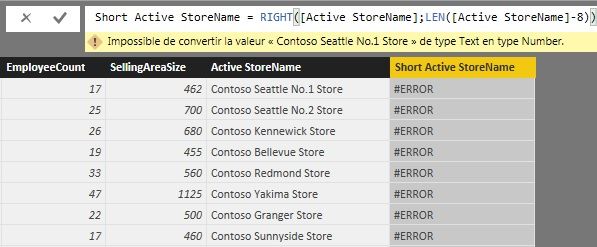
I created a formula to remove the word "Contoso" which is repeated everywhere. But my formula returns an error: "Impossible to convert the value "Contoso Seattle N°1 Store" from Text type to Number type.
But I don't want any Number here! What did I miss?
Thanks for help
Solved! Go to Solution.
Shift one of the closing parenthesis before the "-8".
Imke Feldmann (The BIccountant)
If you liked my solution, please give it a thumbs up. And if I did answer your question, please mark this post as a solution. Thanks!
How to integrate M-code into your solution -- How to get your questions answered quickly -- How to provide sample data -- Check out more PBI- learning resources here -- Performance Tipps for M-queries
Shift one of the closing parenthesis before the "-8".
Imke Feldmann (The BIccountant)
If you liked my solution, please give it a thumbs up. And if I did answer your question, please mark this post as a solution. Thanks!
How to integrate M-code into your solution -- How to get your questions answered quickly -- How to provide sample data -- Check out more PBI- learning resources here -- Performance Tipps for M-queries
Great ! Thanks a lot !
The Power BI Data Visualization World Championships is back! Get ahead of the game and start preparing now!
| User | Count |
|---|---|
| 44 | |
| 40 | |
| 33 | |
| 30 | |
| 23 |
| User | Count |
|---|---|
| 125 | |
| 119 | |
| 90 | |
| 75 | |
| 69 |