
Join us at FabCon Atlanta from March 16 - 20, 2026, for the ultimate Fabric, Power BI, AI and SQL community-led event. Save $200 with code FABCOMM.
Register now!The Power BI Data Visualization World Championships is back! Get ahead of the game and start preparing now! Learn more
Hi guys.
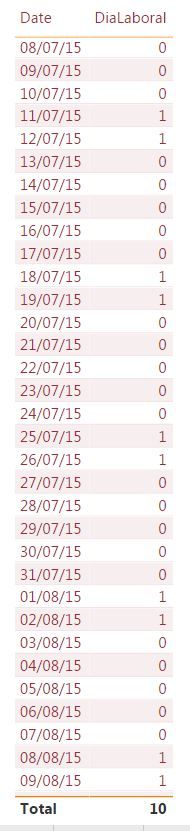
I have 2 tables. One is the DimDate table where I have the Non-working days column, Saturdays and Sundays (0 Weekly, 1 Non-working). The other GTI Table where there are 2 columns with 2 dates: Creation date and expiration date. Both tables are linked.
In the GTI table, I'm calculating how many Saturdays and Sundays there are between Creation date and expiration date:
FDS = CALCULATE (SUM (DimDate [DiaLaboral]); FILTER (DimDate; DimDate [Date]> = FIRSTDATE (GTI_POWERBI [Creation Date]) && DimDate [Date] <LASTDATE (GTI_POWERBI [End Date]))).
This works very well for me but when the Due Date is a Monday, the previous weekend does not count it (Case 1 in Red) but I have another date if it does (Case 2 in blue).
In the image, the result of case 1 must be 10 and not 8. But case 2 is correct and both end on a Monday.
Can you help me?
Case 1: It´s wrong
Case 2: Its Ok
I appreciate your help. Sorry for my English
Solved! Go to Solution.
Hi, you can use a calculated column with:
FDS =
CALCULATE (
SUM ( DimDate[DiaLaboral] ),
FILTER (
DimDate,
DimDate[Date] >= GTI_POWERBI[Fecha de Creación]
&& DimDate[Date] < GTI_POWERBI[Fecha de Vencimiento]
)
)Regards
Victor
Lima - Peru
Hi, you can use a calculated column with:
FDS =
CALCULATE (
SUM ( DimDate[DiaLaboral] ),
FILTER (
DimDate,
DimDate[Date] >= GTI_POWERBI[Fecha de Creación]
&& DimDate[Date] < GTI_POWERBI[Fecha de Vencimiento]
)
)Regards
Victor
Lima - Peru
Excelente Vvelarde.
Muchas gracias. Funcionó perfecto
The Power BI Data Visualization World Championships is back! Get ahead of the game and start preparing now!
| User | Count |
|---|---|
| 39 | |
| 37 | |
| 33 | |
| 33 | |
| 29 |
| User | Count |
|---|---|
| 134 | |
| 96 | |
| 78 | |
| 67 | |
| 65 |