cancel
Showing results for 
Search instead for 
Did you mean: 

The Power BI Data Visualization World Championships is back! Get ahead of the game and start preparing now! Learn more

Reply
Anonymous
Not applicable

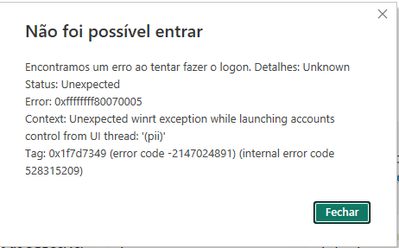
Error Message when LOGON


Edsonsy_0-1686340063817.png


1 ACCEPTED SOLUTION
v-yueyunzh-msft
Community Support
Community Support

Hi , @Anonymous 

According to my search, this error is not mentioned in the Power BI classic error, so it is difficult to provide you with a corresponding solution immediately.

Based on my query and research on the error code given from Power BI side: 0x80070005 It seems related to the permission/access issue when the application try to make a operation.

Error Code 0x80070005: What It Is and How to Fix It (lifewire.com)


For your problem, first you can try to use "run as admin" to check if it can solve the problem.

If you still have the problem, can you please let us know if this is the first download of power BI Desktop or after an update. If the problem occurs after the update, can you try to download the previous version to see if the same problem exists.

If you have the same problem, you can try to use third-party tools and contact the internal IT staff to troubleshoot the existing problems.

You can try to grab the Power BI Desktop trace to check whether there are other error messages that cause this error:
Troubleshoot sign-in issues in Power BI Desktop - Power BI | Microsoft Learn

Here you can try to use Fiddler to see if it is an HTTPs traffic problem:

Download Fiddler Web Debugging Tool for Free by Telerik

You can also use Process Monitor to check whether there is a problem with the computer file or process that causes the block:
Process Monitor - Sysinternals | Microsoft Learn


Thank you for your time and sharing, and thank you for your support and understanding of PowerBI! 


Best Regards,

Aniya Zhang

If this post helps, then please consider Accept it as the solution to help the other members find it more quickly


View solution in original post

1 REPLY 1
v-yueyunzh-msft
Community Support
Community Support

Hi , @Anonymous 

According to my search, this error is not mentioned in the Power BI classic error, so it is difficult to provide you with a corresponding solution immediately.

Based on my query and research on the error code given from Power BI side: 0x80070005 It seems related to the permission/access issue when the application try to make a operation.

Error Code 0x80070005: What It Is and How to Fix It (lifewire.com)


For your problem, first you can try to use "run as admin" to check if it can solve the problem.

If you still have the problem, can you please let us know if this is the first download of power BI Desktop or after an update. If the problem occurs after the update, can you try to download the previous version to see if the same problem exists.

If you have the same problem, you can try to use third-party tools and contact the internal IT staff to troubleshoot the existing problems.

You can try to grab the Power BI Desktop trace to check whether there are other error messages that cause this error:
Troubleshoot sign-in issues in Power BI Desktop - Power BI | Microsoft Learn

Here you can try to use Fiddler to see if it is an HTTPs traffic problem:

Download Fiddler Web Debugging Tool for Free by Telerik

You can also use Process Monitor to check whether there is a problem with the computer file or process that causes the block:
Process Monitor - Sysinternals | Microsoft Learn


Thank you for your time and sharing, and thank you for your support and understanding of PowerBI! 


Best Regards,

Aniya Zhang

If this post helps, then please consider Accept it as the solution to help the other members find it more quickly


Helpful resources

Announcements
Power BI DataViz World Championships

Power BI Dataviz World Championships

The Power BI Data Visualization World Championships is back! Get ahead of the game and start preparing now!

December 2025 Power BI Update Carousel

Power BI Monthly Update - December 2025

Check out the December 2025 Power BI Holiday Recap!

FabCon Atlanta 2026 carousel

FabCon Atlanta 2026

Join us at FabCon Atlanta, March 16-20, for the ultimate Fabric, Power BI, AI and SQL community-led event. Save $200 with code FABCOMM.