cancel
Showing results for 
Search instead for 
Did you mean: 

We've captured the moments from FabCon & SQLCon that everyone is talking about, and we are bringing them to the community, live and on-demand. Starts on April 14th. Register now

Reply
THEG72
Helper V
Helper V

Error Handling for Data Sources

Hi Community,


I have a project where i am building a template data model to use accross multiple data sources.


In some cases the queries i written have no records and the data source returns a null.

The first query below shows the items, nextpagelink and count.


Source Data shows null recordsSource Data shows null recordsQuery tries to expand expand null dataQuery tries to expand expand null data

My query above fails as no data and cause an error on refreshing...


What kind of error handling can i add to this code ?


Here is the code for the data table that wont run as null records.

let
    Source = ItemSource,
    Items = Source[Items],
    #"Converted to Table" = Table.FromList(Items, Splitter.SplitByNothing(), null, null, ExtraValues.Error),
    #"Expanded {0}" = Table.ExpandRecordColumn(#"Converted to Table", "Column1", {"UID", "Number", "Name", "IsActive", "Description", "UseDescription", "CustomList1", "CustomList2", "CustomList3", "CustomField1", "CustomField2", "CustomField3", "QuantityOnHand", "QuantityCommitted", "QuantityOnOrder", "QuantityAvailable", "AverageCost", "CurrentValue", "BaseSellingPrice", "IsBought", "IsSold", "IsInventoried", "ExpenseAccount", "CostOfSalesAccount", "IncomeAccount", "AssetAccount", "BuyingDetails", "SellingDetails", "PhotoURI", "URI", "RowVersion"}, {"UID", "Number", "Name", "IsActive", "Description", "UseDescription", "CustomList1", "CustomList2", "CustomList3", "CustomField1", "CustomField2", "CustomField3", "QuantityOnHand", "QuantityCommitted", "QuantityOnOrder", "QuantityAvailable", "AverageCost", "CurrentValue", "BaseSellingPrice", "IsBought", "IsSold", "IsInventoried", "ExpenseAccount", "CostOfSalesAccount", "IncomeAccount", "AssetAccount", "BuyingDetails", "SellingDetails", "PhotoURI", "URI", "RowVersion"})
in
    #"Expanded {0}"

can i use a try or otherwise?


Or can i stop the queries when detecting null records at the source?


The source shows "COUNT" "NULL"...can i make this a query and use some kind of if statement..so if the data source Query shows a null count the other queries wont run?


Cheers for any suggestions for error handling.

1 ACCEPTED SOLUTION
v-chuncz-msft
Community Support
Community Support

@THEG72,


You may use the try expression.

https://msdn.microsoft.com/en-us/query-bi/m/power-query-m-language-specification

Community Support Team _ Sam Zha
If this post helps, then please consider Accept it as the solution to help the other members find it more quickly.

View solution in original post

3 REPLIES 3
v-chuncz-msft
Community Support
Community Support

@THEG72,


You may use the try expression.

https://msdn.microsoft.com/en-us/query-bi/m/power-query-m-language-specification

Community Support Team _ Sam Zha
If this post helps, then please consider Accept it as the solution to help the other members find it more quickly.


@v-chuncz-msft

So here is my Item Data Source query which is the endpoint containing stock item list.


let
    Source =
        Json.Document(
            Web.Contents(SelectedCompany&"/Inventory/Item/"&APIVersion))
in
    Source

I have two data sources accessed using a SelectedCompany parameter.
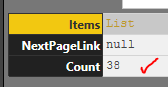
CompanyA has Item Ledger DataSource shows 38 itemsCompanyA has Item Ledger DataSource shows 38 items
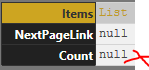
  CompanyB has NO itemsCompanyB has NO items

I then have a second reference query that expands out the table data. This works fine for Company A but fails on Company B as follows;

Fails when get to Expand step as records are nullFails when get to Expand step as records are null

How would i write the try statement into the code below? I had a few goes but get an error


let
    Source = ItemSource,
    Items = Source[Items],
    ToTable = Table.FromList(Items, Splitter.SplitByNothing(), null, null, ExtraValues.Error),
    Expand = Table.ExpandRecordColumn(ToTable, "Column1", {"UID", "Number", "Name", "IsActive", "Description", "UseDescription", "CustomList1", "CustomList2", "CustomList3", "CustomField1", "CustomField2", "CustomField3", "QuantityOnHand", "QuantityCommitted", "QuantityOnOrder", "QuantityAvailable", "AverageCost", "CurrentValue", "BaseSellingPrice", "IsBought", "IsSold", "IsInventoried", "ExpenseAccount", "CostOfSalesAccount", "IncomeAccount", "AssetAccount", "BuyingDetails", "SellingDetails", "PhotoURI", "URI", "RowVersion"}, {"UID", "Number", "Name", "IsActive", "Description", "UseDescription", "CustomList1", "CustomList2", "CustomList3", "CustomField1", "CustomField2", "CustomField3", "QuantityOnHand", "QuantityCommitted", "QuantityOnOrder", "QuantityAvailable", "AverageCost", "CurrentValue", "BaseSellingPrice", "IsBought", "IsSold", "IsInventoried", "ExpenseAccount", "CostOfSalesAccount", "IncomeAccount", "AssetAccount", "BuyingDetails", "SellingDetails", "PhotoURI", "URI", "RowVersion"})
in
  Expand

I have tried this for the source which works


let
    Source =
        try
        Json.Document(
            Web.Contents("http://localhost:8080/AccountRight/?api-version=v2")
                    )
        otherwise
        "Error!"    
in
    Source

However how do i do the Item ledger query error handling when the count is shown as null at the source? I have tried code as follows but get "Token Identifier expected" and couldn’t work out where the comma or bracket error...


How can i put error handling into statement below so that IF COUNT = NULL at the source query ItemSource....the referenced query that expands the records (ItemLedger) output message "no records found" and not complete rest of steps?


let
    Source =
        try
        ItemSource,
        Items = Source[Items],
        ToTable = Table.FromList(Items, Splitter.SplitByNothing(), null, null, ExtraValues.Error),
        Expand = Table.ExpandRecordColumn(ToTable, "Column1", {"UID", "Number", "Name", "IsActive", "Description", "UseDescription", "CustomList1", "CustomList2", "CustomList3", "CustomField1", "CustomField2", "CustomField3", "QuantityOnHand", "QuantityCommitted", "QuantityOnOrder", "QuantityAvailable", "AverageCost", "CurrentValue", "BaseSellingPrice", "IsBought", "IsSold", "IsInventoried", "ExpenseAccount", "CostOfSalesAccount", "IncomeAccount", "AssetAccount", "BuyingDetails", "SellingDetails", "PhotoURI", "URI", "RowVersion"}, {"UID", "Number", "Name", "IsActive", "Description", "UseDescription", "CustomList1", "CustomList2", "CustomList3", "CustomField1", "CustomField2", "CustomField3", "QuantityOnHand", "QuantityCommitted", "QuantityOnOrder", "QuantityAvailable", "AverageCost", "CurrentValue", "BaseSellingPrice", "IsBought", "IsSold", "IsInventoried", "ExpenseAccount", "CostOfSalesAccount", "IncomeAccount", "AssetAccount", "BuyingDetails", "SellingDetails", "PhotoURI", "URI", "RowVersion"})
        otherwise
        "NoDataPresent"
in
    Source


Anonymous
Not applicable

Hi,


Did you ever get a solution for this question?


Thanks


Mike

Helpful resources

Announcements
New to Fabric survey Carousel

New to Fabric Survey

If you have recently started exploring Fabric, we'd love to hear how it's going. Your feedback can help with product improvements.

Power BI DataViz World Championships carousel

Power BI DataViz World Championships - June 2026

A new Power BI DataViz World Championship is coming this June! Don't miss out on submitting your entry.

Join our Fabric User Panel

Join our Fabric User Panel

Share feedback directly with Fabric product managers, participate in targeted research studies and influence the Fabric roadmap.

March Power BI Update Carousel

Power BI Community Update - March 2026

Check out the March 2026 Power BI update to learn about new features.

