@v-chuncz-msft
So here is my Item Data Source query which is the endpoint containing stock item list.
let
    Source =
        Json.Document(
            Web.Contents(SelectedCompany&"/Inventory/Item/"&APIVersion))
in
    Source
I have two data sources accessed using a SelectedCompany parameter.
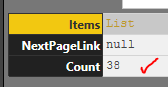 CompanyA has Item Ledger DataSource shows 38 items
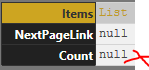 CompanyB has NO items
I then have a second reference query that expands out the table data. This works fine for Company A but fails on Company B as follows;
 Fails when get to Expand step as records are null
How would i write the try statement into the code below? I had a few goes but get an error
let
    Source = ItemSource,
    Items = Source[Items],
    ToTable = Table.FromList(Items, Splitter.SplitByNothing(), null, null, ExtraValues.Error),
    Expand = Table.ExpandRecordColumn(ToTable, "Column1", {"UID", "Number", "Name", "IsActive", "Description", "UseDescription", "CustomList1", "CustomList2", "CustomList3", "CustomField1", "CustomField2", "CustomField3", "QuantityOnHand", "QuantityCommitted", "QuantityOnOrder", "QuantityAvailable", "AverageCost", "CurrentValue", "BaseSellingPrice", "IsBought", "IsSold", "IsInventoried", "ExpenseAccount", "CostOfSalesAccount", "IncomeAccount", "AssetAccount", "BuyingDetails", "SellingDetails", "PhotoURI", "URI", "RowVersion"}, {"UID", "Number", "Name", "IsActive", "Description", "UseDescription", "CustomList1", "CustomList2", "CustomList3", "CustomField1", "CustomField2", "CustomField3", "QuantityOnHand", "QuantityCommitted", "QuantityOnOrder", "QuantityAvailable", "AverageCost", "CurrentValue", "BaseSellingPrice", "IsBought", "IsSold", "IsInventoried", "ExpenseAccount", "CostOfSalesAccount", "IncomeAccount", "AssetAccount", "BuyingDetails", "SellingDetails", "PhotoURI", "URI", "RowVersion"})
in
  Expand
I have tried this for the source which works
let
    Source =
        try
        Json.Document(
            Web.Contents("http://localhost:8080/AccountRight/?api-version=v2")
                    )
        otherwise
        "Error!"
in
    Source
However how do i do the Item ledger query error handling when the count is shown as null at the source? I have tried code as follows but get "Token Identifier expected" and couldn’t work out where the comma or bracket error...
How can i put error handling into statement below so that IF COUNT = NULL at the source query ItemSource....the referenced query that expands the records (ItemLedger) output message "no records found" and not complete rest of steps?
let
    Source =
        try
        ItemSource,
        Items = Source[Items],
        ToTable = Table.FromList(Items, Splitter.SplitByNothing(), null, null, ExtraValues.Error),
        Expand = Table.ExpandRecordColumn(ToTable, "Column1", {"UID", "Number", "Name", "IsActive", "Description", "UseDescription", "CustomList1", "CustomList2", "CustomList3", "CustomField1", "CustomField2", "CustomField3", "QuantityOnHand", "QuantityCommitted", "QuantityOnOrder", "QuantityAvailable", "AverageCost", "CurrentValue", "BaseSellingPrice", "IsBought", "IsSold", "IsInventoried", "ExpenseAccount", "CostOfSalesAccount", "IncomeAccount", "AssetAccount", "BuyingDetails", "SellingDetails", "PhotoURI", "URI", "RowVersion"}, {"UID", "Number", "Name", "IsActive", "Description", "UseDescription", "CustomList1", "CustomList2", "CustomList3", "CustomField1", "CustomField2", "CustomField3", "QuantityOnHand", "QuantityCommitted", "QuantityOnOrder", "QuantityAvailable", "AverageCost", "CurrentValue", "BaseSellingPrice", "IsBought", "IsSold", "IsInventoried", "ExpenseAccount", "CostOfSalesAccount", "IncomeAccount", "AssetAccount", "BuyingDetails", "SellingDetails", "PhotoURI", "URI", "RowVersion"})
        otherwise
        "NoDataPresent"
in
    Source






