cancel
Showing results for 
Search instead for 
Did you mean: 

The Power BI Data Visualization World Championships is back! Get ahead of the game and start preparing now! Learn more

Reply
achen
Frequent Visitor

Enter Formula Into Matrix

Hi,


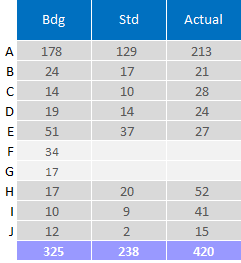
I have the following matrix and I would like to fill in the empty fields with a formula that references the other values in the matrix. 


The BDG comes from 1 table and the STD and Actual comes from another.


What I like to do is fill in Row F of the STD column with the formula BDG Row F / BDG Row E * STD Row E. So the actual calculation would be 34/51*37. 


Is this something I can accomplish? I am not entirely sure where to start with this.


Untitled.png

6 REPLIES 6
achen
Frequent Visitor

Here is the link to my test file on my google drive as I do not appear to have permissions yet to include attachments.


https://drive.google.com/open?id=1eiwwKHMArl17-AGtv-LQYRLCKbvLbGzU


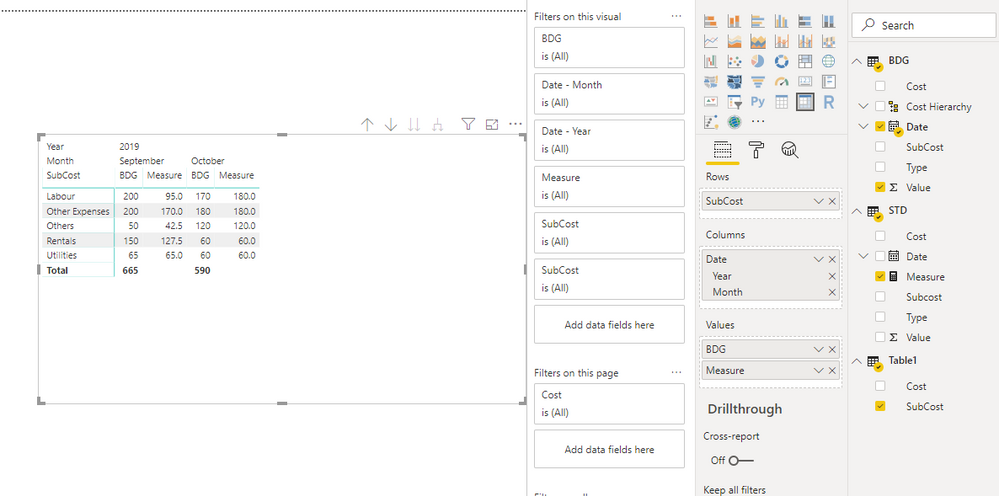
In the attached example, for each month, I need to take  BDG Others / BDG Other Expenses * STD Other Expenses and that value from the formula should appear in STD Others field for each month

Anonymous
Not applicable

Hi @achen ,

You can try to use the following measure formula to manually replace blank cell values:

Measure = 
IF (
    SELECTEDVALUE ( STD[Subcost] ) IN VALUES ( Table1[SubCost] ),
    CALCULATE (
        SUM ( STD[Value] ),
        FILTER (
            ALLSELECTED ( STD ),
            STD[Date] = MAX ( BDG[Date] )
                && [Subcost] IN VALUES ( Table1[SubCost] )
        )
    ),
    IF (
        INTERSECT ( ALLSELECTED ( STD[Date] ), VALUES ( BDG[Date] ) ),
        VAR others =
            CALCULATE (
                SUM ( BDG[Value] ),
                ALLSELECTED ( BDG ),
                BDG[SubCost] = "Others",
                VALUES ( BDG[Date] )
            )
        VAR otherex =
            CALCULATE (
                SUM ( BDG[Value] ),
                ALLSELECTED ( BDG ),
                BDG[SubCost] = "Other Expenses",
                VALUES ( BDG[Date] )
            )
        VAR stdotherex =
            CALCULATE (
                SUM ( STD[Value] ),
                FILTER (
                    ALLSELECTED ( STD ),
                    STD[SubCost] = "Other Expenses"
                        && STD[Date] = MAX ( BDG[Date] )
                )
            )
        VAR Rentals =
            CALCULATE (
                SUM ( BDG[Value] ),
                ALLSELECTED ( BDG ),
                BDG[SubCost] = "Rentals",
                VALUES ( BDG[Date] )
            )
        RETURN
            SWITCH (
                SELECTEDVALUE ( Table1[SubCost] ),
                "Others", others / otherex * stdotherex,
                "Rentals", Rentals / others * ( others / otherex * stdotherex )
            )
    )
)
25.png

Notice: power bi does not contain row/column index and it does not allow you to loop text values, my formula is hardcode based on its row contents.

Regards,

Xiaoxin Sheng

achen
Frequent Visitor

No the table that the STD calculates from doesn not have values at all for F. F comes from the BDG table and from that I need to derive hte desired value.


I managed to replace the empty cells with a generic value like 0 or no value. But I am having issues getting my calculated value into those fields


I tried creating 4 seperate measures. I added them to seperate cards and I get my desired values for each. I realize I dont need to seperate them but it helps keep track as I am new to PowerBi.


M1= CALCULATE(SUM(Bdg[BDG]),'Bdg'[Cost]="F")
M2= CALCULATE(SUM(Bdg[BDG]),'Bdg'[Cost]="E")
M3= CALCULATE(SUM(DB[STD]),DB[Group1]="E")
M4 = M1/M2*M3
 
But when I add M4 into my matrix, it comes up empty. I am guessing it because it doesnt know how to relate the calculated value to the row? How would I go about linking that are assigning my final value to F?
 
 
Anonymous
Not applicable

HI @achen ,

Can you please share some sample data for test? It will be help for test to coding formula.

Notice: do mask on sensitive data or make some fake data with same data structure for test.

Regards,

Xiaoxin Sheng

Anonymous
Not applicable

HI @achen ,

For your requirement, you need to add if statement to check current row contents and replace blank value with specific dax formulas.

BTW, does these blank parts really existed in your table? If not, I think you need to create a new table with all column fields to replace original column field, then you can write formulas to use current category and column label to calculate.

Regards,

Xiaoxin Sheng

kentyler
Solution Sage
Solution Sage

It's not really clear what your base data looks like but perhaps

you could write a measure that tests for blank values and

if it finds a blank, then tries to compute a value from the other rows.

Being able to detect the blank value would be the first step.

Another approach would be to investigate why there are blank rows in the data you are

loading, and take steps to fill in the values there...before you load the data into power bi.


Did this post answer your question? Mark it as a solution so others can find it!

Help when you know. Ask when you don't!


Join the conversation at We Talk BI find out more about me at Slow BI


Helpful resources

Announcements
Power BI DataViz World Championships

Power BI Dataviz World Championships

The Power BI Data Visualization World Championships is back! Get ahead of the game and start preparing now!

December 2025 Power BI Update Carousel

Power BI Monthly Update - December 2025

Check out the December 2025 Power BI Holiday Recap!

FabCon Atlanta 2026 carousel

FabCon Atlanta 2026

Join us at FabCon Atlanta, March 16-20, for the ultimate Fabric, Power BI, AI and SQL community-led event. Save $200 with code FABCOMM.

Top Solution Authors