Join us at FabCon Atlanta from March 16 - 20, 2026, for the ultimate Fabric, Power BI, AI and SQL community-led event. Save $200 with code FABCOMM.
Register now!The Power BI Data Visualization World Championships is back! Get ahead of the game and start preparing now! Learn more
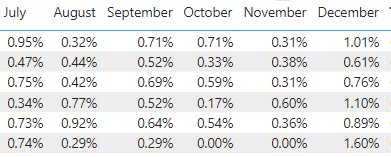
Hello, I have a simple table matrix:
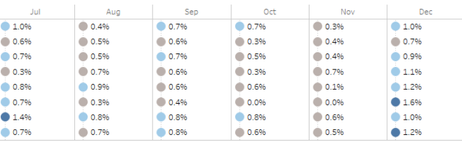
I would like to enhance this visual (preferably using PowerBI native visuals) to add a conditionally formatted dot/circle next to each value, so that it resembles this:
Thanks so much for any ideas on how to make this happen.
Solved! Go to Solution.
Hi @Anonymous
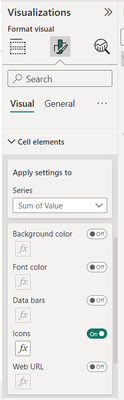
once you create the Maxtix. Then in cell element selection in visualisation pane.
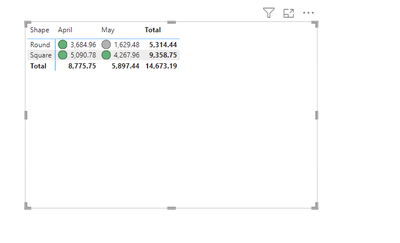
you can select the deisred icon based on rule set
Did I answer your question? Mark my post as a solution! Appreciate your Kudos!!
Check for more intersing solution here: https://www.youtube.com/@letssolveproblem
Regards
Hi @Anonymous
once you create the Maxtix. Then in cell element selection in visualisation pane.
you can select the deisred icon based on rule set
Did I answer your question? Mark my post as a solution! Appreciate your Kudos!!
Check for more intersing solution here: https://www.youtube.com/@letssolveproblem
Regards
Hi @Anonymous
Please find the tutorial link - https://learn.microsoft.com/en-us/power-bi/visuals/desktop-matrix-visual
Follow the section
Let me know if that works for you
If your requirement is solved, please mark THIS ANSWER as SOLUTION ✔️ and help other users find the solution quickly. Please hit the Thumbs Up 👍 button if this comment helps you.
Thanks
Pijush
Linkedin
Proud to be a Super User! | |
The Power BI Data Visualization World Championships is back! Get ahead of the game and start preparing now!
| User | Count |
|---|---|
| 37 | |
| 37 | |
| 33 | |
| 32 | |
| 29 |
| User | Count |
|---|---|
| 130 | |
| 88 | |
| 82 | |
| 68 | |
| 64 |