Join us at FabCon Atlanta from March 16 - 20, 2026, for the ultimate Fabric, Power BI, AI and SQL community-led event. Save $200 with code FABCOMM.
Register now!The Power BI Data Visualization World Championships is back! Get ahead of the game and start preparing now! Learn more
Hi all,
How can I create a new date table but only consist of End of Month dates?
Thank you very much before-hand.
Solved! Go to Solution.
Here is one way to do it in a DAX calculated table. You can adapt it to start at a different month or extend more or less.
Date EOMs =
VAR nums =
GENERATESERIES (
0,
24,
1
)
RETURN
ADDCOLUMNS (
nums,
"Date",
EOMONTH (
DATE ( 2019, 1, 31 ),
[Value]
)
)
Regards,
Pat
To learn more about Power BI, follow me on Twitter or subscribe on YouTube.
You can also create a new calculated table using this formula:
Calendar = filter( calendar( date(2022,1,1), date(2022,12,31)), [Date] = EOMONTH([Date], 0))
Thank you for your reply @ChrisMendoza. I have done something similar to what you suggested but now I would like to the "unrelate" the new date table from an existing Calendar table.
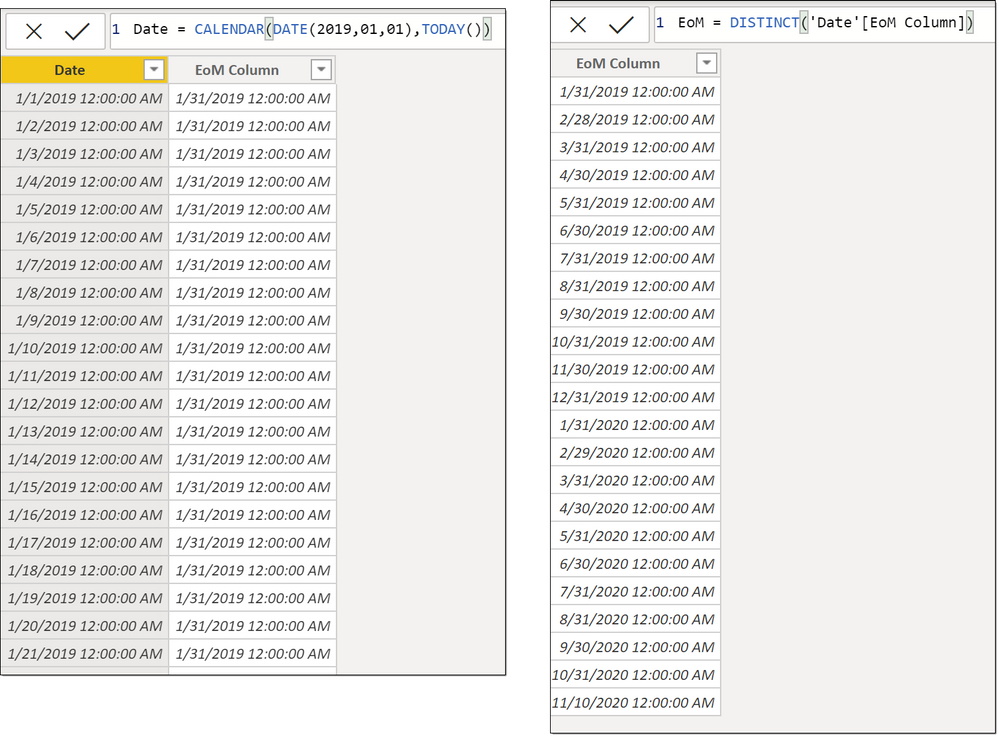
From an existing Date Table as:
Date = CALENDAR(DATE(2019,01,01),TODAY())
Add a Column as :
EoM Column = ENDOFMONTH('Date'[Date])
Create new table as :
EoM = DISTINCT('Date'[EoM Column])
Proud to be a Super User!
Here is one way to do it in a DAX calculated table. You can adapt it to start at a different month or extend more or less.
Date EOMs =
VAR nums =
GENERATESERIES (
0,
24,
1
)
RETURN
ADDCOLUMNS (
nums,
"Date",
EOMONTH (
DATE ( 2019, 1, 31 ),
[Value]
)
)
Regards,
Pat
To learn more about Power BI, follow me on Twitter or subscribe on YouTube.
Hi @mahoneypat,
Is it possible to adjust the series generation such that it will be added month by month instead of having total number of months in the series already specifically defined?
The Power BI Data Visualization World Championships is back! Get ahead of the game and start preparing now!
| User | Count |
|---|---|
| 41 | |
| 38 | |
| 36 | |
| 30 | |
| 28 |
| User | Count |
|---|---|
| 128 | |
| 88 | |
| 79 | |
| 67 | |
| 62 |