Join us at FabCon Atlanta from March 16 - 20, 2026, for the ultimate Fabric, Power BI, AI and SQL community-led event. Save $200 with code FABCOMM.
Register now!The Power BI Data Visualization World Championships is back! Get ahead of the game and start preparing now! Learn more
It is hard to debug the issue that you are experiencing, it may be due to some connection problem or may be due to some change in your source file.
Here are alternative that you can try to figure the bug out.
Solution
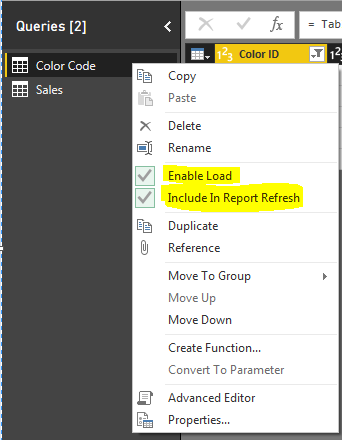
Right Click on your dataset and select Edit Query
Now Right Click on the Query and Disable this two high lighted field.
Save the report and close.
If this fix the problem then the problem is with your source and connection.
Please Like this post if it is helpful
Hi @kaushikd
I am also having this issue. For example I have a relationship between customers and account owners and the account owner table is blank when joining but not in the query itself.
It was not an issue before. Could it be that I have too many queries and relationships?
The Power BI Data Visualization World Championships is back! Get ahead of the game and start preparing now!
| User | Count |
|---|---|
| 37 | |
| 37 | |
| 33 | |
| 32 | |
| 29 |
| User | Count |
|---|---|
| 130 | |
| 88 | |
| 82 | |
| 68 | |
| 64 |