This time we’re going bigger than ever. Fabric, Power BI, SQL, AI and more. We're covering it all. You won't want to miss it.
Learn moreDid you hear? There's a new SQL AI Developer certification (DP-800). Start preparing now and be one of the first to get certified. Register now
Hi all,
can somebody please comment on this:
I want to load data from an Excel-File located in a SharePoint-Folder.
In the Get-Data-Dialog I have entered what is, I think, the requested root-folder.
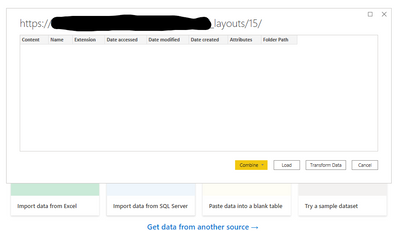
All I receive is an empty list reflecting the structure of the folder (pls. see Screenshot, am I correct on this?)Empty Folder strucutre
Is that an issue refering to user rights?
I received the path to the file. The file exists amongst other objects. But I cannot process it to PQ/PBI.
Kindliy asking for advice.
thx in advance
Thomas
Solved! Go to Solution.
Try using the Web connector (enter the full path, ending with .xlsx).
Proud to be a Super User!
See if this helps:
https://ssbipolar.com/2018/10/29/power-query-connecting-to-excel-workbooks-in-sharepoint-online/
Proud to be a Super User!
Hi all,
thank you very much for the Hint given.
Meanwhile I check it accordingly @DataInsights Link/Hint and it works,... BUT
Ntl... I should see a list of folders/files when handing the base-Url to PBI, shouldn't I?
That is what I am expecting when reading from a SP-Folder, although there might be mixed filetypes e.g XLS*, *.PPTX, *.ACCDB.
So what is the root of the roginal issue?
ntl Solution is accepted, thank you very much
Thomas
Try using the Web connector (enter the full path, ending with .xlsx).
Proud to be a Super User!
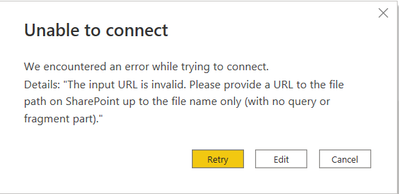
I tried, here is the error:
URL is up to the file name only:
........Doc.aspx?sourcedoc=xxxxxxxxxxxx=filename.xlsx
See if this helps:
https://ssbipolar.com/2018/10/29/power-query-connecting-to-excel-workbooks-in-sharepoint-online/
Proud to be a Super User!
Check out the April 2026 Power BI update to learn about new features.
Sign up to receive a private message when registration opens and key events begin.
If you have recently started exploring Fabric, we'd love to hear how it's going. Your feedback can help with product improvements.
| User | Count |
|---|---|
| 36 | |
| 33 | |
| 31 | |
| 21 | |
| 16 |
| User | Count |
|---|---|
| 66 | |
| 55 | |
| 31 | |
| 24 | |
| 23 |