Join us at FabCon Atlanta from March 16 - 20, 2026, for the ultimate Fabric, Power BI, AI and SQL community-led event. Save $200 with code FABCOMM.
Register now!The Power BI Data Visualization World Championships is back! Get ahead of the game and start preparing now! Learn more
Hi,
I have the below employee hierarchy. Right now, when I create the hierarchy in PowerBI, I'm only able to drill down to the employees that are in the level below. For example, when I drill down into Jim, I can only see quota bar graphs for Mary, Conrad and Fred. I want to click on Jim and get quota bar graphs for every employee below Jim, regardless of level (Mary, Conrad, Fred, Phil, Megan and Aaron). I would like this because Jim is concerned with the performance of all the employees under him, not just those that report directly into him. Then, within that view, I also want to be able to click Fred and see those employees below him, which would be Phil, Megan and Aaron. Any help to construct this hierarchy would be greatly appreciated!
| Name | 1 | 2 | 3 | 4 | Quota |
| Jim | Jim | 21000 | |||
| Mary | Jim | Mary | 1000 | ||
| Conrad | Jim | Conrad | 2000 | ||
| Fred | Jim | Fred | 3000 | ||
| Phil | Jim | Fred | Phil | 4000 | |
| Megan | Jim | Fred | Megan | 5000 | |
| Aaron | Jim | Fred | Megan | Aaron | 6000 |
Solved! Go to Solution.
Hi,
I have a workaround to meet your requirement.
Please try to create a name slicer table first:
Name Slicer = DISTINCT(SELECTCOLUMNS('Table',"Name Slicer",'Table'[Name]))Then create this column:
Column = SWITCH(true,'Table'[Name]='Table'[1],1,'Table'[Name]='Table'[2],2,'Table'[Name]='Table'[3],3,'Table'[Name]='Table'[4],4)Try this measure:
Measure = IF(MAX('Table'[Column])>CALCULATE(MAX('Table'[Column]),FILTER(ALLSELECTED('Table'),'Table'[Name]=SELECTEDVALUE('Name Slicer'[Name Slicer]))),1,0)Apply this measure to the table visual.
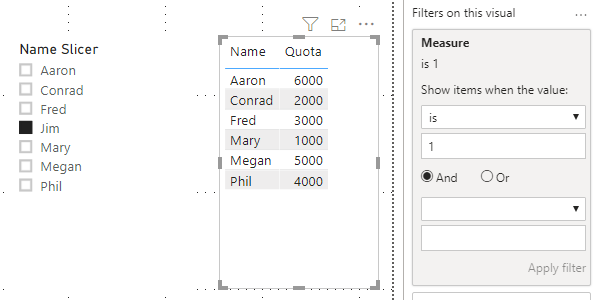
When you choose one name in name slicer, the result shows all employees under him/her:
Here is my test pbix:
Hope this helps.
Best Regards,
Giotto Zhi
Hi,
I have a workaround to meet your requirement.
Please try to create a name slicer table first:
Name Slicer = DISTINCT(SELECTCOLUMNS('Table',"Name Slicer",'Table'[Name]))Then create this column:
Column = SWITCH(true,'Table'[Name]='Table'[1],1,'Table'[Name]='Table'[2],2,'Table'[Name]='Table'[3],3,'Table'[Name]='Table'[4],4)Try this measure:
Measure = IF(MAX('Table'[Column])>CALCULATE(MAX('Table'[Column]),FILTER(ALLSELECTED('Table'),'Table'[Name]=SELECTEDVALUE('Name Slicer'[Name Slicer]))),1,0)Apply this measure to the table visual.
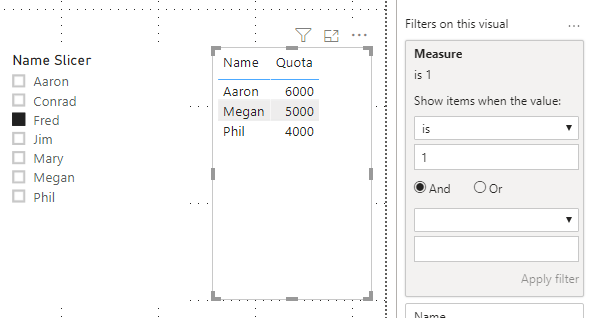
When you choose one name in name slicer, the result shows all employees under him/her:
Here is my test pbix:
Hope this helps.
Best Regards,
Giotto Zhi
I believe you use the double arrow drill down versus the forked arrow drill down.
@Anonymous -
Take a look at https://www.daxpatterns.com/parent-child-hierarchies/. I think you'll find this pattern a nice solution to your need.
Proud to be a Super User!
The Power BI Data Visualization World Championships is back! Get ahead of the game and start preparing now!
| User | Count |
|---|---|
| 39 | |
| 37 | |
| 33 | |
| 32 | |
| 29 |
| User | Count |
|---|---|
| 132 | |
| 88 | |
| 82 | |
| 68 | |
| 64 |