Don't miss your chance to take the Fabric Data Engineer (DP-600) exam for FREE! Find out how by watching the DP-600 session on-demand now through April 28th.
Learn moreJoin the FabCon + SQLCon recap series. Up next: Power BI, Real-Time Intelligence, IQ and AI, and Data Factory take center stage. All sessions are available on-demand after the live show. Register now
Hi,
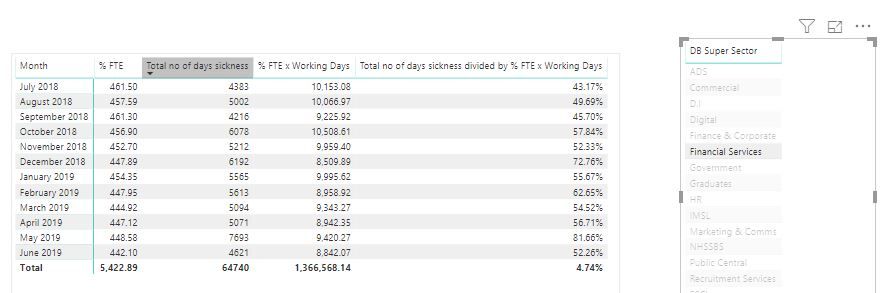
I'm trying to calculate employee sickness absence rate, the end goal is to have a graph showing the absence rate for each month which will change when a different business area is selected. The calulcation will be Total Sickness Days Lost / Available Working Days (Sum of FTE X Working Days for the month)
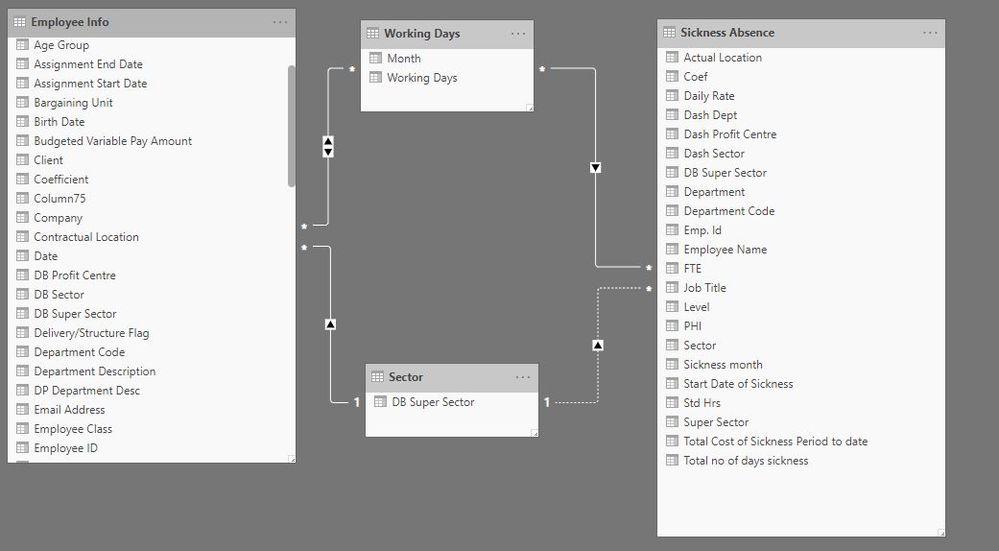
I've started out with 4 tables.
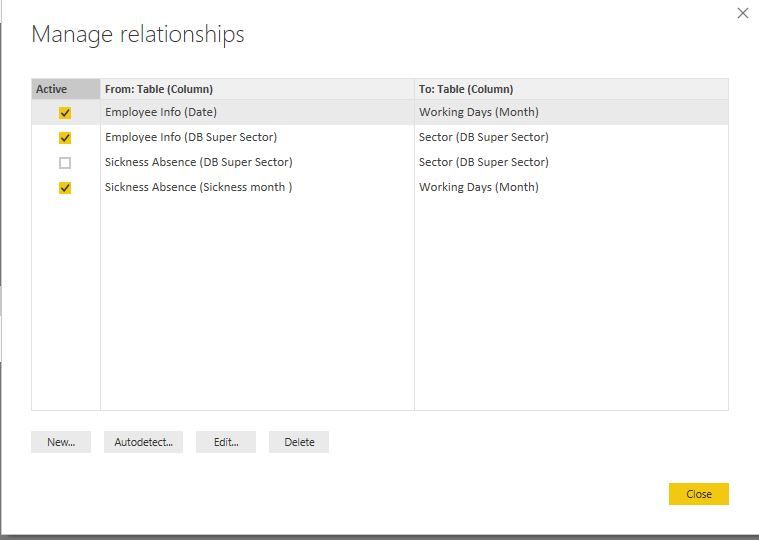
These are the relationships I have set up and I've created a table with what I'm hoping to achieve. When I change the DB Super Sector, it changes the FTE but not the total no of days sickness. I'm sure it's a simple fix but I can't work it out.
A couple of things I noticed:
Proud to be a Super User!
I'm afraid I'm unable to share the file due to the sensitivity of the data.
1. Would that be one directional from Employee Info to Working days?
2. What would I change it to?
3. What type of relationship would this be? Would this then filter all of the other matching columns?
Proud to be a Super User!
okay how do you calculated your measures?
Is it possible for you to share your pbix?
Thanks for the quick reply, the table in the slider is "Sector"
Hi
Which table are you using in the slider? Because you have that column in two tables.
If you are using the Sector table notice that you don't have an active relationship.
Please also provide you DAX measure.
Check out the April 2026 Power BI update to learn about new features.
If you have recently started exploring Fabric, we'd love to hear how it's going. Your feedback can help with product improvements.
A new Power BI DataViz World Championship is coming this June! Don't miss out on submitting your entry.
| User | Count |
|---|---|
| 48 | |
| 40 | |
| 38 | |
| 20 | |
| 17 |
| User | Count |
|---|---|
| 68 | |
| 65 | |
| 30 | |
| 26 | |
| 25 |