This time we’re going bigger than ever. Fabric, Power BI, SQL, AI and more. We're covering it all. You won't want to miss it.
Learn moreLevel up your Power BI skills this month - build one visual each week and tell better stories with data! Get started
Hi all,
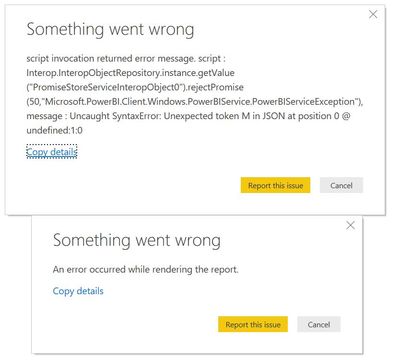
I built a PBIX with an embedded Power App a couple of months back and when I went into today it has started throwing errors and is unable to connect or render the Power App I had on the canvas. It is working in the service, but not in desktop. Has there been a change of some kind with the configuration of the Power Apps visual? I have included a screenhsot of the errors it is presenting. I should also mention that attempting to delete and add the app back in results in the same errors.
Thanks
Paul
Solved! Go to Solution.
Hi,
I have come into work this morning and launched the report in desktop and it is working again. No idea why it was throwing that error last week. So I am just going to consider the issue resolved.
Thanks.
Paul
@Anonymous ,
Please update power bi desktop to the latest version and check if the M code is valid and also check if there're any unprintable characters in the script.
Community Support Team _ Jimmy Tao
If this post helps, then please consider Accept it as the solution to help the other members find it more quickly.
Hi,
I have come into work this morning and launched the report in desktop and it is working again. No idea why it was throwing that error last week. So I am just going to consider the issue resolved.
Thanks.
Paul
Check out the April 2026 Power BI update to learn about new features.
Sign up to receive a private message when registration opens and key events begin.
If you have recently started exploring Fabric, we'd love to hear how it's going. Your feedback can help with product improvements.
| User | Count |
|---|---|
| 36 | |
| 28 | |
| 28 | |
| 20 | |
| 18 |
| User | Count |
|---|---|
| 65 | |
| 35 | |
| 34 | |
| 25 | |
| 24 |