Join us at FabCon Atlanta from March 16 - 20, 2026, for the ultimate Fabric, Power BI, AI and SQL community-led event. Save $200 with code FABCOMM.
Register now!The Power BI Data Visualization World Championships is back! It's time to submit your entry. Live now!
Hi, I have an issue with the efficiency of a solution to a problem. Does anyone have improvement suggestions to improve speed?
I have the basic settings in Power BI desktop, but the solution (see below) to the problem (see below) is far too slow. My data usually ranges from 50 000 - 1 000 000 rows, so looping "find" is probably too slow. Any suggestions for a more efficient solution?
Problem
For people familiar with accounting: I would like to see where do entries from one account go to. As in "other side of a journal entry".
Basically the data is this as in the table below:
| Account | Identifier | Sum |
| 1000 | 565 | 100€ |
| 1100 | 565 | 20€ |
| 1200 | 565 | -120€ |
| 1200 | 572 | -101€ |
| 1300 | 572 | 50€ |
| 1400 | 572 | 50€ |
| 1500 | 572 | 1€ |
| 1600 | 577 | -5000€ |
| 1600 | 577 | 5000€ |
Of course, there will be hundreds of thousands of lines. But the rule is:
1. All Identifiers (565 for example) equal out to zero in the Sum-field.
Goal:
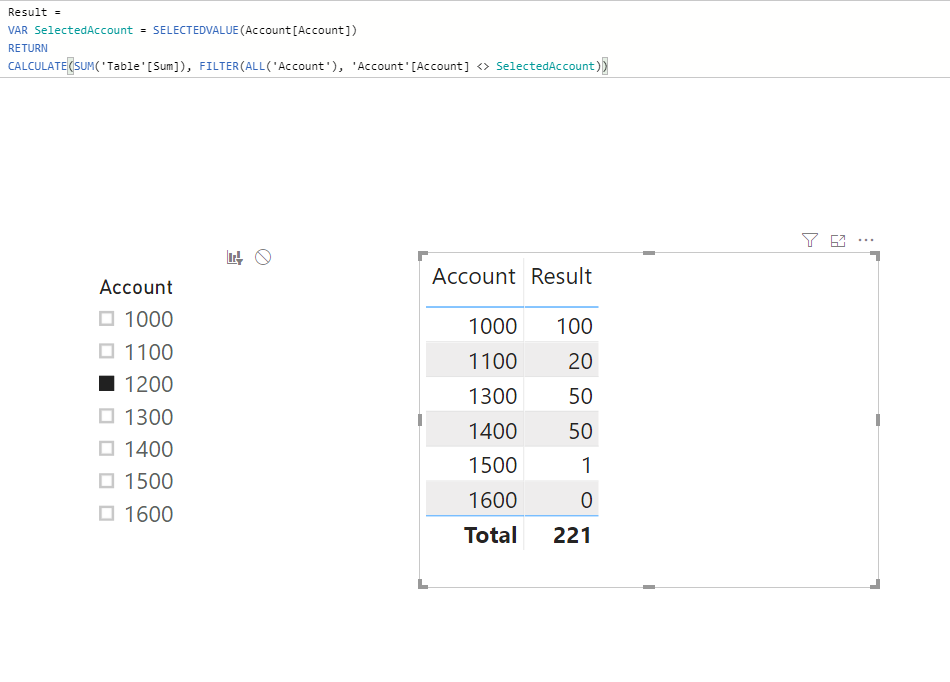
I would like to create a dashboard, where i can filter account 1200 and it would present to me the following:
| Account | |
| 1000 | 100€ |
| 1100 | 20€ |
| 1300 | 50€ |
| 1400 | 50€ |
| 1500 | 1€ |
How do i start to create this? So the function would be like this:
Filter all Identifiers that are in account 1200 (565 & 572 in this case).
If account <> 1200 then SUM the values of these identifiers and show which account they are assigned to
Solution:
Solved! Go to Solution.
Hi @Anonymous ,
check this out.
Marcus Wegener works as Full Stack Power BI Engineer at BI or DIE.
His mission is clear: "Get the most out of data, with Power BI."
twitter - LinkedIn - YouTube - website - podcast - Power BI Tutorials
@Anonymous ,
Create an additional table using dax below:
Account = DISTINCT('Table'[Account])
Then create slicer based on the new 'Account' table and create measure using dax below:
Result =
VAR SelectedAccount = SELECTEDVALUE(Account[Account])
RETURN
CALCULATE(SUM('Table'[Sum]), FILTER(ALL('Account'), 'Account'[Account] <> SelectedAccount))
You can also refer to pbix attached.
Community Support Team _ Jimmy Tao
If this post helps, then please consider Accept it as the solution to help the other members find it more quickly.
@Anonymous ,
Create an additional table using dax below:
Account = DISTINCT('Table'[Account])
Then create slicer based on the new 'Account' table and create measure using dax below:
Result =
VAR SelectedAccount = SELECTEDVALUE(Account[Account])
RETURN
CALCULATE(SUM('Table'[Sum]), FILTER(ALL('Account'), 'Account'[Account] <> SelectedAccount))
You can also refer to pbix attached.
Community Support Team _ Jimmy Tao
If this post helps, then please consider Accept it as the solution to help the other members find it more quickly.
Hi @Anonymous ,
check this out.
Marcus Wegener works as Full Stack Power BI Engineer at BI or DIE.
His mission is clear: "Get the most out of data, with Power BI."
twitter - LinkedIn - YouTube - website - podcast - Power BI Tutorials
Hi,
Actually this has a small issue with it. If i slice multiple items, it shows the other side of the journal entry, yes, but it also shows the accounts i have selected. So the inverse-selection doesnt work with multiple items. Is there a fix for this?
Thank you!
Hi,
Thank you, elegant and efficient! I need to further look into this, as I really don't understand why the relationships are required in the background and if I would like to add a second column to the filter and the table (for example account name) it does break down.
But these are issues that should be solved by me now that I have the core.
Thank you!
The Power BI Data Visualization World Championships is back! It's time to submit your entry.
Check out the January 2026 Power BI update to learn about new features.
| User | Count |
|---|---|
| 61 | |
| 49 | |
| 30 | |
| 25 | |
| 23 |
| User | Count |
|---|---|
| 128 | |
| 104 | |
| 56 | |
| 39 | |
| 31 |