Join us at FabCon Atlanta from March 16 - 20, 2026, for the ultimate Fabric, Power BI, AI and SQL community-led event. Save $200 with code FABCOMM.
Register now!The Power BI Data Visualization World Championships is back! Get ahead of the game and start preparing now! Learn more
Hi Guys,
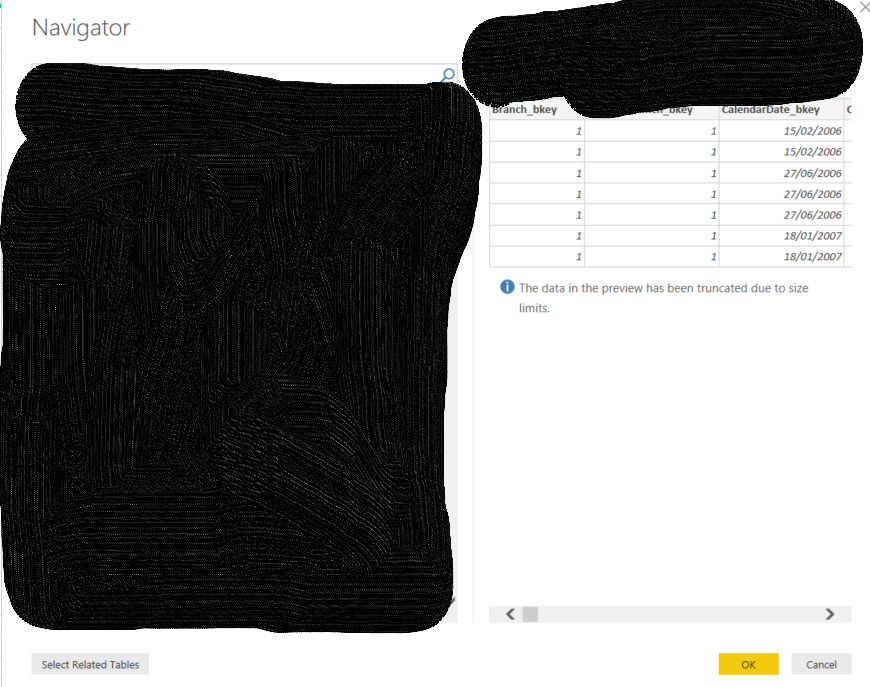
I've got a report I've been working on that's already got some data from source pulling in but I wanted to add some more and I noticed the Edit option from the navigator has disappeared?? I checked in a new blank file I still get the option so not sure what I've done in this specific report to disable it... Can you please help?
@Anonymous ,
Which data source and which connection mode are you using? Could you clarify more details?
Regards,
Jimmy Tao
Hi Jimmy Tao,
See above please, I've just posted about the connection details that I'm using.
Thank you!!
Hi @Anonymous ,
Did you select the direct query or import mode when connecting to the datasource?
Regards,
MFelix
Regards
Miguel Félix
Proud to be a Super User!
Check out my blog: Power BI em PortuguêsHi MFelix,
I didn't get the option to choose between those two. The way I connect is:
New Source/PostgreSQL database then I put in the server address and the database name, and it connects and I can see the list of views and tables, etc. On the existing report there is no option to edit, whereas if I connect the exact same way in a blank file the option to Edit is there.
Thank you
The Power BI Data Visualization World Championships is back! Get ahead of the game and start preparing now!
| User | Count |
|---|---|
| 38 | |
| 36 | |
| 33 | |
| 30 | |
| 28 |
| User | Count |
|---|---|
| 128 | |
| 88 | |
| 79 | |
| 67 | |
| 62 |