cancel
Showing results for 
Search instead for 
Did you mean: 

We've captured the moments from FabCon & SQLCon that everyone is talking about, and we are bringing them to the community, live and on-demand. Starts on April 14th. Register now

Reply
jennys
New Member

Edit legend/ format axis?

Two-part question.


1: I have several charts that show the output line, and a target line. The legend shows the names of both (e.g. "% of output timely, timeliness target"). I would like to keep the names of the measures, but edit the legend so it reads "% of output timely, target." Is it possible to edit the legend without renaming the measures?


2: The x axis, which shows dates, is inconsistent/random with which dates it shows. Can I fix it so that it shows dates at a specified interval? Right now it only seems to add/remove dates as I resize the charts larger or smaller, and even then I cannot choose which dates are shown. In column graphs, the dates shown below the columns don't match the actual date that column shows. Is this able to be edited?


Thank you in advance.

1 ACCEPTED SOLUTION
v-qiuyu-msft
Community Support
Community Support

Hi @jennys,


#1. Currently, we are able to custom Legend Name rather than legend values. For your requirement, you can vote on this same idea: custom legend.


#2. You can try to create a calendar table, create a relationship between this new table and fact table. Drag the date column from calendar table to chart X-Axis.


Best Regards,
Qiuyun Yu

Community Support Team _ Qiuyun Yu
If this post helps, then please consider Accept it as the solution to help the other members find it more quickly.

View solution in original post

5 REPLIES 5
JosiendeBie
New Member

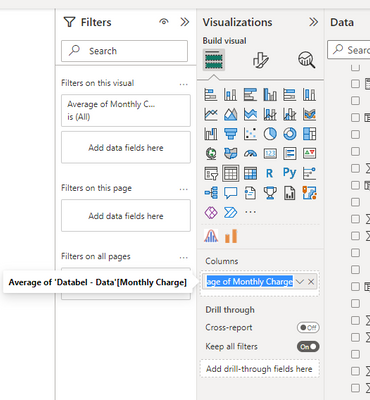
This has now been fixed. You can doubleclick on the variable in the visualisations tab and it will let you rename it. 

JosiendeBie_0-1683038733015.png


v-qiuyu-msft
Community Support
Community Support

Hi @jennys,


#1. Currently, we are able to custom Legend Name rather than legend values. For your requirement, you can vote on this same idea: custom legend.


#2. You can try to create a calendar table, create a relationship between this new table and fact table. Drag the date column from calendar table to chart X-Axis.


Best Regards,
Qiuyun Yu

Community Support Team _ Qiuyun Yu
If this post helps, then please consider Accept it as the solution to help the other members find it more quickly.
MattAllington
Community Champion
Community Champion

1. Unfortunately not. There is no custom label like in Excel as yet. You can vote for it at ideas.powerbi.com

2. There is a formatting option that allows you to set a continuous or categorical axis. It is in the formatting area I think. Try to swap that and see if it does what you want


* Matt is an 8 times Microsoft MVP (Power BI) and author of the Power BI Book Supercharge Power BI.
I will not give you bad advice, even if you unknowingly ask for it.

Thanks. I had tried the categorical option earlier, but it shows every single date available instead of a select few at a regular interval (makes sense for a categorical variable). Is that the only other way you know of?

In terms of Question 2. Your best option for the moment if the continuous/categorical option isn't working for you is to FORMAT the date to the required format and then Sort this by a column in the date table (any that will accept) as so it's properly in order.

Helpful resources

Announcements
New to Fabric survey Carousel

New to Fabric Survey

If you have recently started exploring Fabric, we'd love to hear how it's going. Your feedback can help with product improvements.

Power BI DataViz World Championships carousel

Power BI DataViz World Championships - June 2026

A new Power BI DataViz World Championship is coming this June! Don't miss out on submitting your entry.

Join our Fabric User Panel

Join our Fabric User Panel

Share feedback directly with Fabric product managers, participate in targeted research studies and influence the Fabric roadmap.

March Power BI Update Carousel

Power BI Community Update - March 2026

Check out the March 2026 Power BI update to learn about new features.