Join us at FabCon Atlanta from March 16 - 20, 2026, for the ultimate Fabric, Power BI, AI and SQL community-led event. Save $200 with code FABCOMM.
Register now!Get Fabric Certified for FREE during Fabric Data Days. Don't miss your chance! Request now
Hello experts,
I have a table of inventory data that is compiling over time. I would like to add a column in Edit Queries that will layer in an identifyer that will tag the latest date for a particular Distributor/Item's inventory date and position. I would then filter on that new column to exclude all of the old data.
Here is a mockup of the data
| Distributor | Item Name | Item # | Inventory Date | Quantity |
| San Diego | Apples | 1010258 | 7/22/2019 | 74 |
| San Diego | Apples | 1010258 | 7/21/2019 | 61 |
| San Diego | Apples | 1010258 | 7/20/2019 | 20 |
| San Diego | Apples | 1010258 | 7/19/2019 | 94 |
| San Diego | Apples | 1010258 | 7/18/2019 | 91 |
| San Diego | Bananas | 876542 | 7/20/2019 | 41 |
| San Diego | Bananas | 876542 | 7/18/2019 | 75 |
| San Diego | Bananas | 876542 | 7/17/2019 | 24 |
| San Diego | Bananas | 876542 | 6/30/2018 | 13 |
| Denver | Oranges | 46599 | 7/21/2019 | 78 |
| Denver | Oranges | 46599 | 7/19/2019 | 99 |
| Denver | Oranges | 46599 | 7/18/2019 | 28 |
| Denver | Bananas | 876542 | 6/30/2019 | 59 |
| Denver | Bananas | 876542 | 6/29/2019 | 73 |
| Denver | Bananas | 876542 | 6/28/2019 | 86 |
| Denver | Bananas | 876542 | 12/31/2018 | 9 |
| Denver | Apples | 1010258 | 4/30/2019 | 99 |
| Denver | Apples | 1010258 | 6/30/2019 | 51 |
| Denver | Apples | 1010258 | 1/22/2019 | 100 |
| Kansas City | Apples | 1010258 | 12/25/2018 | 98 |
| Kansas City | Apples | 1010258 | 6/5/2019 | 31 |
| Kansas City | Oranges | 46599 | 4/30/2019 | 69 |
| Kansas City | Oranges | 46599 | 8/7/2018 | 94 |
| Kansas City | Bananas | 876542 | 12/12/2018 | 52 |
| Kansas City | Bananas | 876542 | 12/15/2018 | 87 |
| Kansas City | Bananas | 876542 | 11/20/2017 | 72 |
And here is the desired solution (filtered on the tag)
| Distributor | Item Name | Item # | Inventory Date | Quantity | Latest? |
| Denver | Oranges | 46599 | 7/21/2019 | 78 | Latest |
| Denver | Bananas | 876542 | 6/30/2019 | 59 | Latest |
| Denver | Apples | 1010258 | 6/30/2019 | 51 | Latest |
| Kansas City | Oranges | 46599 | 4/30/2019 | 69 | Latest |
| Kansas City | Bananas | 876542 | 12/15/2018 | 87 | Latest |
| Kansas City | Apples | 1010258 | 6/5/2019 | 31 | Latest |
| San Diego | Bananas | 876542 | 7/20/2019 | 41 | Latest |
| San Diego | Apples | 1010258 | 7/22/2019 | 74 | Latest |
Thanks in advance!
Dan
Solved! Go to Solution.
hi, @danb
You could try this way as below:
Step1:
Duplicate the basic table.
Step2:
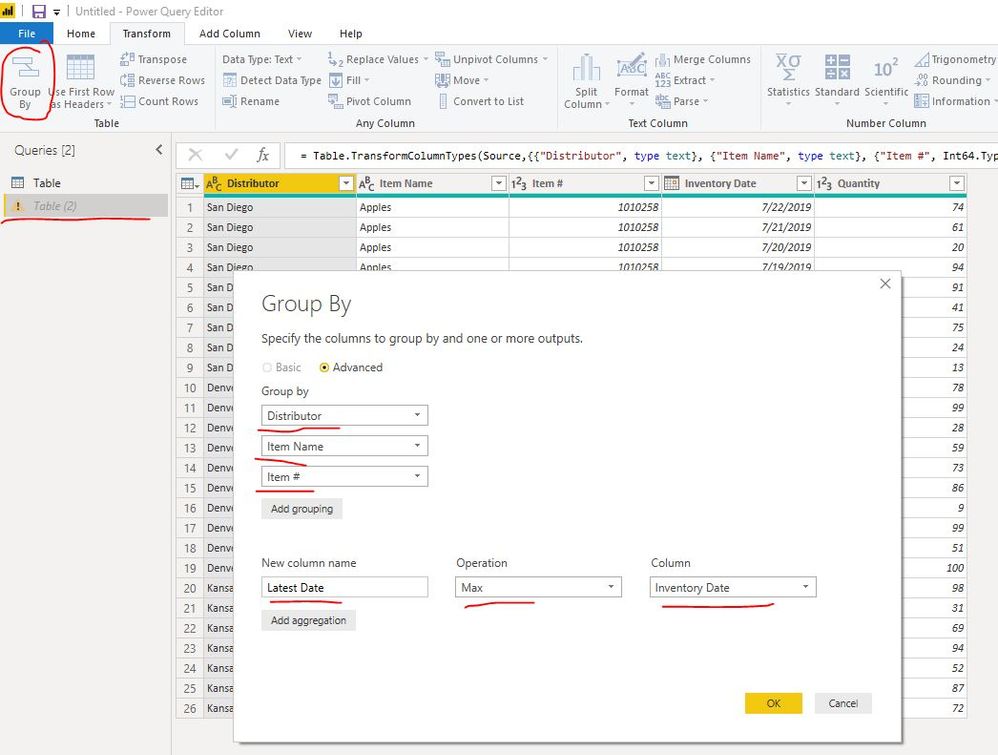
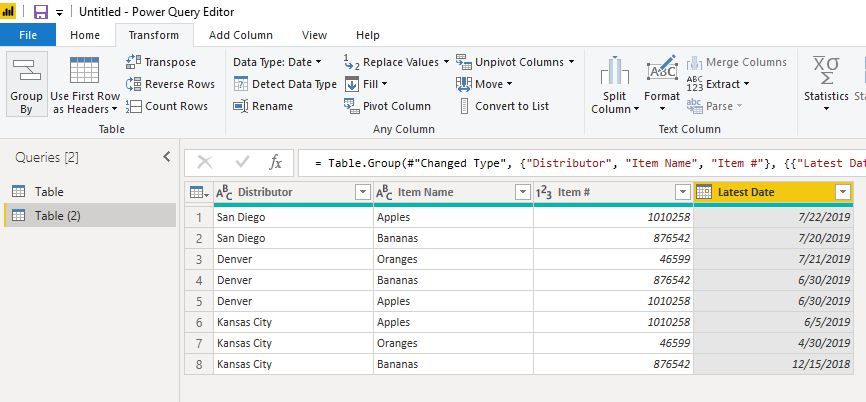
Use Group By function in edit queries as below for duplicate table
Step3:
Now, merge the basic table and this new table
Step4:
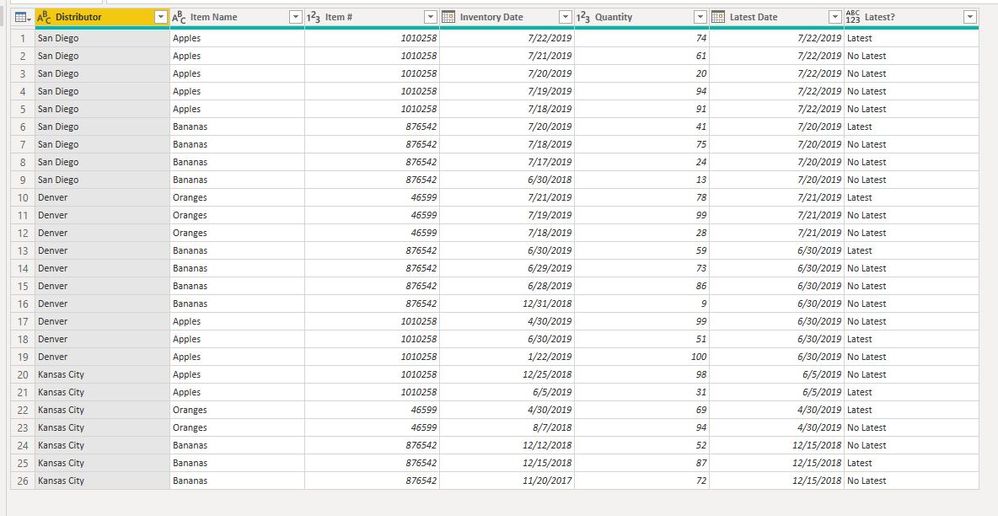
Expand Lastest Date column
Now you could add a custom column for filter as below:
here is my sample pbix file, please try it.
Best Regards,
Lin
hi, @danb
You could try this way as below:
Step1:
Duplicate the basic table.
Step2:
Use Group By function in edit queries as below for duplicate table
Step3:
Now, merge the basic table and this new table
Step4:
Expand Lastest Date column
Now you could add a custom column for filter as below:
here is my sample pbix file, please try it.
Best Regards,
Lin
@v-lili6-msft - this works great and you actually showed me how to simplify the approach. I originally was thinking I needed some type of flag column to filter out certain rows however simply grouping the data in the original table gets me to what i need. Many thanks again!
Dan
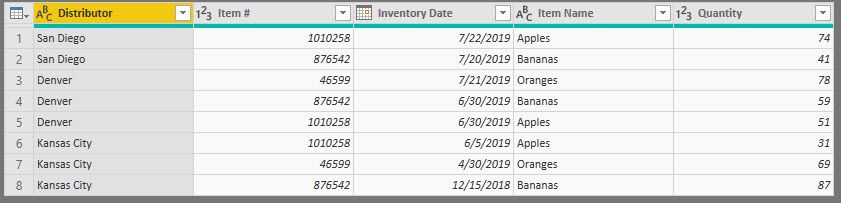
Hello @danb
The new query below assumes your original table is called 'Table'
let
Source = Table,
#"Grouped Rows" = Table.Group(Source, {"Distributor", "Item #"}, {{"Inventory Date", each List.Max([Inventory Date]), type date}}),
#"Merged Queries" = Table.NestedJoin(#"Grouped Rows", {"Distributor", "Item #", "Inventory Date"}, Table, {"Distributor", "Item #", "Inventory Date"}, "Table", JoinKind.Inner),
#"Expanded Table" = Table.ExpandTableColumn(#"Merged Queries", "Table", {"Item Name", "Quantity"}, {"Item Name", "Quantity"})
in
#"Expanded Table"It uses group by and max then joins back to your original to get the QTY and name.
Hello @jdbuchanan71 - thanks for your response. I do have a question however as where do i enter in the code? I tried dropping it into the Advanced Editor section however I got an error.
Check out the November 2025 Power BI update to learn about new features.
Advance your Data & AI career with 50 days of live learning, contests, hands-on challenges, study groups & certifications and more!