cancel
Showing results for 
Search instead for 
Did you mean: 

July 28 - August 9 | Final Round of the Power BI Dataviz World Championships. This is your chance. Learn more

Reply
Tripb44
Helper II
Helper II

Earlier Function error

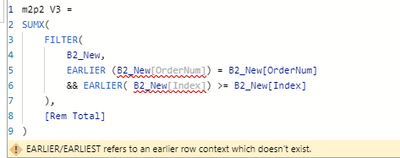
I am getting an error when trying to use the "earlier" function shown below.


Tripb44_0-1640802661648.png


1 ACCEPTED SOLUTION
parry2k
Super User
Super User

@Tripb44 are you adding a column or a measure? It will not work if you are adding a measure. 


Follow us on LinkedIn


Learn about conditional formatting at Microsoft Reactor

My latest blog post The Power of Using Calculation Groups with Inactive Relationships (Part 1) (perytus.com) I would  Kudos if my solution helped. 👉 If you can spend time posting the question, you can also make efforts to give Kudos to whoever helped to solve your problem. It is a token of appreciation!


Visit us at https://perytus.com, your one-stop-shop for Power BI-related projects/training/consultancy.


Subscribe to the @PowerBIHowTo YT channel for an upcoming video on List and Record functions in Power Query!!

Learn Power BI and Fabric - subscribe to our YT channel - Click here: @PowerBIHowTo

If my solution proved useful, I'd be delighted to receive Kudos. When you put effort into asking a question, it's equally thoughtful to acknowledge and give Kudos to the individual who helped you solve the problem. It's a small gesture that shows appreciation and encouragement! ❤


Did I answer your question? Mark my post as a solution. Proud to be a Super User! Appreciate your Kudos 🙂
Feel free to email me with any of your BI needs.

View solution in original post

2 REPLIES 2
Ashish_Mathur
Super User
Super User

Hi,

I do not know what you are trying to do, but this calculated column formula in the B2_new table should help

=calculate(sum(B2_new[Amount]),filter(B2_New,B2_New[Ordernum]=earlier(B2_New[Ordernum])&&B2_New[index]<=earlier(B2_New[index])))


Regards,
Ashish Mathur
http://www.ashishmathur.com
https://www.linkedin.com/in/excelenthusiasts/
parry2k
Super User
Super User

@Tripb44 are you adding a column or a measure? It will not work if you are adding a measure. 


Follow us on LinkedIn


Learn about conditional formatting at Microsoft Reactor

My latest blog post The Power of Using Calculation Groups with Inactive Relationships (Part 1) (perytus.com) I would  Kudos if my solution helped. 👉 If you can spend time posting the question, you can also make efforts to give Kudos to whoever helped to solve your problem. It is a token of appreciation!


Visit us at https://perytus.com, your one-stop-shop for Power BI-related projects/training/consultancy.


Subscribe to the @PowerBIHowTo YT channel for an upcoming video on List and Record functions in Power Query!!

Learn Power BI and Fabric - subscribe to our YT channel - Click here: @PowerBIHowTo

If my solution proved useful, I'd be delighted to receive Kudos. When you put effort into asking a question, it's equally thoughtful to acknowledge and give Kudos to the individual who helped you solve the problem. It's a small gesture that shows appreciation and encouragement! ❤


Did I answer your question? Mark my post as a solution. Proud to be a Super User! Appreciate your Kudos 🙂
Feel free to email me with any of your BI needs.

Helpful resources

Announcements
FabCon and SQLCon Barcelona 2026

FabCon & SQLCon – Barcelona 2026

Join us in Barcelona for FabCon and SQLCon, the Fabric, Power BI, SQL, and AI community event. Save €200 with code FABCMTY200.

Fabric Community Sticker Design Challenge Barcelona Carousel

Fabric Community Sticker Challenge - Barcelona 2026

If you love stickers, then you will definitely want to check out our community sticker challenge, Barcelona edition!

July Power BI Update Carousel

Power BI Monthly Update - July 2026

Check out the July 2026 Power BI update to learn about new features.

Power BI DataViz World Championships carousel

Power BI DataViz World Championships - June 2026

A new Power BI DataViz World Championship is coming this June! Don't miss out on submitting your entry.

Top Solution Authors