cancel
Showing results for 
Search instead for 
Did you mean: 

The Power BI Data Visualization World Championships is back! Get ahead of the game and start preparing now! Learn more

Reply
charlie77
Helper II
Helper II

ESRI map settings disappeared

Hi 

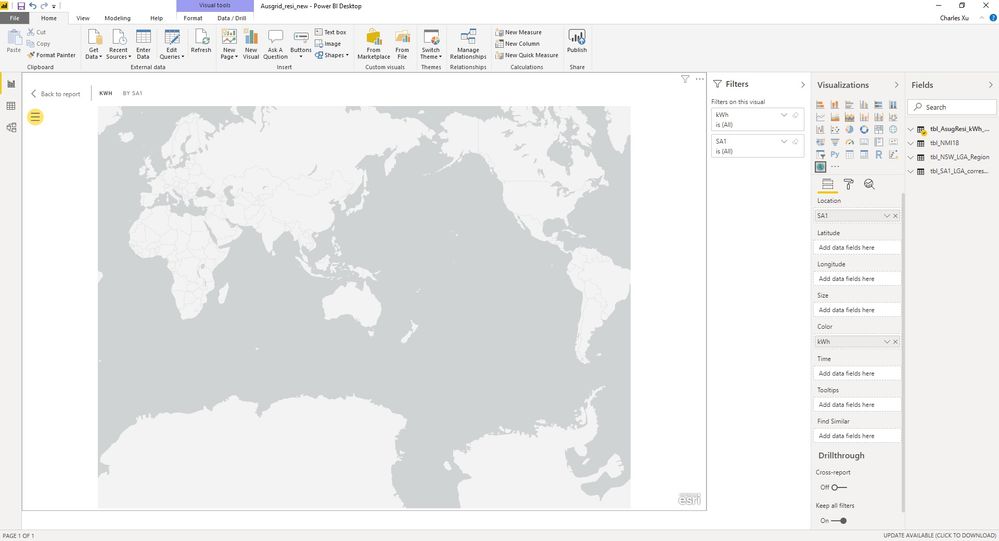
I had been using ESRI map for quite a while and had no problem at all. This time I changed a new laptop and supposedly have the latest Power BI. I created a ESRI visual throwing data to it and clicked Edit but I wan't able to see any settigns such as base map, map themes etc (see the screenshot).

PBI_ESRI.jpg

Advice please.


Thanks

Charlie

4 REPLIES 4
Anonymous
Not applicable

Hey I'm having the same issue. But I did notice you can edit basemap if you exit out of edit mode and you should be able to find it there under the yellow circle selection. I have been working on a massive project and I needed to change the color theme of pinpoints but I cannot find it anywhere. I submitted the issue to power BI and ARCGIS. 


Edit: I found the color change option. Had to unselect and exit out of edit mode. Don't really see how this update is user friendly but that could be personal preference. 

Hi auburnRG

Thanks. Indeed! I exit the Edit window and in the normal report window I'm able to access Base Map that is not available in the Edit window (virtually nothing there). However I still can't create a new map as there is nowhere I can choose Location Type - polygon or point. 


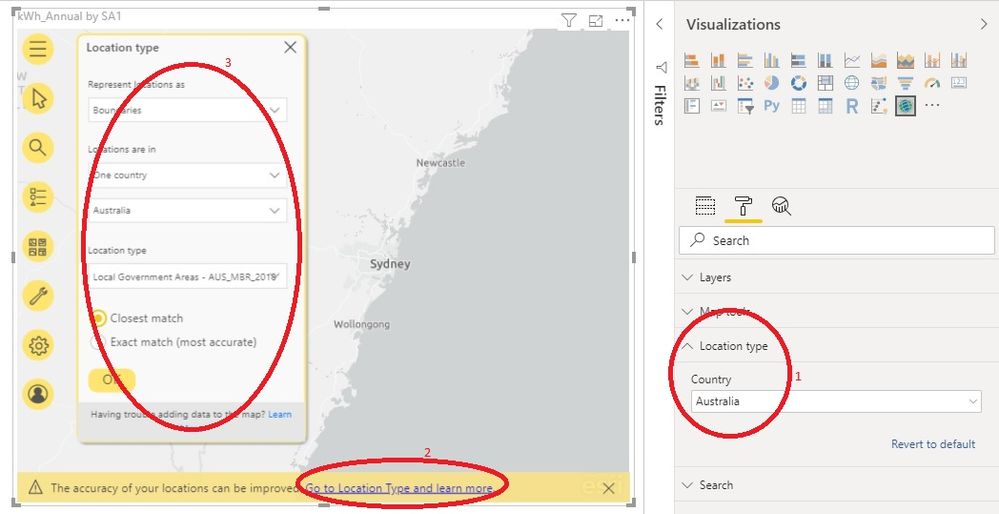
It's sheer luck that I looked at the Setting pane at the righthand side and did find a Location Type which only allows you to choose a specific country as opposed to the default "World". Once I selected Australia the magic occurred - see screenshot below. At the bottom of the ESRI visual a yellow message bar appeared. I clicked the hyperlinked message "Go to location type and learn more" and the full Location Type setting window suddenly popped out. So far so good but I still have no idea how to edit an existing map visual once created.  

ESRI.jpg  Cheers

Charles 

amitchandak
Super User
Super User

The map visual created in the last machine can still be displayed but can't be edited (see below). That is, when I get into the edit mode clicking Edit I got a screen as shown previously - there is no settings for selecting basemap, map type etc. Because of this problem I have nowhere to categorise data country (Australia) and state.

OldData.jpg


Thanks

Charlie 

Helpful resources

Announcements
Power BI DataViz World Championships

Power BI Dataviz World Championships

The Power BI Data Visualization World Championships is back! Get ahead of the game and start preparing now!

December 2025 Power BI Update Carousel

Power BI Monthly Update - December 2025

Check out the December 2025 Power BI Holiday Recap!

FabCon Atlanta 2026 carousel

FabCon Atlanta 2026

Join us at FabCon Atlanta, March 16-20, for the ultimate Fabric, Power BI, AI and SQL community-led event. Save $200 with code FABCOMM.