Share feedback directly with Fabric product managers, participate in targeted research studies and influence the Fabric roadmap.
Sign up nowGet Fabric certified for FREE! Don't miss your chance! Learn more
I just downloaded lastest version of PowerBI and don't see the ESRI map visualization. There is a Bing visualization but I can't seem to find the ESRI visualization. I subscribed to ESRI Plus and hope it is still available.
Solved! Go to Solution.
Hi psctds,
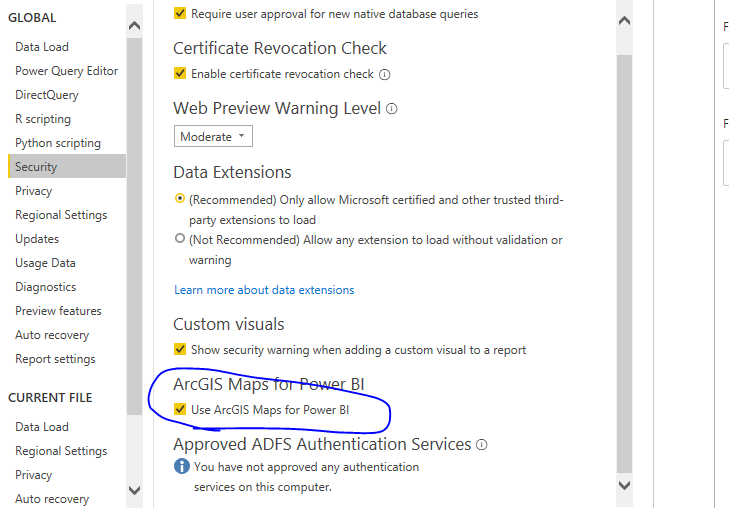
You said that you can't view the ESRI map in your powerbi, you need to make sure whether you enbale
You could refer to ArcGIS Maps in Power BI Desktop for details.
Best Regards,
Zoe Zhi
If this post helps, then please consider Accept it as the solution to help the other members find it more quickly.
Hi psctds,
You said that you can't view the ESRI map in your powerbi, you need to make sure whether you enbale
You could refer to ArcGIS Maps in Power BI Desktop for details.
Best Regards,
Zoe Zhi
If this post helps, then please consider Accept it as the solution to help the other members find it more quickly.
I'm having the same issue, the ESRI Map visualization is not available in the visualizations pane. I made sure ESRI is enabled and have deleted the CEF folder as suggested by ArcGIS
Version: 2.83.5894.961 64-bit (July 2020).
Can somene tell me how to get it back.
Thank you for your help!
If you love stickers, then you will definitely want to check out our Community Sticker Challenge!
Check out the January 2026 Power BI update to learn about new features.
| User | Count |
|---|---|
| 64 | |
| 63 | |
| 49 | |
| 21 | |
| 18 |
| User | Count |
|---|---|
| 121 | |
| 118 | |
| 38 | |
| 36 | |
| 29 |