cancel
Showing results for 
Search instead for 
Did you mean: 

The Power BI Data Visualization World Championships is back! Get ahead of the game and start preparing now! Learn more

Reply
Anonymous
Not applicable

Dynamically updated tasks

Hey there

This might be a very simple thing to do (or not), but i'm very new at using Power BI so bear with me.
I am trying to create a "to do list" which has to dynamically update at specificed times.

I have tasks that needs to be processed every 14 days, a certain date in a month and yearly..
Is it possible to have "Task A" appear every 14 days, which I can then mark as done and it won't appear until 14 days later? 

The data itself is pretty static and only changes every now and then.

So it's gonna work kinda like a to do list in a way, so I can quickly see a list with stuff that has to be resolved and when.

Is this doable with PowerBI and how would I go about it?
Thanks a bunch!!


4 REPLIES 4
Anonymous
Not applicable

Hi @Anonymous , 

Please have a try.

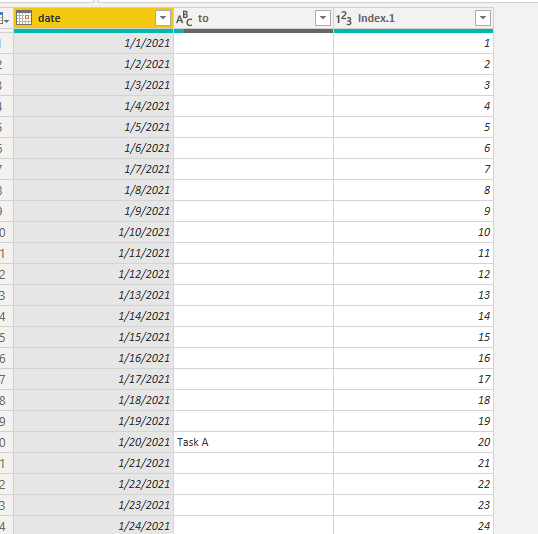
Insert an index column.

Select Home>>Transform data>>Add column>>index column>>from 1.

11.PNG

Create a column.

date_141 = var day_14='Table'[Index.1]/14
var fen=CEILING(day_14,1)
return fen

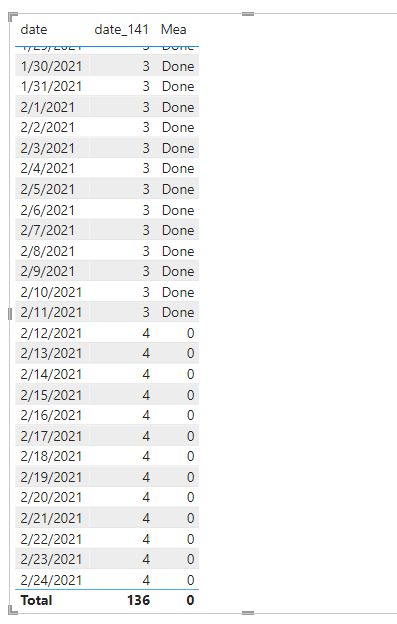
Then create a measure.

Mea = var days=CALCULATE(COUNT('Table'[date ]),FILTER(ALL('Table'),'Table'[date_141]=SELECTEDVALUE('Table'[date_141])))
var mark = IF(days=14,"Done",0)
return mark

22.PNG

If I have misunderstood your meaning, please provide some sample data and desired output.


Best Regards

Community Support Team _ Polly


If this post helps, then please consider Accept it as the solution to help the other members find it more quickly.

Anonymous
Not applicable

Hi @Anonymous ,

I have some questions. When does Task A appear and what conditions must be met?  It automatically appears  every 14 days?  Please provide some sample data and desired output.


Best Regards

Community Support Team _ Polly


If this post helps, then please consider Accept it as the solution to help the other members find it more quickly.

Anonymous
Not applicable

Hey, thanks for your reply!

We have List A, List B, List C and so on.

All of the lists are a set of tasks that has to be completed at designated times.
So ideally I'd like a dashboard with a table, where the tasks will pop up and then maybe the functionality to mark it as done, which then removes it until it's relevant again (If thats doable?)


Example
List A - Set of tasks that needs to be solved every 14 days

List B - Set of tasks that needs to be solved every week

List C - Set of tasks that needs to be solved a certain date, every month


The lists sometimes update, so it needs to be somewhat easy to edit and remove tasks.


I hope that's enough info? Otherwise please let me know!!
Thanks a bunch.

amitchandak
Super User
Super User

@Anonymous , start with a date you want as first date


new table =
var _cal = calendar(date(2019,01,01), today())
return
filter(addcolumns(_cal, "_filter", mod(datediff(minx(_tab, [Date]),[Date], date),14)),[_filter]=0)


Share with Power BI Enthusiasts: Full Power BI Video (20 Hours) YouTube
Microsoft Fabric Series 60+ Videos YouTube
Microsoft Fabric Hindi End to End YouTube

Helpful resources

Announcements
Power BI DataViz World Championships

Power BI Dataviz World Championships

The Power BI Data Visualization World Championships is back! Get ahead of the game and start preparing now!

December 2025 Power BI Update Carousel

Power BI Monthly Update - December 2025

Check out the December 2025 Power BI Holiday Recap!

FabCon Atlanta 2026 carousel

FabCon Atlanta 2026

Join us at FabCon Atlanta, March 16-20, for the ultimate Fabric, Power BI, AI and SQL community-led event. Save $200 with code FABCOMM.

Top Solution Authors